Appearance
实现 在线白板 / 画板 工具
分类:developer | 标签:白板、画板、绘图 自由绘制、图形、便签、撤销与导出 PNG
2.1 功能说明
自由绘制、图形、便签、撤销与导出 PNG
2.1.1 使用指南
功能说明
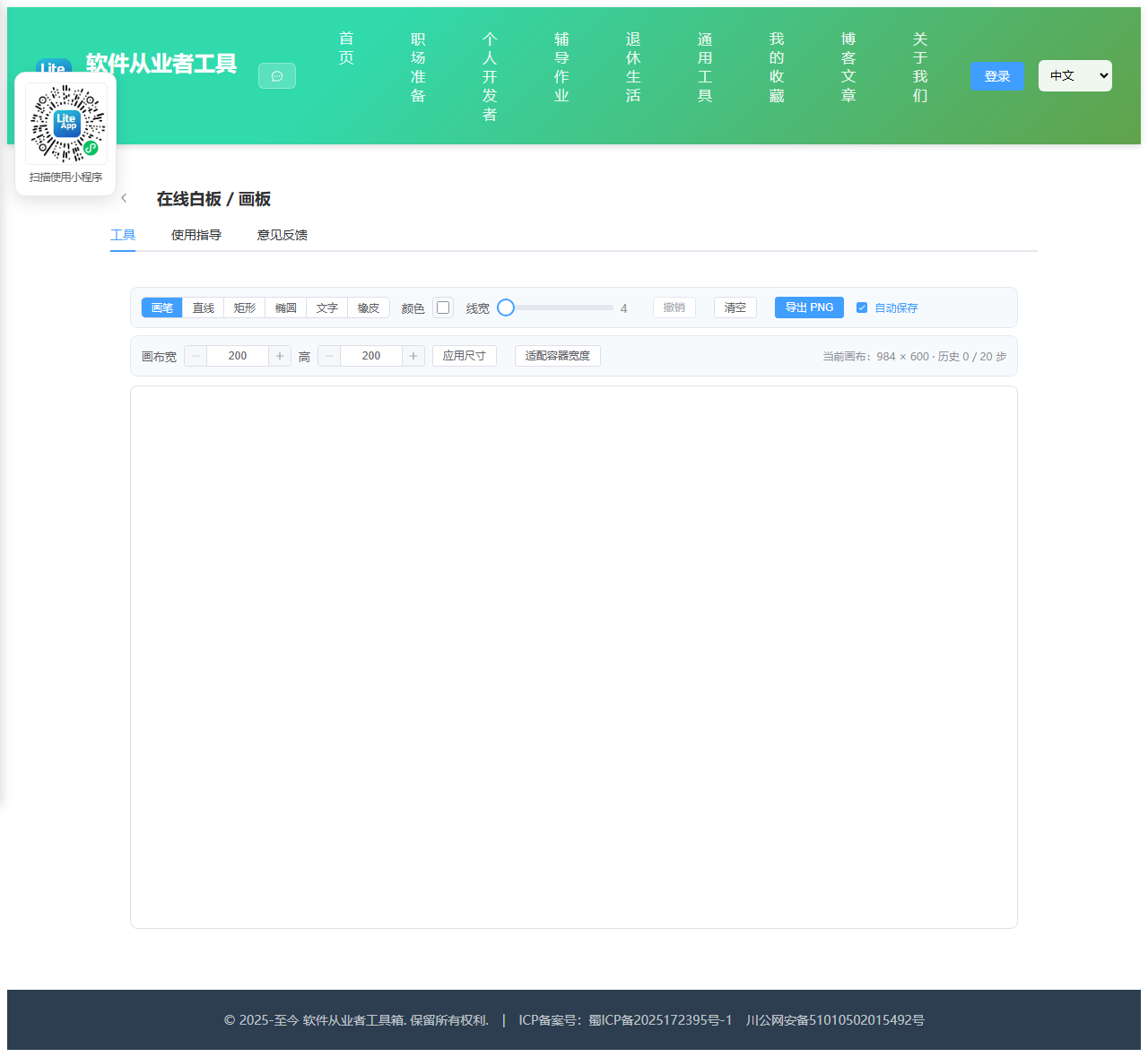
一个纯浏览器实现的在线画板,支持自由画笔、直线、矩形、椭圆、文字与橡皮擦,可自定义颜色和线宽,随时撤销并导出 PNG。所有内容只存在于本机浏览器中,不会上传到任何服务器。
工具说明
画笔:按住并拖动即可自由绘制,笔触自动圆角连接,适合手写和批注。
直线:按下确定起点,拖动过程中实时预览,松开确定终点。
矩形 / 椭圆:按下拖动画出外接矩形,松开完成绘制,拖动方向不限。
文字:选中后在画布上点击一下,弹出输入框,确认后按当前颜色和字号写入画布。字号随线宽联动,线宽越大字越大。
橡皮擦:以当前线宽用白色覆盖画布内容。因为导出的 PNG 需要白色底,橡皮采用「涂白」而不是「挖透明」的方式,这样擦除区域和背景完全一致,导出后也不会出现透明空洞。
撤销机制
每次开始一笔绘制之前,工具会把当前画布用 toDataURL 存成一帧快照压入栈中,最多保留 20 帧。点击撤销时弹出最近一帧并重新绘制回画布,因此撤销是按「一次操作」而不是按像素回退的。超过 20 步的历史会被丢弃,属于内存与可用性之间的取舍;如果需要长历史,建议中途先导出一次 PNG。
画布与保存
画布初始宽度自动适配容器,默认高度 600 像素,也可以手动输入宽高后点击「应用尺寸」,调整时会尽量保留已有内容,超出部分被裁掉。画布区域可横向和纵向滚动。
开启「自动保存」后,每完成一笔会把画布内容写入浏览器 localStorage,刷新页面或下次打开时自动恢复。清空画布会同时清除保存的内容。若画布很大导致存储超限,自动保存会静默失败并提示,此时请手动导出 PNG 备份。
输入设备
使用 Pointer Events 统一处理鼠标、触摸屏和手写笔,在平板与触屏笔记本上可以直接用手指或触控笔书写。
2.2 代码实现
2.2.1 组件结构
本工具是一个基于 Vue 3 <script setup> 语法的单文件组件(SFC),统一包裹在 ToolPageShell 组件内,由它提供页面标题、工具 ID、分类与「使用指南」插槽等通用外壳;核心业务逻辑(响应式状态、计算属性、事件处理函数)全部写在 <script setup> 中,输入/输出通过 el-input、el-button 等 Element Plus 组件与用户交互,所有数据均在浏览器本地处理,不会上传服务器。
2.2.2 核心逻辑概览
<script setup> 中定义的主要函数/方法:
fillWhite()setupCanvas()applySize()fitContainer()pushSnapshot()restoreFromDataUrl()undo()clearCanvas()persist()restoreSaved()getPos()applyStroke()drawText()onPointerDown()onPointerMove()drawShape()onPointerUp()exportPng()handleResize()
2.2.3 关键实现代码
以下是该工具的完整 <script setup> 实现(核心代码)。模板(<template>)与样式(<style>)已省略。
vue
import { ref, onMounted, onBeforeUnmount, nextTick } from 'vue'
import ToolPageShell from '@/components/ToolPageShell.vue'

const STORAGE_KEY = 'tool-whiteboard-content-v1'
const MAX_HISTORY = 20

const wrapRef = ref(null)
const canvasRef = ref(null)

const tool = ref('pen')
const color = ref('#303133')
const lineWidth = ref(4)
const autoSave = ref(true)
const notice = ref('')

const canvasW = ref(1000)
const canvasH = ref(600)
const inputW = ref(1000)
const inputH = ref(600)

const snapshots = ref([])

let ctx = null
let drawing = false
let startX = 0
let startY = 0
let baseFrame = null // 形状拖拽预览用的底图 ImageData
let activePointerId = null
let moved = false

/* ---------------- 画布初始化 ---------------- */

function fillWhite() {
  ctx.save()
  ctx.globalCompositeOperation = 'source-over'
  ctx.fillStyle = '#ffffff'
  ctx.fillRect(0, 0, canvasRef.value.width, canvasRef.value.height)
  ctx.restore()
}

function setupCanvas(width, height, keepContent) {
  const canvas = canvasRef.value
  let previous = null
  if (keepContent && canvas.width && canvas.height) {
    previous = document.createElement('canvas')
    previous.width = canvas.width
    previous.height = canvas.height
    previous.getContext('2d').drawImage(canvas, 0, 0)
  }
  canvas.width = width
  canvas.height = height
  canvasW.value = width
  canvasH.value = height
  ctx = canvas.getContext('2d')
  ctx.lineCap = 'round'
  ctx.lineJoin = 'round'
  fillWhite()
  if (previous) ctx.drawImage(previous, 0, 0)
}

function applySize() {
  setupCanvas(Number(inputW.value) || 1000, Number(inputH.value) || 600, true)
  snapshots.value = []
  persist()
}

function fitContainer() {
  const wrap = wrapRef.value
  if (!wrap) return
  const width = Math.max(320, Math.floor(wrap.clientWidth - 4))
  inputW.value = width
  setupCanvas(width, Number(inputH.value) || 600, true)
  snapshots.value = []
  persist()
}

/* ---------------- 快照与撤销 ---------------- */

function pushSnapshot() {
  try {
    snapshots.value.push(canvasRef.value.toDataURL('image/png'))
    if (snapshots.value.length > MAX_HISTORY) snapshots.value.shift()
  } catch (e) {
    notice.value = '快照保存失败,撤销功能可能不可用'
  }
}

function restoreFromDataUrl(dataUrl, afterDone) {
  const img = new Image()
  img.onload = () => {
    fillWhite()
    ctx.drawImage(img, 0, 0)
    if (afterDone) afterDone()
  }
  img.src = dataUrl
}

function undo() {
  const last = snapshots.value.pop()
  if (!last) return
  restoreFromDataUrl(last, persist)
}

function clearCanvas() {
  pushSnapshot()
  fillWhite()
  try {
    localStorage.removeItem(STORAGE_KEY)
  } catch (e) {
    // 忽略存储异常
  }
}

/* ---------------- 本地保存 ---------------- */

function persist() {
  if (!autoSave.value) return
  try {
    localStorage.setItem(STORAGE_KEY, canvasRef.value.toDataURL('image/png'))
  } catch (e) {
    notice.value = '内容超出本地存储上限,自动保存已跳过,请手动导出 PNG 备份'
  }
}

function restoreSaved() {
  let saved = null
  try {
    saved = localStorage.getItem(STORAGE_KEY)
  } catch (e) {
    saved = null
  }
  if (!saved) return
  const img = new Image()
  img.onload = () => {
    if (img.width !== canvasRef.value.width || img.height !== canvasRef.value.height) {
      setupCanvas(img.width, img.height, false)
      inputW.value = img.width
      inputH.value = img.height
    }
    ctx.drawImage(img, 0, 0)
  }
  img.src = saved
}

/* ---------------- 绘制 ---------------- */

function getPos(evt) {
  const rect = canvasRef.value.getBoundingClientRect()
  const scaleX = canvasRef.value.width / rect.width
  const scaleY = canvasRef.value.height / rect.height
  return {
    x: (evt.clientX - rect.left) * scaleX,
    y: (evt.clientY - rect.top) * scaleY
  }
}

function applyStroke() {
  ctx.globalCompositeOperation = 'source-over'
  ctx.strokeStyle = tool.value === 'eraser' ? '#ffffff' : color.value
  ctx.fillStyle = tool.value === 'eraser' ? '#ffffff' : color.value
  ctx.lineWidth = lineWidth.value
  ctx.lineCap = 'round'
  ctx.lineJoin = 'round'
}

function drawText(x, y) {
  const input = window.prompt('请输入要写入画布的文字', '')
  if (!input) return
  pushSnapshot()
  const fontSize = Math.max(12, lineWidth.value * 6)
  ctx.save()
  ctx.globalCompositeOperation = 'source-over'
  ctx.fillStyle = color.value
  ctx.font = fontSize + 'px "Microsoft YaHei", "PingFang SC", sans-serif'
  ctx.textBaseline = 'top'
  const lines = input.split('\n')
  lines.forEach((line, index) => {
    ctx.fillText(line, x, y + index * fontSize * 1.25)
  })
  ctx.restore()
  persist()
}

function onPointerDown(evt) {
  if (!ctx) return
  const pos = getPos(evt)

  if (tool.value === 'text') {
    drawText(pos.x, pos.y)
    return
  }

  evt.preventDefault()
  activePointerId = evt.pointerId
  if (canvasRef.value.setPointerCapture) {
    canvasRef.value.setPointerCapture(evt.pointerId)
  }

  pushSnapshot()
  drawing = true
  moved = false
  startX = pos.x
  startY = pos.y
  applyStroke()

  if (tool.value === 'pen' || tool.value === 'eraser') {
    ctx.beginPath()
    ctx.moveTo(pos.x, pos.y)
    // 单击也留下一个点
    ctx.lineTo(pos.x + 0.01, pos.y + 0.01)
    ctx.stroke()
  } else {
    baseFrame = ctx.getImageData(0, 0, canvasRef.value.width, canvasRef.value.height)
  }
}

function onPointerMove(evt) {
  if (!drawing || !ctx) return
  if (activePointerId !== null && evt.pointerId !== activePointerId) return
  evt.preventDefault()
  moved = true
  const pos = getPos(evt)

  if (tool.value === 'pen' || tool.value === 'eraser') {
    ctx.lineTo(pos.x, pos.y)
    ctx.stroke()
    return
  }

  if (baseFrame) ctx.putImageData(baseFrame, 0, 0)
  applyStroke()
  drawShape(startX, startY, pos.x, pos.y)
}

function drawShape(x1, y1, x2, y2) {
  if (tool.value === 'line') {
    ctx.beginPath()
    ctx.moveTo(x1, y1)
    ctx.lineTo(x2, y2)
    ctx.stroke()
    return
  }
  const x = Math.min(x1, x2)
  const y = Math.min(y1, y2)
  const w = Math.abs(x2 - x1)
  const h = Math.abs(y2 - y1)
  if (tool.value === 'rect') {
    ctx.beginPath()
    ctx.rect(x, y, w, h)
    ctx.stroke()
  } else if (tool.value === 'ellipse') {
    ctx.beginPath()
    ctx.ellipse(x + w / 2, y + h / 2, w / 2, h / 2, 0, 0, Math.PI * 2)
    ctx.stroke()
  }
}

function onPointerUp(evt) {
  if (!drawing) return
  if (activePointerId !== null && evt && evt.pointerId !== activePointerId) return
  const isShape = tool.value !== 'pen' && tool.value !== 'eraser'
  drawing = false
  baseFrame = null
  activePointerId = null
  if (evt && canvasRef.value.releasePointerCapture && evt.pointerId !== undefined) {
    try {
      canvasRef.value.releasePointerCapture(evt.pointerId)
    } catch (e) {
      // 指针已释放时忽略
    }
  }
  ctx.beginPath()
  // 图形工具只按下未拖动时不产生内容,回收多余的历史帧
  if (isShape && !moved) {
    snapshots.value.pop()
    return
  }
  persist()
}

/* ---------------- 导出 ---------------- */

function exportPng() {
  canvasRef.value.toBlob((blob) => {
    if (!blob) return
    const url = URL.createObjectURL(blob)
    const a = document.createElement('a')
    a.href = url
    a.download = 'whiteboard-' + Date.now() + '.png'
    document.body.appendChild(a)
    a.click()
    document.body.removeChild(a)
    setTimeout(() => URL.revokeObjectURL(url), 2000)
  }, 'image/png')
}

/* ---------------- 生命周期 ---------------- */

function handleResize() {
  // 仅在画布仍是初始自适应宽度时跟随容器,避免覆盖用户手动设置
  const wrap = wrapRef.value
  if (!wrap) return
  const width = Math.max(320, Math.floor(wrap.clientWidth - 4))
  if (Math.abs(width - canvasW.value) > 120 && !snapshots.value.length) {
    inputW.value = width
    setupCanvas(width, canvasH.value, true)
  }
}

onMounted(async () => {
  await nextTick()
  const wrap = wrapRef.value
  const width = wrap ? Math.max(320, Math.floor(wrap.clientWidth - 4)) : 1000
  inputW.value = width
  inputH.value = 600
  setupCanvas(width, 600, false)
  restoreSaved()
  window.addEventListener('resize', handleResize)
  // 指针在画布外抬起时的兜底,避免笔画卡住
  window.addEventListener('pointerup', onPointerUp)
})

onBeforeUnmount(() => {
  window.removeEventListener('resize', handleResize)
  window.removeEventListener('pointerup', onPointerUp)
})
2.3 效果截图