Appearance
实现 Gzip 在线压缩解压 工具
分类:developer | 标签:Gzip、压缩、解压 文本或文件 Gzip 压缩与解压
2.1 功能说明
文本或文件 Gzip 压缩与解压
核心能力
- 压缩
- text
- file
2.1.1 使用指南
功能说明
Gzip 是互联网上使用最广泛的通用压缩格式,基于 DEFLATE 算法(LZ77 加哈夫曼编码),由 RFC 1952 定义。本工具利用浏览器原生的 CompressionStream 与 DecompressionStream 接口完成压缩与解压,没有引入任何第三方压缩库,也不会向服务器发送任何数据,处理敏感配置文件与日志时可以放心使用。
浏览器兼容性提醒
压缩流 API 属于较新的标准,要求 Chrome 80 及以上、Edge 80 及以上、Firefox 113 及以上、Safari 16.4 及以上。若你的浏览器版本过低,页面顶部会给出红色提示且按钮不可用,此时请升级浏览器;受限于零依赖的设计约束,本工具不会退化到 JavaScript 实现的压缩库。此外该 API 通常要求页面运行在安全上下文(HTTPS 或 localhost)下。
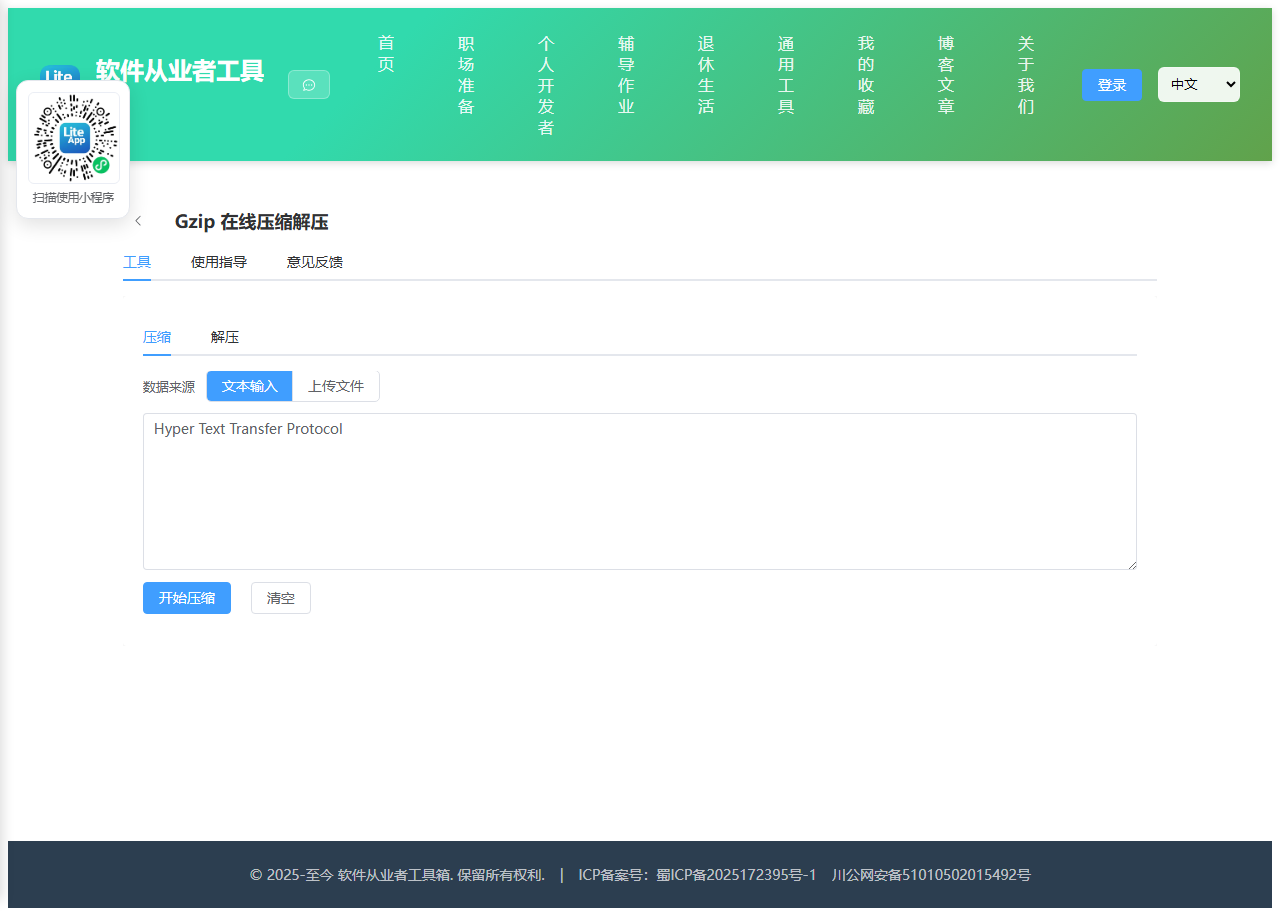
压缩面板
支持两种输入源。选择文本时,内容会先按 UTF-8 编码成字节再压缩;选择文件时会直接读取原始字节流,图片、视频、数据库导出文件都可以处理。压缩完成后会给出原始大小、压缩后大小、压缩后占比与体积节省四项指标,并把结果编码成 Base64 方便复制粘贴。你也可以直接下载 .gz 文件,该文件与命令行 gzip 产出的格式完全一致,可用 gunzip 或 7-Zip 正常解开。
关于压缩率的现实预期
压缩效果高度依赖数据本身的冗余程度。JSON、日志、HTML、SQL 这类重复度高的文本通常能压到原始体积的两到三成;而 JPEG、PNG、MP4、ZIP 等已经压缩过的格式几乎没有压缩空间,甚至会因为增加 Gzip 头尾而略微变大,这属于正常现象而非工具异常。另外需要注意 Base64 编码本身会使数据膨胀约三分之一,所以「压缩后的 Base64 字符串」有时会比原始小文本还长,若追求最小体积请直接使用下载的二进制 .gz 文件。
解压面板
既可以粘贴 Base64 字符串,也可以直接拖入 .gz 文件(文件会被自动转成 Base64 填入输入框)。解压后工具会尝试以严格模式的 UTF-8 解码:若能成功解码则以文本形式展示并支持复制;若数据是图片等二进制内容,则提示无法预览并提供下载。若你粘贴的 Base64 不完整或并非 Gzip 格式,会得到明确的错误提示——常见原因是复制时漏掉了结尾字符,或者数据实际是 zlib、deflate 裸流而非 gzip 格式,这三者头部不同不能混用。
使用场景
核对接口返回的 gzip 压缩体、还原日志系统里存成 Base64 的压缩字段、估算静态资源开启 gzip 后的传输体积、在只能传文本的通道里搬运二进制数据。
2.2 代码实现
2.2.1 组件结构
本工具是一个基于 Vue 3 <script setup> 语法的单文件组件(SFC),统一包裹在 ToolPageShell 组件内,由它提供页面标题、工具 ID、分类与「使用指南」插槽等通用外壳;核心业务逻辑(响应式状态、计算属性、事件处理函数)全部写在 <script setup> 中,输入/输出通过 el-input、el-button 等 Element Plus 组件与用户交互,所有数据均在浏览器本地处理,不会上传服务器。
2.2.2 核心逻辑概览
<script setup> 中定义的主要函数/方法:
showHint()formatSize()bytesToBase64()base64ToBytes()gzipBytes()gunzipBytes()handleCompressFile()runCompress()handleDecompressFile()runDecompress()triggerDownload()downloadGz()downloadDecompressed()sendToDecompress()copyText()clearCompress()clearDecompress()
2.2.3 关键实现代码
以下是该工具的完整 <script setup> 实现(核心代码)。模板(<template>)与样式(<style>)已省略。
vue
import { computed, reactive, ref } from 'vue'
import ToolPageShell from '@/components/ToolPageShell.vue'

const supported = typeof window !== 'undefined' &&
  typeof window.CompressionStream === 'function' &&
  typeof window.DecompressionStream === 'function'

const activeTab = ref('compress')
const busy = ref(false)
const hint = ref('')

const compressSource = ref('text')
const compressInput = ref('')
const compressOutput = ref('')
const compressError = ref('')
const sourceFileName = ref('')
const sourceFileSize = ref(0)
let sourceFileBytes = null
let compressedBytes = null

const decompressInput = ref('')
const decompressOutput = ref('')
const decompressError = ref('')
let decompressedBytes = null

const compressStats = reactive({ done: false, raw: 0, packed: 0, ratio: '0', saved: '0' })
const decompressStats = reactive({ done: false, raw: 0, packed: 0, isText: true })

// 已压缩过的数据可能略微变大,进度条需要限制在 0 到 100 之间
const progressPercent = computed(() => {
  const ratio = Number(compressStats.ratio)
  if (!Number.isFinite(ratio)) return 0
  return Math.min(100, Math.max(0, Number(ratio.toFixed(1))))
})

const progressColor = computed(() => {
  const ratio = Number(compressStats.ratio)
  if (ratio < 30) return '#67c23a'
  if (ratio < 70) return '#e6a23c'
  return '#f56c6c'
})

function showHint(text) {
  hint.value = text
  window.setTimeout(() => { hint.value = '' }, 2000)
}

function formatSize(bytes) {
  if (!bytes && bytes !== 0) return '-'
  if (bytes < 1024) return bytes + ' B'
  if (bytes < 1024 * 1024) return (bytes / 1024).toFixed(2) + ' KB'
  return (bytes / 1024 / 1024).toFixed(2) + ' MB'
}

function bytesToBase64(bytes) {
  let binary = ''
  const chunkSize = 0x8000
  for (let i = 0; i < bytes.length; i += chunkSize) {
    binary += String.fromCharCode.apply(null, bytes.subarray(i, i + chunkSize))
  }
  return btoa(binary)
}

function base64ToBytes(text) {
  const cleaned = String(text).replace(/\s+/g, '').replace(/-/g, '+').replace(/_/g, '/')
  const padded = cleaned + '='.repeat((4 - (cleaned.length % 4)) % 4)
  const binary = atob(padded)
  const bytes = new Uint8Array(binary.length)
  for (let i = 0; i < binary.length; i++) bytes[i] = binary.charCodeAt(i)
  return bytes
}

async function gzipBytes(bytes) {
  const stream = new Blob([bytes]).stream().pipeThrough(new window.CompressionStream('gzip'))
  const buffer = await new Response(stream).arrayBuffer()
  return new Uint8Array(buffer)
}

async function gunzipBytes(bytes) {
  const stream = new Blob([bytes]).stream().pipeThrough(new window.DecompressionStream('gzip'))
  const buffer = await new Response(stream).arrayBuffer()
  return new Uint8Array(buffer)
}

function handleCompressFile(file) {
  const raw = file.raw
  if (!raw) return
  sourceFileName.value = raw.name
  sourceFileSize.value = raw.size
  compressError.value = ''
  const reader = new FileReader()
  reader.onload = () => {
    sourceFileBytes = new Uint8Array(reader.result)
  }
  reader.onerror = () => {
    compressError.value = '文件读取失败,请重试'
    sourceFileBytes = null
  }
  reader.readAsArrayBuffer(raw)
}

async function runCompress() {
  if (!supported) return
  compressError.value = ''
  compressStats.done = false
  compressOutput.value = ''
  compressedBytes = null

  let input
  if (compressSource.value === 'text') {
    if (!compressInput.value) { compressError.value = '请先输入要压缩的文本'; return }
    input = new TextEncoder().encode(compressInput.value)
  } else {
    if (!sourceFileBytes) { compressError.value = '请先选择要压缩的文件'; return }
    input = sourceFileBytes
  }

  busy.value = true
  try {
    const packed = await gzipBytes(input)
    compressedBytes = packed
    compressOutput.value = bytesToBase64(packed)
    const ratio = input.length ? (packed.length / input.length) * 100 : 0
    compressStats.raw = input.length
    compressStats.packed = packed.length
    compressStats.ratio = ratio.toFixed(1)
    compressStats.saved = Math.max(0, 100 - ratio).toFixed(1)
    compressStats.done = true
    showHint('压缩完成')
  } catch (e) {
    compressError.value = '压缩失败:' + (e && e.message ? e.message : '未知错误')
  } finally {
    busy.value = false
  }
}

function handleDecompressFile(file) {
  const raw = file.raw
  if (!raw) return
  decompressError.value = ''
  const reader = new FileReader()
  reader.onload = () => {
    decompressInput.value = bytesToBase64(new Uint8Array(reader.result))
    showHint('已读取文件,可点击开始解压')
  }
  reader.onerror = () => { decompressError.value = '文件读取失败,请重试' }
  reader.readAsArrayBuffer(raw)
}

async function runDecompress() {
  if (!supported) return
  decompressError.value = ''
  decompressStats.done = false
  decompressOutput.value = ''
  decompressedBytes = null

  const text = decompressInput.value.trim()
  if (!text) { decompressError.value = '请先粘贴 Base64 数据或上传 .gz 文件'; return }

  let packed
  try {
    packed = base64ToBytes(text)
  } catch {
    decompressError.value = 'Base64 解析失败,请检查内容是否完整且没有多余字符'
    return
  }

  if (packed.length < 2 || packed[0] !== 0x1f || packed[1] !== 0x8b) {
    decompressError.value = '数据头部不是 Gzip 魔数 1F 8B,可能是 zlib 或 deflate 裸流,无法用 gzip 解压'
    return
  }

  busy.value = true
  try {
    const raw = await gunzipBytes(packed)
    decompressedBytes = raw
    decompressStats.packed = packed.length
    decompressStats.raw = raw.length
    try {
      // 严格模式解码,遇到非法 UTF-8 序列即判定为二进制
      decompressOutput.value = new TextDecoder('utf-8', { fatal: true }).decode(raw)
      decompressStats.isText = true
    } catch {
      decompressOutput.value = ''
      decompressStats.isText = false
    }
    decompressStats.done = true
    showHint('解压完成')
  } catch (e) {
    decompressError.value = '解压失败:' + (e && e.message ? e.message : '数据不是有效的 Gzip 格式')
  } finally {
    busy.value = false
  }
}

function triggerDownload(blob, name) {
  const url = URL.createObjectURL(blob)
  const link = document.createElement('a')
  link.href = url
  link.download = name
  document.body.appendChild(link)
  link.click()
  document.body.removeChild(link)
  URL.revokeObjectURL(url)
  showHint('已开始下载')
}

function downloadGz() {
  if (!compressedBytes) return
  const base = compressSource.value === 'file' && sourceFileName.value ? sourceFileName.value : 'content.txt'
  triggerDownload(new Blob([compressedBytes], { type: 'application/gzip' }), base + '.gz')
}

function downloadDecompressed() {
  if (!decompressedBytes) return
  const type = decompressStats.isText ? 'text/plain;charset=utf-8' : 'application/octet-stream'
  const name = decompressStats.isText ? 'decompressed.txt' : 'decompressed.bin'
  triggerDownload(new Blob([decompressedBytes], { type }), name)
}

function sendToDecompress() {
  decompressInput.value = compressOutput.value
  activeTab.value = 'decompress'
}

async function copyText(text) {
  if (!text) return
  try {
    await navigator.clipboard.writeText(text)
    showHint('已复制到剪贴板')
  } catch {
    showHint('复制失败,请手动选择文本复制')
  }
}

function clearCompress() {
  compressInput.value = ''
  compressOutput.value = ''
  compressError.value = ''
  sourceFileName.value = ''
  sourceFileSize.value = 0
  sourceFileBytes = null
  compressedBytes = null
  compressStats.done = false
}

function clearDecompress() {
  decompressInput.value = ''
  decompressOutput.value = ''
  decompressError.value = ''
  decompressedBytes = null
  decompressStats.done = false
}
2.3 效果截图