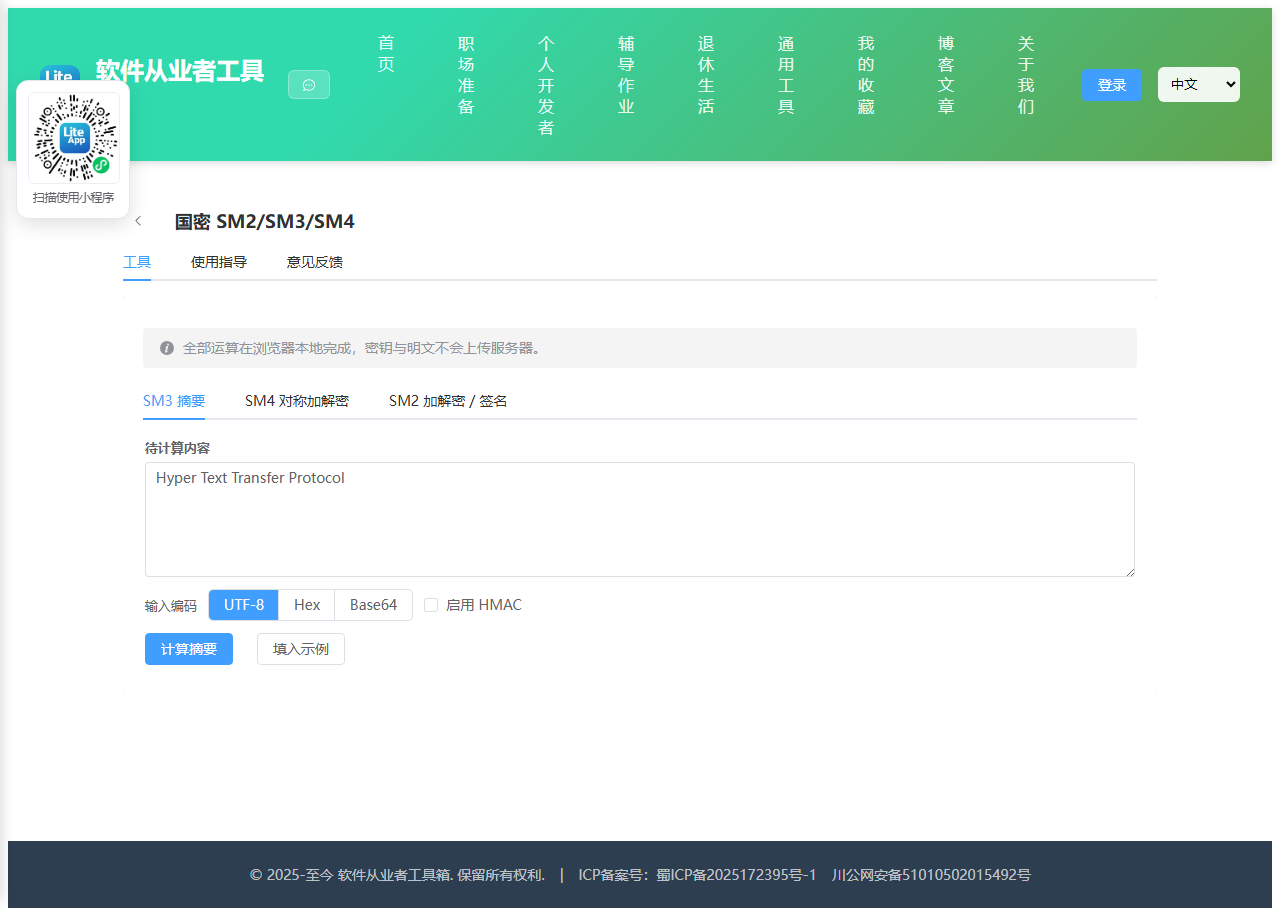
Appearance
实现 国密SM2/SM3/SM4 工具
分类:developer | 标签:国密、SM2、SM3、SM4 国密 SM2 加解密与签名验签、SM3 摘要、SM4 对称加密
2.1 功能说明
国密 SM2 加解密与签名验签、SM3 摘要、SM4 对称加密
2.1.1 使用指南
功能说明
在浏览器本地完成中国商用密码算法的运算,覆盖 SM3 摘要、SM4 对称加解密、SM2 非对称加解密与签名验签。 所有计算均在当前页面完成,密钥与明文不会发送到任何服务器。
SM3 摘要
SM3 是国密杂凑算法,输出固定 256 位(64 位十六进制字符),常用于完整性校验、口令摘要与数字签名前的预处理。
本工具同时支持 HMAC-SM3:填写十六进制密钥后即可生成带密钥的消息认证码。标准测试向量 SM3("abc") = 66c7f0f4…8f4ba8e0,可用于自检。
SM4 对称加解密
SM4 是 128 位分组对称算法,密钥固定为 128 位,即 32 个十六进制字符。可点击「随机密钥」快速生成。
模式说明:ECB 相同明文分组会产生相同密文,安全性较弱,仅建议用于兼容旧系统; CBC 需要额外提供 128 位初始向量 IV(同样是 32 个十六进制字符),同一密钥下每次加密应使用不同 IV。
填充方式选择 PKCS#7 时明文长度任意;选择「不填充」时明文字节数必须是 16 的整数倍,否则末尾不足一组的数据会被丢弃。 明文可按 UTF-8 / Hex / Base64 解释,密文可输出为 Hex 或 Base64,方便与后端 Java、Go 等实现对接。
SM2 加解密与签名
SM2 是基于椭圆曲线的公钥算法。点击「生成密钥对」得到 64 位十六进制私钥与以 04 开头的 130 位十六进制公钥。
密文排列顺序需与对端保持一致:C1C3C2 是《GM/T 0009》推荐的新标准顺序(多数 Java 实现默认), C1C2C3 是早期实现的顺序。解密时选错顺序会直接失败。
签名默认启用 SM3 杂凑并使用用户标识 1234567812345678(国标默认值); 若对端使用了自定义 userId,请在此处填写相同的值,否则验签不通过。DER 编码用于与 OpenSSL、Java BouncyCastle 等互通。
使用场景
国产化改造联调时快速验证加解密结果、排查前后端算法参数不一致问题、生成测试用密钥与签名数据。
2.2 代码实现
2.2.1 组件结构
本工具是一个基于 Vue 3 <script setup> 语法的单文件组件(SFC),统一包裹在 ToolPageShell 组件内,由它提供页面标题、工具 ID、分类与「使用指南」插槽等通用外壳;核心业务逻辑(响应式状态、计算属性、事件处理函数)全部写在 <script setup> 中,输入/输出通过 el-input、el-button 等 Element Plus 组件与用户交互,所有数据均在浏览器本地处理,不会上传服务器。
2.2.2 核心逻辑概览
<script setup> 中定义的主要函数/方法:
bytesToHex()hexToBytes()bytesToBase64()base64ToBytes()utf8ToBytes()bytesToUtf8()decodeInput()encodeOutput()randomHex()copy()assertHexLen()runSm3()fillSm3Sample()sm4Options()runSm4Encrypt()runSm4Decrypt()fillSm4Sample()genSm2KeyPair()derivePublicKey()runSm2Encrypt()runSm2Decrypt()signOptions()runSm2Sign()runSm2Verify()
2.2.3 关键实现代码
以下是该工具的完整 <script setup> 实现(核心代码)。模板(<template>)与样式(<style>)已省略。
vue
import {ref, watch} from 'vue'
import {ElMessage} from 'element-plus'
import ToolPageShell from '@/components/ToolPageShell.vue'
import {sm2, sm3, sm4} from '@/vendor/sm-crypto/index.mjs'

const activeTab = ref('sm3')

/* ------------------------- 编码辅助 ------------------------- */

const HEX_RE = /^[0-9a-fA-F]*$/

function bytesToHex(bytes) {
  return Array.from(bytes).map(b => b.toString(16).padStart(2, '0')).join('')
}

function hexToBytes(hex) {
  const clean = hex.replace(/\s+/g, '')
  if (!HEX_RE.test(clean)) throw new Error('十六进制字符串包含非法字符')
  if (clean.length % 2 !== 0) throw new Error('十六进制字符串长度必须是偶数')
  const out = []
  for (let i = 0; i < clean.length; i += 2) out.push(parseInt(clean.substr(i, 2), 16))
  return out
}

function bytesToBase64(bytes) {
  let bin = ''
  for (const b of bytes) bin += String.fromCharCode(b)
  return btoa(bin)
}

function base64ToBytes(str) {
  const bin = atob(str.replace(/\s+/g, ''))
  const out = []
  for (let i = 0; i < bin.length; i++) out.push(bin.charCodeAt(i))
  return out
}

function utf8ToBytes(str) {
  return Array.from(new TextEncoder().encode(str))
}

function bytesToUtf8(bytes) {
  return new TextDecoder('utf-8').decode(Uint8Array.from(bytes))
}

function decodeInput(text, enc) {
  if (enc === 'hex') return hexToBytes(text)
  if (enc === 'base64') return base64ToBytes(text)
  return utf8ToBytes(text)
}

function encodeOutput(bytes, enc) {
  if (enc === 'hex') return bytesToHex(bytes)
  if (enc === 'base64') return bytesToBase64(bytes)
  return bytesToUtf8(bytes)
}

function randomHex(byteLen) {
  const arr = new Uint8Array(byteLen)
  crypto.getRandomValues(arr)
  return bytesToHex(arr)
}

async function copy(text) {
  try {
    await navigator.clipboard.writeText(text)
    ElMessage.success('已复制到剪贴板')
  } catch {
    ElMessage.warning('复制失败,请手动选择内容复制')
  }
}

function assertHexLen(value, byteLen, label) {
  const clean = value.replace(/\s+/g, '')
  if (!HEX_RE.test(clean)) throw new Error(`${label}必须是十六进制字符串`)
  if (clean.length !== byteLen * 2) throw new Error(`${label}必须是 ${byteLen * 2} 个十六进制字符(${byteLen * 8} 位)`)
  return clean
}

/* ------------------------- SM3 ------------------------- */

const sm3Input = ref('abc')
const sm3InputEnc = ref('utf8')
const sm3UseHmac = ref(false)
const sm3HmacKey = ref('')
const sm3Output = ref('')
const sm3Error = ref('')

function runSm3() {
  sm3Error.value = ''
  sm3Output.value = ''
  try {
    if (!sm3Input.value) throw new Error('请输入需要计算摘要的内容')
    const bytes = decodeInput(sm3Input.value, sm3InputEnc.value)
    if (sm3UseHmac.value) {
      const key = sm3HmacKey.value.replace(/\s+/g, '')
      if (!key) throw new Error('启用 HMAC 时必须填写十六进制密钥')
      if (!HEX_RE.test(key) || key.length % 2 !== 0) throw new Error('HMAC 密钥必须是合法的十六进制字符串')
      sm3Output.value = sm3(bytes, {mode: 'hmac', key})
    } else {
      sm3Output.value = sm3(bytes)
    }
  } catch (e) {
    sm3Error.value = e.message || '计算失败'
  }
}

function fillSm3Sample() {
  sm3InputEnc.value = 'utf8'
  sm3UseHmac.value = false
  sm3Input.value = 'abc'
  runSm3()
}

/* ------------------------- SM4 ------------------------- */

const sm4Key = ref('0123456789abcdeffedcba9876543210')
const sm4Mode = ref('ecb')
const sm4Padding = ref('pkcs#7')
const sm4Iv = ref('fedcba98765432100123456789abcdef')
const sm4PlainEnc = ref('utf8')
const sm4CipherEnc = ref('hex')
const sm4Plain = ref('')
const sm4Cipher = ref('')
const sm4Error = ref('')
const sm4Ok = ref('')

function sm4Options() {
  const opts = {
    padding: sm4Padding.value,
    mode: sm4Mode.value,
    output: 'array'
  }
  if (sm4Mode.value === 'cbc') opts.iv = assertHexLen(sm4Iv.value, 16, '初始向量 IV')
  return opts
}

function runSm4Encrypt() {
  sm4Error.value = ''
  sm4Ok.value = ''
  try {
    if (!sm4Plain.value) throw new Error('请输入待加密的明文')
    const key = assertHexLen(sm4Key.value, 16, '密钥')
    const bytes = decodeInput(sm4Plain.value, sm4PlainEnc.value)
    if (sm4Padding.value === 'none' && bytes.length % 16 !== 0) {
      throw new Error(`不填充模式下明文长度必须是 16 字节的整数倍,当前为 ${bytes.length} 字节`)
    }
    const out = sm4.encrypt(bytes, key, sm4Options())
    sm4Cipher.value = encodeOutput(out, sm4CipherEnc.value)
    sm4Ok.value = `加密成功,密文 ${out.length} 字节`
  } catch (e) {
    sm4Error.value = e.message || '加密失败'
  }
}

function runSm4Decrypt() {
  sm4Error.value = ''
  sm4Ok.value = ''
  try {
    if (!sm4Cipher.value) throw new Error('请输入待解密的密文')
    const key = assertHexLen(sm4Key.value, 16, '密钥')
    const cipherBytes = sm4CipherEnc.value === 'base64'
        ? base64ToBytes(sm4Cipher.value)
        : hexToBytes(sm4Cipher.value)
    if (cipherBytes.length === 0 || cipherBytes.length % 16 !== 0) {
      throw new Error('密文长度必须是 16 字节的整数倍,请检查密文编码是否选择正确')
    }
    const out = sm4.decrypt(bytesToHex(cipherBytes), key, sm4Options())
    sm4Plain.value = encodeOutput(out, sm4PlainEnc.value)
    sm4Ok.value = `解密成功,明文 ${out.length} 字节`
  } catch (e) {
    sm4Error.value = /padding is invalid/i.test(e.message || '')
        ? '解密失败:填充校验不通过,请确认密钥、模式、IV 与填充方式是否一致'
        : (e.message || '解密失败')
  }
}

function fillSm4Sample() {
  sm4Key.value = '0123456789abcdeffedcba9876543210'
  sm4Iv.value = 'fedcba98765432100123456789abcdef'
  sm4PlainEnc.value = 'utf8'
  sm4CipherEnc.value = 'hex'
  sm4Padding.value = 'pkcs#7'
  sm4Plain.value = '国密 SM4 加密测试 hello 123'
  runSm4Encrypt()
}

/* ------------------------- SM2 ------------------------- */

const sm2PrivateKey = ref('')
const sm2PublicKey = ref('')
const sm2CipherMode = ref(1)
const sm2WithPrefix = ref(false)
const sm2Plain = ref('')
const sm2Cipher = ref('')
const sm2CryptError = ref('')
const sm2CryptOk = ref('')

const sm2UserId = ref('1234567812345678')
const sm2HashFlag = ref(true)
const sm2DerFlag = ref(false)
const sm2SignMsg = ref('')
const sm2Signature = ref('')
const sm2SignError = ref('')
const sm2SignOk = ref('')
const sm2VerifyResult = ref(null)

// 原文或签名一旦改动,之前的验签结论即失效
watch([sm2SignMsg, sm2Signature, sm2PublicKey], () => {
  sm2VerifyResult.value = null
})

function genSm2KeyPair() {
  const kp = sm2.generateKeyPairHex()
  sm2PrivateKey.value = kp.privateKey
  sm2PublicKey.value = kp.publicKey
  sm2CryptError.value = ''
  sm2CryptOk.value = '已生成新的 SM2 密钥对'
  if (!sm2Plain.value) sm2Plain.value = '国密 SM2 加密测试 hello 123'
  if (!sm2SignMsg.value) sm2SignMsg.value = '需要签名的业务报文内容'
}

function derivePublicKey() {
  sm2CryptError.value = ''
  sm2CryptOk.value = ''
  try {
    const priv = assertHexLen(sm2PrivateKey.value, 32, '私钥')
    sm2PublicKey.value = sm2.getPublicKeyFromPrivateKey(priv)
    sm2CryptOk.value = '已由私钥推导出公钥'
  } catch (e) {
    sm2CryptError.value = e.message || '推导失败'
  }
}

function runSm2Encrypt() {
  sm2CryptError.value = ''
  sm2CryptOk.value = ''
  try {
    if (!sm2Plain.value) throw new Error('请输入待加密的明文')
    const pub = sm2PublicKey.value.replace(/\s+/g, '')
    if (!pub) throw new Error('请先填写或生成公钥')
    if (!sm2.verifyPublicKey(pub)) throw new Error('公钥格式不合法,应为以 04 开头的 130 位十六进制字符串')
    const cipher = sm2.doEncrypt(sm2Plain.value, pub, sm2CipherMode.value)
    sm2Cipher.value = sm2WithPrefix.value ? '04' + cipher : cipher
    sm2CryptOk.value = `加密成功,密文排列 ${sm2CipherMode.value === 1 ? 'C1C3C2' : 'C1C2C3'}`
  } catch (e) {
    sm2CryptError.value = e.message || '加密失败'
  }
}

function runSm2Decrypt() {
  sm2CryptError.value = ''
  sm2CryptOk.value = ''
  try {
    let cipher = sm2Cipher.value.replace(/\s+/g, '')
    if (!cipher) throw new Error('请输入待解密的密文')
    if (!HEX_RE.test(cipher)) throw new Error('密文必须是十六进制字符串')
    const priv = assertHexLen(sm2PrivateKey.value, 32, '私钥')
    // 部分实现会在密文前保留未压缩点标志 04,sm-crypto 不需要该前缀
    if (cipher.length % 2 === 0 && cipher.length > 194 && cipher.startsWith('04')) {
      cipher = cipher.slice(2)
    }
    if (cipher.length <= 192) throw new Error('密文长度不足,无法解析 C1/C2/C3 分量')
    const plain = sm2.doDecrypt(cipher, priv, sm2CipherMode.value)
    if (!plain) throw new Error('解密结果为空,请确认密钥与密文排列顺序(C1C3C2 / C1C2C3)是否正确')
    sm2Plain.value = plain
    sm2CryptOk.value = '解密成功'
  } catch (e) {
    sm2CryptError.value = e.message || '解密失败,请确认密钥与密文排列顺序是否正确'
  }
}

function signOptions() {
  const opts = {hash: sm2HashFlag.value, der: sm2DerFlag.value}
  const uid = sm2UserId.value.trim()
  if (uid) opts.userId = uid
  return opts
}

function runSm2Sign() {
  sm2SignError.value = ''
  sm2SignOk.value = ''
  sm2VerifyResult.value = null
  try {
    if (!sm2SignMsg.value) throw new Error('请输入待签名的内容')
    const priv = assertHexLen(sm2PrivateKey.value, 32, '私钥')
    const opts = signOptions()
    if (sm2PublicKey.value.trim()) opts.publicKey = sm2PublicKey.value.replace(/\s+/g, '')
    sm2Signature.value = sm2.doSignature(sm2SignMsg.value, priv, opts)
    sm2SignOk.value = `签名成功(${sm2DerFlag.value ? 'DER 编码' : 'R||S 拼接'})`
  } catch (e) {
    sm2SignError.value = e.message || '签名失败'
  }
}

function runSm2Verify() {
  sm2SignError.value = ''
  sm2SignOk.value = ''
  sm2VerifyResult.value = null
  try {
    if (!sm2SignMsg.value) throw new Error('请输入待验签的原文')
    const sig = sm2Signature.value.replace(/\s+/g, '')
    if (!sig) throw new Error('请输入签名值')
    const pub = sm2PublicKey.value.replace(/\s+/g, '')
    if (!pub) throw new Error('请填写公钥')
    if (!sm2.verifyPublicKey(pub)) throw new Error('公钥格式不合法')
    sm2VerifyResult.value = sm2.doVerifySignature(sm2SignMsg.value, sig, pub, signOptions())
  } catch (e) {
    sm2SignError.value = e.message || '验签失败'
  }
}
2.3 效果截图