Appearance
实现 Favicon / App Icon 生成 工具
分类:developer | 标签:favicon、icon、PWA 上传图片批量生成 favicon 与多尺寸图标、PWA manifest
2.1 功能说明
上传图片批量生成 favicon 与多尺寸图标、PWA manifest
2.1.1 使用指南
功能说明
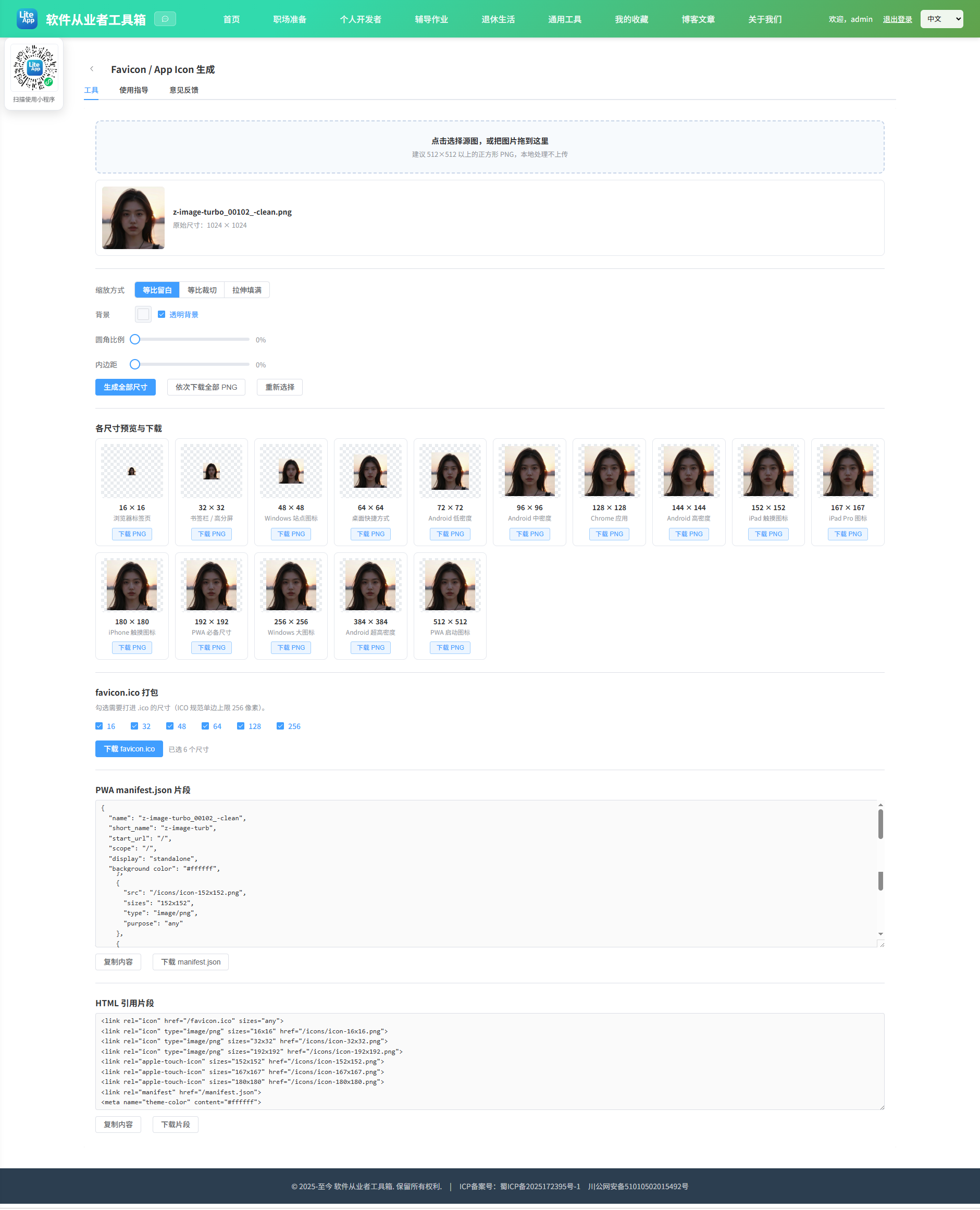
上传一张源图(建议使用正方形、分辨率不低于 512×512 的 PNG),工具会在浏览器本地用 Canvas 把它缩放成网站与应用常用的全部图标尺寸,并可导出多尺寸 favicon.ico 与 PWA manifest 片段。整个过程不上传任何文件。
尺寸说明
16 / 32 / 48:浏览器标签页、书签栏、Windows 任务栏使用的传统 favicon 尺寸。
64 / 128 / 256:桌面端高分屏 favicon 与 Chrome 应用图标。
72 / 96 / 144 / 192 / 384 / 512:Android 与 PWA manifest 标准图标尺寸,其中 192 与 512 是 PWA 安装的必备项。
152 / 167 / 180:iOS apple-touch-icon 尺寸,分别对应 iPad、iPad Pro 和 iPhone。
缩放与裁切
等比留白(contain):完整保留源图内容,不足部分用背景色或透明填充,适合非正方形源图。
等比裁切(cover):铺满整个方形画布,超出部分被裁掉,适合背景满幅的图。
拉伸填满(stretch):强行拉伸到正方形,可能变形,仅在特殊需要时使用。
还可以设置背景色(或勾选透明背景)与圆角比例,圆角以画布边长的百分比计算,50% 即为圆形图标。
关于 favicon.ico
生成的 .ico 采用 PNG-in-ICO 结构:6 字节 ICONDIR 文件头,加上每个尺寸 16 字节的目录项,再拼接各尺寸的 PNG 原始数据。这是 Vista 之后 Windows 与所有现代浏览器都支持的标准做法,体积比传统 BMP-in-ICO 小很多。需要注意的是,极老的环境(例如 Windows XP 自带资源管理器、IE6)只识别 BMP 编码的 ICO,无法显示这种文件;如果必须兼容这类环境,请另行使用专门的 BMP 编码工具。ICO 规范中单边最大为 256 像素,256 在目录项里以 0 表示,工具已按规范处理。
下载方式
为了保持零第三方依赖,工具不提供 ZIP 打包。每个尺寸都有独立的 PNG 下载按钮,也可以点击「依次下载全部 PNG」连续触发下载,浏览器可能会询问是否允许多文件下载,请选择允许。manifest.json 与 HTML 引用片段可直接复制或下载为文件。
2.2 代码实现
2.2.1 组件结构
本工具是一个基于 Vue 3 <script setup> 语法的单文件组件(SFC),统一包裹在 ToolPageShell 组件内,由它提供页面标题、工具 ID、分类与「使用指南」插槽等通用外壳;核心业务逻辑(响应式状态、计算属性、事件处理函数)全部写在 <script setup> 中,输入/输出通过 el-input、el-button 等 Element Plus 组件与用户交互,所有数据均在浏览器本地处理,不会上传服务器。
2.2.2 核心逻辑概览
<script setup> 中定义的主要函数/方法:
pickFile()loadImageFile()setSource()onPick()onDrop()clearPreviews()reset()renderSize()roundRectPath()renderAll()downloadBlob()downloadPng()sleep()downloadAllPng()downloadText()copyText()blobToArrayBuffer()canvasToPngBytes()buildIcoBlob()downloadIco()
2.2.3 关键实现代码
以下是该工具的完整 <script setup> 实现(核心代码)。模板(<template>)与样式(<style>)已省略。
vue
import { ref, computed, watch, markRaw, onBeforeUnmount } from 'vue'
import ToolPageShell from '@/components/ToolPageShell.vue'

const SIZES = [
  { size: 16, usage: '浏览器标签页' },
  { size: 32, usage: '书签栏 / 高分屏' },
  { size: 48, usage: 'Windows 站点图标' },
  { size: 64, usage: '桌面快捷方式' },
  { size: 72, usage: 'Android 低密度' },
  { size: 96, usage: 'Android 中密度' },
  { size: 128, usage: 'Chrome 应用' },
  { size: 144, usage: 'Android 高密度' },
  { size: 152, usage: 'iPad 触摸图标' },
  { size: 167, usage: 'iPad Pro 图标' },
  { size: 180, usage: 'iPhone 触摸图标' },
  { size: 192, usage: 'PWA 必备尺寸' },
  { size: 256, usage: 'Windows 大图标' },
  { size: 384, usage: 'Android 超高密度' },
  { size: 512, usage: 'PWA 启动图标' }
]

const PWA_SIZES = [72, 96, 128, 144, 152, 192, 384, 512]

const fileInput = ref(null)
const source = ref(null)
const errorMsg = ref('')
const tipMsg = ref('')

const fitMode = ref('contain')
const bgColor = ref('#ffffff')
const transparentBg = ref(true)
const radiusPct = ref(0)
const paddingPct = ref(0)

const previews = ref([])
const icoCandidates = [16, 32, 48, 64, 128, 256]
const icoSizes = ref([16, 32, 48, 64, 128, 256])
const icoBuilding = ref(false)

const appName = ref('My App')

const pickFile = () => fileInput.value && fileInput.value.click()

function loadImageFile(file) {
  return new Promise((resolve, reject) => {
    const objectURL = URL.createObjectURL(file)
    const img = new Image()
    img.onload = () => {
      resolve({
        name: file.name || '未命名图片',
        url: objectURL,
        img: markRaw(img),
        width: img.naturalWidth || img.width,
        height: img.naturalHeight || img.height
      })
    }
    img.onerror = () => {
      URL.revokeObjectURL(objectURL)
      reject(new Error('无法解析图片:' + (file.name || '未命名')))
    }
    img.src = objectURL
  })
}

async function setSource(file) {
  errorMsg.value = ''
  tipMsg.value = ''
  if (!file || file.type.indexOf('image/') !== 0) {
    errorMsg.value = '请选择一个有效的图片文件'
    return
  }
  try {
    const item = await loadImageFile(file)
    if (source.value) URL.revokeObjectURL(source.value.url)
    clearPreviews()
    source.value = item
    const dot = item.name.lastIndexOf('.')
    appName.value = dot > 0 ? item.name.slice(0, dot) : item.name
    renderAll()
  } catch (e) {
    errorMsg.value = e.message
  }
}

async function onPick(evt) {
  await setSource(evt.target.files && evt.target.files[0])
  evt.target.value = ''
}

async function onDrop(evt) {
  const files = evt.dataTransfer && evt.dataTransfer.files
  await setSource(files && files[0])
}

function clearPreviews() {
  previews.value = []
}

function reset() {
  if (source.value) URL.revokeObjectURL(source.value.url)
  source.value = null
  clearPreviews()
  errorMsg.value = ''
  tipMsg.value = ''
}

/** 把源图按当前配置渲染到指定边长的方形 canvas */
function renderSize(size) {
  const canvas = document.createElement('canvas')
  canvas.width = size
  canvas.height = size
  const ctx = canvas.getContext('2d')
  const radius = (Math.min(radiusPct.value, 50) / 100) * size

  if (radius > 0) {
    ctx.beginPath()
    roundRectPath(ctx, 0, 0, size, size, radius)
    ctx.clip()
  }

  if (!transparentBg.value) {
    ctx.fillStyle = bgColor.value || '#ffffff'
    ctx.fillRect(0, 0, size, size)
  }

  const pad = Math.round((paddingPct.value / 100) * size)
  const box = Math.max(1, size - pad * 2)
  const src = source.value.img
  const sw = source.value.width
  const sh = source.value.height

  ctx.imageSmoothingEnabled = true
  ctx.imageSmoothingQuality = 'high'

  if (fitMode.value === 'stretch') {
    ctx.drawImage(src, pad, pad, box, box)
  } else if (fitMode.value === 'cover') {
    const scale = Math.max(box / sw, box / sh)
    const dw = sw * scale
    const dh = sh * scale
    ctx.drawImage(src, pad + (box - dw) / 2, pad + (box - dh) / 2, dw, dh)
  } else {
    const scale = Math.min(box / sw, box / sh)
    const dw = sw * scale
    const dh = sh * scale
    ctx.drawImage(src, pad + (box - dw) / 2, pad + (box - dh) / 2, dw, dh)
  }
  return canvas
}

function roundRectPath(ctx, x, y, w, h, r) {
  const rr = Math.min(r, w / 2, h / 2)
  ctx.moveTo(x + rr, y)
  ctx.lineTo(x + w - rr, y)
  ctx.arcTo(x + w, y, x + w, y + rr, rr)
  ctx.lineTo(x + w, y + h - rr)
  ctx.arcTo(x + w, y + h, x + w - rr, y + h, rr)
  ctx.lineTo(x + rr, y + h)
  ctx.arcTo(x, y + h, x, y + h - rr, rr)
  ctx.lineTo(x, y + rr)
  ctx.arcTo(x, y, x + rr, y, rr)
  ctx.closePath()
}

function renderAll() {
  if (!source.value) return
  previews.value = SIZES.map((item) => {
    const canvas = renderSize(item.size)
    return {
      size: item.size,
      usage: item.usage,
      display: Math.min(item.size, 96),
      url: canvas.toDataURL('image/png')
    }
  })
}

let renderTimer = null
watch([fitMode, bgColor, transparentBg, radiusPct, paddingPct], () => {
  if (!source.value) return
  if (renderTimer) clearTimeout(renderTimer)
  renderTimer = setTimeout(renderAll, 120)
})

/* ---------------- 下载 ---------------- */

function downloadBlob(blob, filename) {
  const url = URL.createObjectURL(blob)
  const a = document.createElement('a')
  a.href = url
  a.download = filename
  document.body.appendChild(a)
  a.click()
  document.body.removeChild(a)
  setTimeout(() => URL.revokeObjectURL(url), 2000)
}

function downloadPng(size) {
  const canvas = renderSize(size)
  canvas.toBlob((blob) => {
    if (blob) downloadBlob(blob, 'icon-' + size + 'x' + size + '.png')
  }, 'image/png')
}

const sleep = (ms) => new Promise((r) => setTimeout(r, ms))

async function downloadAllPng() {
  for (const item of SIZES) {
    downloadPng(item.size)
    await sleep(320)
  }
  tipMsg.value = '已依次触发 ' + SIZES.length + ' 个 PNG 下载,请在浏览器下载列表中查看'
}

function downloadText(text, filename) {
  downloadBlob(new Blob([text], { type: 'text/plain;charset=utf-8' }), filename)
}

async function copyText(text) {
  try {
    if (navigator.clipboard && navigator.clipboard.writeText) {
      await navigator.clipboard.writeText(text)
    } else {
      const ta = document.createElement('textarea')
      ta.value = text
      ta.style.position = 'fixed'
      ta.style.opacity = '0'
      document.body.appendChild(ta)
      ta.select()
      document.execCommand('copy')
      document.body.removeChild(ta)
    }
    tipMsg.value = '已复制到剪贴板'
    setTimeout(() => { tipMsg.value = '' }, 2000)
  } catch (e) {
    errorMsg.value = '复制失败,请手动选中文本复制'
  }
}

/* ---------------- ICO 编码 ---------------- */

function blobToArrayBuffer(blob) {
  return new Promise((resolve, reject) => {
    const reader = new FileReader()
    reader.onload = () => resolve(reader.result)
    reader.onerror = () => reject(new Error('读取 PNG 数据失败'))
    reader.readAsArrayBuffer(blob)
  })
}

function canvasToPngBytes(canvas) {
  return new Promise((resolve, reject) => {
    canvas.toBlob(async (blob) => {
      if (!blob) {
        reject(new Error('生成 PNG 失败'))
        return
      }
      try {
        resolve(new Uint8Array(await blobToArrayBuffer(blob)))
      } catch (e) {
        reject(e)
      }
    }, 'image/png')
  })
}

/**
 * PNG-in-ICO 编码
 * 结构:ICONDIR(6 字节) + N × ICONDIRENTRY(16 字节) + N 段 PNG 原始数据
 */
async function buildIcoBlob(sizes) {
  const ordered = sizes.slice().sort((a, b) => a - b)
  const entries = []
  for (const size of ordered) {
    const bytes = await canvasToPngBytes(renderSize(size))
    entries.push({ size, bytes })
  }

  const headerSize = 6 + 16 * entries.length
  const totalSize = entries.reduce((sum, e) => sum + e.bytes.length, headerSize)
  const out = new Uint8Array(totalSize)
  const view = new DataView(out.buffer)

  // ICONDIR
  view.setUint16(0, 0, true) // reserved
  view.setUint16(2, 1, true) // type = 1 表示图标
  view.setUint16(4, entries.length, true)

  let offset = headerSize
  entries.forEach((entry, index) => {
    const base = 6 + index * 16
    // 256 在规范中以 0 表示
    const dim = entry.size >= 256 ? 0 : entry.size
    out[base] = dim // width
    out[base + 1] = dim // height
    out[base + 2] = 0 // 调色板颜色数,真彩色为 0
    out[base + 3] = 0 // reserved
    view.setUint16(base + 4, 1, true) // color planes
    view.setUint16(base + 6, 32, true) // bits per pixel
    view.setUint32(base + 8, entry.bytes.length, true) // 数据长度
    view.setUint32(base + 12, offset, true) // 数据偏移
    out.set(entry.bytes, offset)
    offset += entry.bytes.length
  })

  return new Blob([out], { type: 'image/x-icon' })
}

async function downloadIco() {
  if (!source.value || !icoSizes.value.length) return
  icoBuilding.value = true
  errorMsg.value = ''
  try {
    const blob = await buildIcoBlob(icoSizes.value)
    downloadBlob(blob, 'favicon.ico')
    tipMsg.value = 'favicon.ico 已生成,包含 ' + icoSizes.value.length + ' 个尺寸'
  } catch (e) {
    errorMsg.value = 'ICO 生成失败:' + e.message
  } finally {
    icoBuilding.value = false
  }
}

/* ---------------- 文本片段 ---------------- */

const manifestText = computed(() => {
  const icons = PWA_SIZES.map((s) => ({
    src: '/icons/icon-' + s + 'x' + s + '.png',
    sizes: s + 'x' + s,
    type: 'image/png',
    purpose: s >= 192 ? 'any maskable' : 'any'
  }))
  const manifest = {
    name: appName.value || 'My App',
    short_name: (appName.value || 'My App').slice(0, 12),
    start_url: '/',
    scope: '/',
    display: 'standalone',
    background_color: transparentBg.value ? '#ffffff' : bgColor.value,
    theme_color: transparentBg.value ? '#ffffff' : bgColor.value,
    icons
  }
  return JSON.stringify(manifest, null, 2)
})

const htmlSnippet = computed(() => {
  const lines = [
    '<link rel="icon" href="/favicon.ico" sizes="any">',
    '<link rel="icon" type="image/png" sizes="16x16" href="/icons/icon-16x16.png">',
    '<link rel="icon" type="image/png" sizes="32x32" href="/icons/icon-32x32.png">',
    '<link rel="icon" type="image/png" sizes="192x192" href="/icons/icon-192x192.png">',
    '<link rel="apple-touch-icon" sizes="152x152" href="/icons/icon-152x152.png">',
    '<link rel="apple-touch-icon" sizes="167x167" href="/icons/icon-167x167.png">',
    '<link rel="apple-touch-icon" sizes="180x180" href="/icons/icon-180x180.png">',
    '<link rel="manifest" href="/manifest.json">',
    '<meta name="theme-color" content="' + (transparentBg.value ? '#ffffff' : bgColor.value) + '">'
  ]
  return lines.join('\n')
})

onBeforeUnmount(() => {
  if (renderTimer) clearTimeout(renderTimer)
  if (source.value) URL.revokeObjectURL(source.value.url)
})
2.3 效果截图