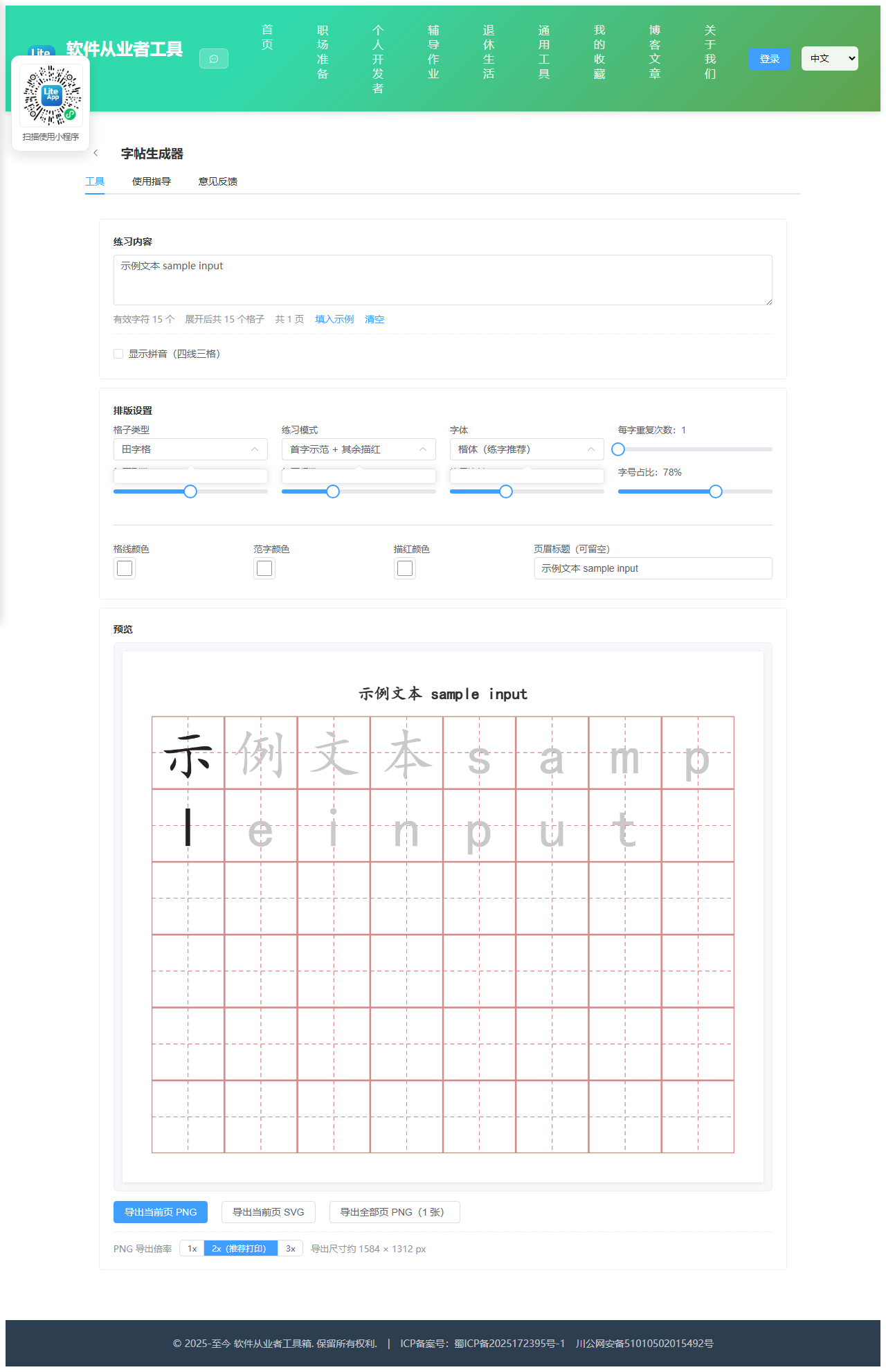
Appearance
实现 字帖生成器 工具
分类:general | 标签:字帖、练字、田字格 生成田字格米字格练字帖
2.1 功能说明
生成田字格米字格练字帖
2.1.1 使用指南
功能说明
输入想练的汉字,自动排版成田字格、米字格、回宫格或空白格练字帖, 支持描红底字、首字示范、每字重复等常见练习模式,可导出高清 PNG 或矢量 SVG 直接打印。 全部在浏览器本地生成,不联网、不上传内容。
格子类型怎么选
田字格:格内一横一竖两条虚线分成四格,是小学低年级最常用的写字格,便于把握字的上下左右部件位置。
米字格:在田字格基础上加两条对角虚线,共八个方向的参照线,定位更精确,适合练习结构复杂的字和书法入门。
回宫格:格内套一个九宫方框,强调字的重心要落在中宫范围内,多用于楷书结构训练。
空白格:只有外框,适合已经掌握结构、做成篇书写练习时使用。
练习模式说明
全部描红:所有字都用浅灰色印出,照着描写,适合初学者和幼儿启蒙。
首字示范 + 其余描红:每行第一个字为深色范字,后面是浅灰描红字,先看后描。
首字示范 + 其余空白:每行第一个字为范字,后面全部留空自己写,检验记忆效果,是最常见的作业形式。
全部实心:所有字都是深色,可以当作字卡或范本查看,不用于书写。
每字重复次数:把每个字连续排列多遍,例如设为 4,「永」就会连续占 4 个格子,适合单字强化练习。
关于拼音
本工具不内置汉字读音词库(避免引入额外的体积和依赖),因此拼音需要手动填写。 勾选「显示拼音」后,在拼音输入框里按顺序用空格分隔填入每个字的拼音即可,例如 yong he jiu nian, 数量不足的字会留空四线格。四线三格会自动画在每个格子的正上方。
字体的系统依赖(重要)
网页只能调用你电脑上已经安装的字体,本工具不加载任何在线字体文件。 楷体(KaiTi / STKaiti)在 Windows 与 macOS 上通常自带,是练字帖最合适的字形; 但 Linux、部分安卓与 iOS 设备可能没有楷体,此时浏览器会自动回退成系统默认中文字体(如黑体或苹方), 笔画形态会与标准楷书有差异。如果发现字形不对,请换一个字体选项,或在电脑上安装楷体后重新生成。
同理,导出的 SVG 里保存的是文字加字体名称,不是矢量轮廓。 在你自己的电脑上打开显示正常,但发给没装同款字体的人可能会变形。 需要严格保真时,请用 PNG 导出;需要无限缩放印刷时,再用 SVG 并确保目标设备装有同款字体。
打印建议
导出倍率选 2x 或 3x 得到的 PNG 在 A4 上打印足够清晰。 每页列数 × 行数建议控制在 8 × 10 以内,格子边长 80~110 像素时接近真实练字本的手感。 打印时把缩放设为「实际大小」或「适合页面」,不要选「无边距」以免切掉外框。
2.2 代码实现
2.2.1 组件结构
本工具是一个基于 Vue 3 <script setup> 语法的单文件组件(SFC),统一包裹在 ToolPageShell 组件内,由它提供页面标题、工具 ID、分类与「使用指南」插槽等通用外壳;核心业务逻辑(响应式状态、计算属性、事件处理函数)全部写在 <script setup> 中,输入/输出通过 el-input、el-button 等 Element Plus 组件与用户交互,所有数据均在浏览器本地处理,不会上传服务器。
2.2.2 核心逻辑概览
<script setup> 中定义的主要函数/方法:
styleForCell()drawDashedLine()drawGridCell()drawPinyinGrid()renderPage()renderPreview()esc()svgLine()buildSvg()downloadBlob()notify()exportPng()exportSvg()exportAllPng()
2.2.3 关键实现代码
以下是该工具的完整 <script setup> 实现(核心代码)。模板(<template>)与样式(<style>)已省略。
vue
import { ref, computed, watch, onMounted, nextTick } from 'vue'
import ToolPageShell from '@/components/ToolPageShell.vue'
const sampleText = '永和九年岁在癸丑暮春之初会于会稽山阴之兰亭'
const fonts = [
{ key: 'kai', label: '楷体(练字推荐)', css: '"KaiTi", "STKaiti", "Kaiti SC", "楷体", serif' },
{ key: 'song', label: '宋体', css: '"SimSun", "Songti SC", "宋体", serif' },
{ key: 'hei', label: '黑体', css: '"SimHei", "Heiti SC", "黑体", sans-serif' },
{ key: 'fang', label: '仿宋', css: '"FangSong", "STFangsong", "仿宋", serif' },
{ key: 'yahei', label: '微软雅黑 / 苹方', css: '"Microsoft YaHei", "PingFang SC", sans-serif' }
]
const text = ref(sampleText)
const pinyinText = ref('')
const showPinyin = ref(false)
const gridType = ref('tian')
const mode = ref('first')
const fontKey = ref('kai')
const repeat = ref(1)
const cols = ref(8)
const rows = ref(6)
const cell = ref(90)
const fontRatio = ref(0.78)
const gridColor = ref('#d98b8b')
const inkColor = ref('#222222')
const traceColor = ref('#c9c9c9')
const title = ref('')
const pageIndex = ref(0)
const exportScale = ref(2)
const message = ref('')
const canvasEl = ref(null)
const PADDING = 36
const TITLE_H = 44
const fontCss = computed(() => {
const f = fonts.find((x) => x.key === fontKey.value)
return f ? f.css : fonts[0].css
})
// 过滤空白与换行,保留所有非空白字符(含标点,便于练习整句)
const chars = computed(() => Array.from(text.value).filter((c) => !/\s/.test(c)))
const expanded = computed(() => {
const out = []
const n = Math.max(1, repeat.value)
const list = chars.value
for (let i = 0; i < list.length; i++) {
for (let r = 0; r < n; r++) {
out.push({ char: list[i], srcIndex: i })
}
}
return out
})
const pinyinList = computed(() =>
pinyinText.value
.trim()
.split(/\s+/)
.filter((s) => s.length > 0)
)
const perPage = computed(() => cols.value * rows.value)
const pages = computed(() => {
const list = expanded.value
if (list.length === 0) return []
const result = []
for (let i = 0; i < list.length; i += perPage.value) {
result.push(list.slice(i, i + perPage.value))
}
return result
})
const pinyinH = computed(() => (showPinyin.value ? Math.round(cell.value * 0.34) : 0))
const rowH = computed(() => cell.value + pinyinH.value)
const titleH = computed(() => (title.value.trim() ? TITLE_H : 0))
const pageW = computed(() => PADDING * 2 + cols.value * cell.value)
const pageH = computed(() => PADDING * 2 + titleH.value + rows.value * rowH.value)
// 根据模式决定某个格子的填充方式
function styleForCell(indexInPage) {
const col = indexInPage % cols.value
if (mode.value === 'solid') return 'ink'
if (mode.value === 'trace') return 'trace'
if (mode.value === 'first') return col === 0 ? 'ink' : 'trace'
if (mode.value === 'firstBlank') return col === 0 ? 'ink' : 'none'
return 'trace'
}
/* ---------------- Canvas 绘制 ---------------- */
function drawDashedLine(ctx, x1, y1, x2, y2) {
ctx.save()
ctx.setLineDash([5, 4])
ctx.beginPath()
ctx.moveTo(x1, y1)
ctx.lineTo(x2, y2)
ctx.stroke()
ctx.restore()
}
function drawGridCell(ctx, x, y, size) {
ctx.strokeStyle = gridColor.value
ctx.lineWidth = 1.2
// 外框
ctx.strokeRect(x + 0.5, y + 0.5, size - 1, size - 1)
ctx.lineWidth = 1
const cx = x + size / 2
const cy = y + size / 2
if (gridType.value === 'tian' || gridType.value === 'mi') {
drawDashedLine(ctx, x, cy, x + size, cy)
drawDashedLine(ctx, cx, y, cx, y + size)
}
if (gridType.value === 'mi') {
drawDashedLine(ctx, x, y, x + size, y + size)
drawDashedLine(ctx, x + size, y, x, y + size)
}
if (gridType.value === 'hui') {
const t = size / 3
drawDashedLine(ctx, x + t, y, x + t, y + size)
drawDashedLine(ctx, x + t * 2, y, x + t * 2, y + size)
drawDashedLine(ctx, x, y + t, x + size, y + t)
drawDashedLine(ctx, x, y + t * 2, x + size, y + t * 2)
}
}
function drawPinyinGrid(ctx, x, y, w, h) {
const step = h / 3
ctx.strokeStyle = gridColor.value
ctx.lineWidth = 1
for (let i = 0; i <= 3; i++) {
const ly = y + step * i
if (i === 1 || i === 2) {
drawDashedLine(ctx, x, ly, x + w, ly)
} else {
ctx.beginPath()
ctx.moveTo(x, ly + 0.5)
ctx.lineTo(x + w, ly + 0.5)
ctx.stroke()
}
}
}
function renderPage(canvas, pageData, scaleFactor) {
const s = scaleFactor || 1
canvas.width = pageW.value * s
canvas.height = pageH.value * s
const ctx = canvas.getContext('2d')
ctx.scale(s, s)
ctx.fillStyle = '#ffffff'
ctx.fillRect(0, 0, pageW.value, pageH.value)
let top = PADDING
if (title.value.trim()) {
ctx.fillStyle = '#303133'
ctx.font = '600 20px ' + fontCss.value
ctx.textAlign = 'center'
ctx.textBaseline = 'middle'
ctx.fillText(title.value.trim(), pageW.value / 2, top + TITLE_H / 2 - 6)
top += TITLE_H
}
const size = cell.value
for (let i = 0; i < perPage.value; i++) {
const r = Math.floor(i / cols.value)
const c = i % cols.value
const x = PADDING + c * size
const rowTop = top + r * rowH.value
const gy = rowTop + pinyinH.value
if (showPinyin.value) {
drawPinyinGrid(ctx, x, rowTop + 2, size, pinyinH.value - 4)
}
drawGridCell(ctx, x, gy, size)
const item = pageData[i]
if (!item) continue
// 拼音
if (showPinyin.value) {
const py = pinyinList.value[item.srcIndex]
if (py) {
ctx.fillStyle = inkColor.value
ctx.font = Math.round(pinyinH.value * 0.5) + 'px "Times New Roman", Georgia, serif'
ctx.textAlign = 'center'
ctx.textBaseline = 'middle'
ctx.fillText(py, x + size / 2, rowTop + pinyinH.value / 2)
}
}
// 汉字
const fill = styleForCell(i)
if (fill === 'none') continue
ctx.fillStyle = fill === 'ink' ? inkColor.value : traceColor.value
ctx.font = Math.round(size * fontRatio.value) + 'px ' + fontCss.value
ctx.textAlign = 'center'
ctx.textBaseline = 'middle'
ctx.fillText(item.char, x + size / 2, gy + size / 2 + size * 0.02)
}
}
function renderPreview() {
const cv = canvasEl.value
if (!cv) return
const page = pages.value[pageIndex.value] || []
// 预览用 2 倍分辨率保证清晰
renderPage(cv, page, 2)
}
/* ---------------- SVG 生成 ---------------- */
function esc(str) {
return String(str)
.replace(/&/g, '&')
.replace(/</g, '<')
.replace(/>/g, '>')
.replace(/"/g, '"')
}
function svgLine(x1, y1, x2, y2, dashed) {
return (
'<line x1="' +
x1 +
'" y1="' +
y1 +
'" x2="' +
x2 +
'" y2="' +
y2 +
'" stroke="' +
gridColor.value +
'" stroke-width="1"' +
(dashed ? ' stroke-dasharray="5,4"' : '') +
'/>'
)
}
function buildSvg(pageData) {
const size = cell.value
const parts = []
parts.push(
'<svg xmlns="http://www.w3.org/2000/svg" width="' +
pageW.value +
'" height="' +
pageH.value +
'" viewBox="0 0 ' +
pageW.value +
' ' +
pageH.value +
'">'
)
parts.push('<rect width="100%" height="100%" fill="#ffffff"/>')
let top = PADDING
if (title.value.trim()) {
parts.push(
'<text x="' +
pageW.value / 2 +
'" y="' +
(top + TITLE_H / 2 - 6) +
'" font-size="20" font-weight="600" fill="#303133" font-family="' +
esc(fontCss.value) +
'" text-anchor="middle" dominant-baseline="central">' +
esc(title.value.trim()) +
'</text>'
)
top += TITLE_H
}
for (let i = 0; i < perPage.value; i++) {
const r = Math.floor(i / cols.value)
const c = i % cols.value
const x = PADDING + c * size
const rowTop = top + r * rowH.value
const gy = rowTop + pinyinH.value
if (showPinyin.value) {
const ph = pinyinH.value - 4
const py0 = rowTop + 2
const step = ph / 3
for (let k = 0; k <= 3; k++) {
parts.push(svgLine(x, py0 + step * k, x + size, py0 + step * k, k === 1 || k === 2))
}
}
// 外框
parts.push(
'<rect x="' +
x +
'" y="' +
gy +
'" width="' +
size +
'" height="' +
size +
'" fill="none" stroke="' +
gridColor.value +
'" stroke-width="1.2"/>'
)
const cx = x + size / 2
const cy = gy + size / 2
if (gridType.value === 'tian' || gridType.value === 'mi') {
parts.push(svgLine(x, cy, x + size, cy, true))
parts.push(svgLine(cx, gy, cx, gy + size, true))
}
if (gridType.value === 'mi') {
parts.push(svgLine(x, gy, x + size, gy + size, true))
parts.push(svgLine(x + size, gy, x, gy + size, true))
}
if (gridType.value === 'hui') {
const t = size / 3
parts.push(svgLine(x + t, gy, x + t, gy + size, true))
parts.push(svgLine(x + t * 2, gy, x + t * 2, gy + size, true))
parts.push(svgLine(x, gy + t, x + size, gy + t, true))
parts.push(svgLine(x, gy + t * 2, x + size, gy + t * 2, true))
}
const item = pageData[i]
if (!item) continue
if (showPinyin.value) {
const py = pinyinList.value[item.srcIndex]
if (py) {
parts.push(
'<text x="' +
cx +
'" y="' +
(rowTop + pinyinH.value / 2) +
'" font-size="' +
Math.round(pinyinH.value * 0.5) +
'" fill="' +
inkColor.value +
'" font-family="Times New Roman, Georgia, serif" text-anchor="middle" dominant-baseline="central">' +
esc(py) +
'</text>'
)
}
}
const fill = styleForCell(i)
if (fill === 'none') continue
parts.push(
'<text x="' +
cx +
'" y="' +
(cy + size * 0.02) +
'" font-size="' +
Math.round(size * fontRatio.value) +
'" fill="' +
(fill === 'ink' ? inkColor.value : traceColor.value) +
'" font-family="' +
esc(fontCss.value) +
'" text-anchor="middle" dominant-baseline="central">' +
esc(item.char) +
'</text>'
)
}
parts.push('</svg>')
return parts.join('')
}
/* ---------------- 导出 ---------------- */
function downloadBlob(blob, name) {
const url = URL.createObjectURL(blob)
const a = document.createElement('a')
a.href = url
a.download = name
document.body.appendChild(a)
a.click()
document.body.removeChild(a)
setTimeout(() => URL.revokeObjectURL(url), 1000)
}
function notify(t) {
message.value = t
setTimeout(() => {
message.value = ''
}, 2600)
}
function exportPng() {
const page = pages.value[pageIndex.value]
if (!page) return
const cv = document.createElement('canvas')
renderPage(cv, page, exportScale.value)
cv.toBlob((blob) => {
if (blob) {
downloadBlob(blob, 'copybook-p' + (pageIndex.value + 1) + '.png')
notify('已导出第 ' + (pageIndex.value + 1) + ' 页 PNG')
}
}, 'image/png')
}
function exportSvg() {
const page = pages.value[pageIndex.value]
if (!page) return
const svg = buildSvg(page)
const blob = new Blob([svg], { type: 'image/svg+xml;charset=utf-8' })
downloadBlob(blob, 'copybook-p' + (pageIndex.value + 1) + '.svg')
notify('已导出第 ' + (pageIndex.value + 1) + ' 页 SVG')
}
function exportAllPng() {
const list = pages.value
if (list.length === 0) return
list.forEach((page, i) => {
// 逐张错开触发,避免浏览器拦截连续下载
setTimeout(() => {
const cv = document.createElement('canvas')
renderPage(cv, page, exportScale.value)
cv.toBlob((blob) => {
if (blob) downloadBlob(blob, 'copybook-p' + (i + 1) + '.png')
}, 'image/png')
}, i * 400)
})
notify('正在依次导出 ' + list.length + ' 张 PNG,请留意浏览器下载提示')
}
/* ---------------- 联动 ---------------- */
watch(
[
text,
pinyinText,
showPinyin,
gridType,
mode,
fontKey,
repeat,
cols,
rows,
cell,
fontRatio,
gridColor,
inkColor,
traceColor,
title,
pageIndex
],
() => {
nextTick(renderPreview)
}
)
watch(pages, () => {
if (pageIndex.value > pages.value.length - 1) {
pageIndex.value = Math.max(0, pages.value.length - 1)
}
})
onMounted(() => {
// 等待字体就绪后再绘制,避免首帧使用回退字体
if (document.fonts && document.fonts.ready) {
document.fonts.ready.then(() => renderPreview()).catch(() => renderPreview())
}
renderPreview()
})2.3 效果截图