Appearance
实现 Shield Badge 生成 工具
分类:general | 标签:Badge、Shield、徽章 生成 shields.io 风格徽章 SVG
2.1 功能说明
生成 shields.io 风格徽章 SVG
核心能力
- item.label
- flat
- plastic
- square
2.1.1 使用指南
功能说明
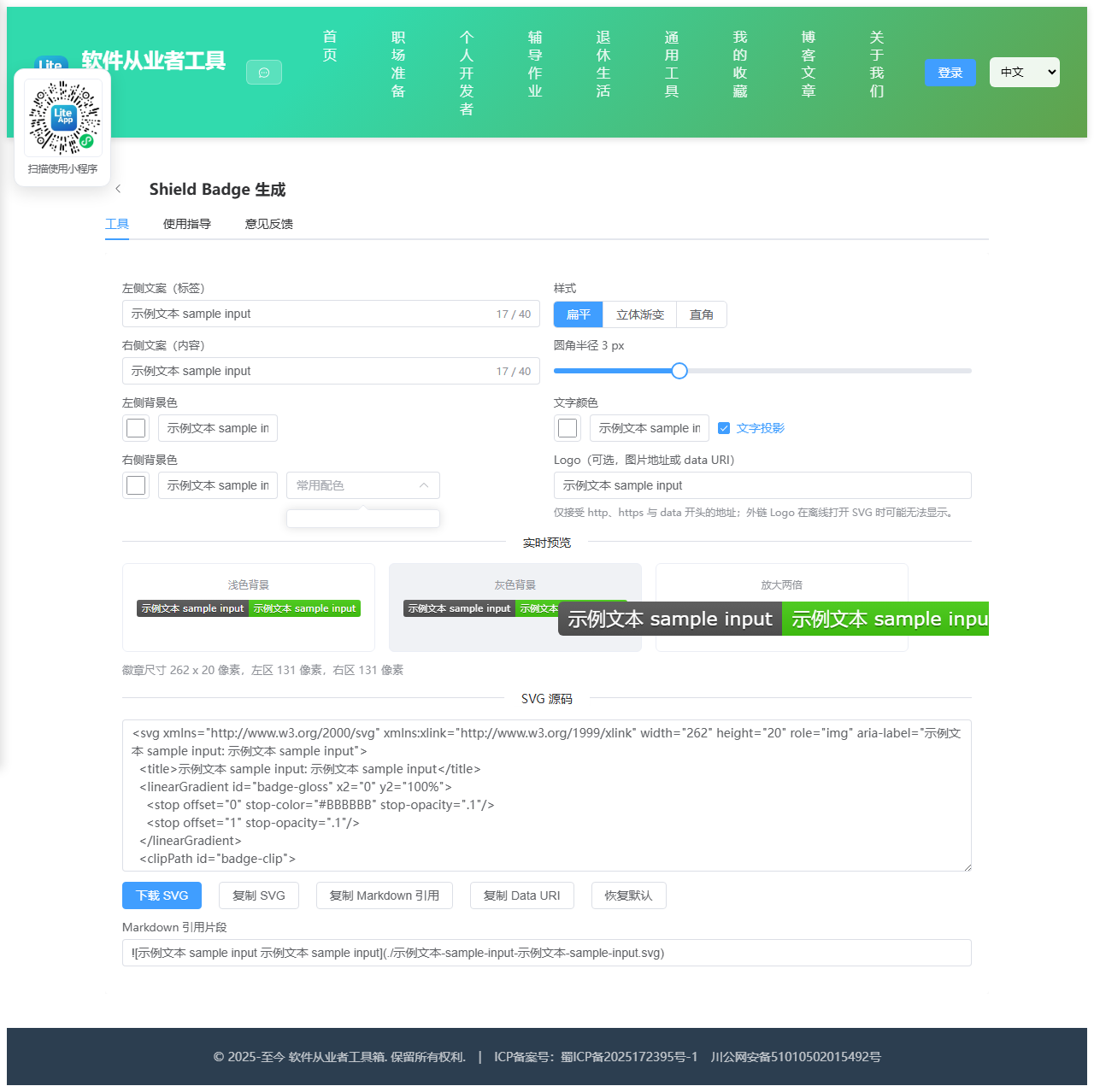
本工具生成 shields.io 风格的状态徽章(Badge),就是常见于开源项目 README 顶部的那种「build passing」「license MIT」小标签。徽章由左右两个色块组成,左侧通常是类别标签,右侧是具体状态值。所有 SVG 均在浏览器本地拼接生成,不请求任何外部服务,因此可以放心用于内网项目与私有仓库。
为什么要自己生成
直接引用 shields.io 的在线图片有三个现实问题:内网或离线环境无法访问导致图片裂开;外部服务偶发抖动会拖慢 README 加载;文档导出为 PDF 或离线包时图片会丢失。把 SVG 下载到仓库里作为静态资源引用,可以彻底避免这些问题,而且 SVG 是矢量格式,任意缩放都清晰,体积通常只有一两 KB。
宽度是怎么算出来的
SVG 本身不会自动收缩到文字宽度,必须预先算好每段文字的像素宽度。本工具优先使用 Canvas 的 measureText 以 11 号 Verdana 字体实测宽度,这与 shields.io 的排版基准一致;当环境不支持 Canvas 时,回退到按字符类别估算的宽度表(中日韩字符按 11 像素、大写字母按 7.5 像素、小写字母按 6.4 像素、i 与 l 这类窄字符按 3.6 像素等)。文字两侧各留 6 像素内边距,带 Logo 时左区额外增加 17 像素。因此中文徽章、长文案徽章都能得到合适的宽度,不会出现文字溢出色块的情况。
样式说明
扁平是最常见的现代风格,纯色平铺配 3 像素圆角;立体渐变在色块上叠加一层自上而下的半透明渐变,模拟早期 Travis CI 徽章的塑料质感;直角去掉圆角,适合排版紧凑的表格或与其他方形元素对齐。文字投影会在正文下方绘制一层半透明深色文字,可显著提升浅色背景上的可读性,建议保持开启。
Logo 与安全限制
Logo 通过 SVG 的 image 元素嵌入,绘制在左区文字前方,尺寸固定为 14 x 14 像素。出于安全考虑,只接受 http、https、data 三种协议的地址,其他形式会被忽略。强烈建议使用 data URI 形式的内联 Logo,因为外链图片在把 SVG 当作独立文件打开、或在部分 Markdown 渲染器中会因跨域与引用限制而不显示,内联则永远可靠。你可以先用 Base64 工具把小图标转成 data URI 再粘贴进来。
使用场景
开源项目 README 状态标识、内部文档的版本与环境标签、CI 流水线产出的动态状态图、技术分享 PPT 中的技术栈标签。
2.2 代码实现
2.2.1 组件结构
本工具是一个基于 Vue 3 <script setup> 语法的单文件组件(SFC),统一包裹在 ToolPageShell 组件内,由它提供页面标题、工具 ID、分类与「使用指南」插槽等通用外壳;核心业务逻辑(响应式状态、计算属性、事件处理函数)全部写在 <script setup> 中,输入/输出通过 el-input、el-button 等 Element Plus 组件与用户交互,所有数据均在浏览器本地处理,不会上传服务器。
2.2.2 核心逻辑概览
<script setup> 中定义的主要函数/方法:
getMeasureContext()estimateWidth()measureText()escapeXml()safeLogo()normalizeColor()utf8ToBase64()applyPreset()showHint()copyText()downloadSvg()reset()
2.2.3 关键实现代码
以下是该工具的完整 <script setup> 实现(核心代码)。模板(<template>)与样式(<style>)已省略。
vue
import { computed, ref } from 'vue'
import ToolPageShell from '@/components/ToolPageShell.vue'
const BADGE_HEIGHT = 20
const FONT_SIZE = 11
const PADDING = 6
const LOGO_SIZE = 14
const LOGO_TOTAL = 17
const FONT_STACK = 'Verdana,Geneva,DejaVu Sans,sans-serif'
const leftText = ref('build')
const rightText = ref('passing')
const leftColor = ref('#555555')
const rightColor = ref('#44CC11')
const textColor = ref('#FFFFFF')
const style = ref('flat')
const radius = ref(3)
const shadow = ref(true)
const logoUrl = ref('')
const presetColor = ref('')
const hint = ref('')
const colorPresets = [
{ label: '亮绿 brightgreen', value: '#44CC11' },
{ label: '绿色 green', value: '#97CA00' },
{ label: '黄绿 yellowgreen', value: '#A4A61D' },
{ label: '黄色 yellow', value: '#DFB317' },
{ label: '橙色 orange', value: '#FE7D37' },
{ label: '红色 red', value: '#E05D44' },
{ label: '蓝色 blue', value: '#007EC6' },
{ label: '灰色 lightgrey', value: '#9F9F9F' },
{ label: '深灰 grey', value: '#555555' },
{ label: '藏青 informational', value: '#1F6FEB' }
]
let measureContext = null
function getMeasureContext() {
if (measureContext !== null) return measureContext
try {
const canvas = document.createElement('canvas')
const ctx = canvas.getContext('2d')
if (ctx) {
ctx.font = FONT_SIZE + 'px ' + FONT_STACK
measureContext = ctx
return ctx
}
} catch {
// 忽略,走估算分支
}
measureContext = false
return false
}
// 无 Canvas 时按字符类别估算宽度,窄字符需优先判断
const NARROW_CHARS = 'iljtIJ.,:;|!\'`[]()'
function estimateWidth(text) {
let width = 0
for (const ch of Array.from(text)) {
const code = ch.codePointAt(0)
if (code > 0x2e80) width += 11
else if (ch === ' ') width += 3.6
else if (NARROW_CHARS.includes(ch)) width += 3.6
else if (code >= 0x41 && code <= 0x5a) width += 7.5
else if (code >= 0x61 && code <= 0x7a) width += 6.4
else if (code >= 0x30 && code <= 0x39) width += 7
else width += 6.6
}
return width
}
function measureText(text) {
if (!text) return 0
const ctx = getMeasureContext()
if (ctx) {
ctx.font = FONT_SIZE + 'px ' + FONT_STACK
return ctx.measureText(text).width
}
return estimateWidth(text)
}
function escapeXml(text) {
return String(text)
.replace(/&/g, '&')
.replace(/</g, '<')
.replace(/>/g, '>')
.replace(/"/g, '"')
.replace(/'/g, ''')
}
// 只允许安全协议,避免把任意内容注入 SVG
function safeLogo(url) {
const trimmed = String(url || '').trim()
if (!trimmed) return ''
if (!/^(https?:\/\/|data:image\/)/i.test(trimmed)) return ''
return escapeXml(trimmed)
}
function normalizeColor(value, fallback) {
const text = String(value || '').trim()
if (/^#([0-9a-fA-F]{3}|[0-9a-fA-F]{6}|[0-9a-fA-F]{8})$/.test(text)) return text
if (/^rgba?\([\d\s.,%]+\)$/.test(text)) return text
if (/^[a-zA-Z]+$/.test(text)) return text
return fallback
}
const safeLogoUrl = computed(() => safeLogo(logoUrl.value))
const hasLogo = computed(() => !!safeLogoUrl.value)
const leftTextWidth = computed(() => measureText(leftText.value))
const rightTextWidth = computed(() => measureText(rightText.value))
const leftWidth = computed(() => {
const base = leftText.value ? Math.round(leftTextWidth.value) + PADDING * 2 : (hasLogo.value ? PADDING : 0)
return base + (hasLogo.value ? LOGO_TOTAL : 0)
})
const rightWidth = computed(() => {
if (!rightText.value) return 0
return Math.round(rightTextWidth.value) + PADDING * 2
})
const totalWidth = computed(() => Math.max(leftWidth.value + rightWidth.value, 1))
const effectiveRadius = computed(() => (style.value === 'square' ? 0 : radius.value))
const svgMarkup = computed(() => {
const width = totalWidth.value
const lw = leftWidth.value
const rw = rightWidth.value
const height = BADGE_HEIGHT
const rx = effectiveRadius.value
const left = escapeXml(leftText.value)
const right = escapeXml(rightText.value)
const lc = escapeXml(normalizeColor(leftColor.value, '#555555'))
const rc = escapeXml(normalizeColor(rightColor.value, '#44CC11'))
const tc = escapeXml(normalizeColor(textColor.value, '#FFFFFF'))
const ariaLabel = escapeXml((leftText.value ? leftText.value + ': ' : '') + rightText.value)
const logoOffset = hasLogo.value ? LOGO_TOTAL : 0
const leftTextCenter = logoOffset + PADDING + leftTextWidth.value / 2
const rightTextCenter = lw + PADDING + rightTextWidth.value / 2
const lines = []
lines.push('<svg xmlns="http://www.w3.org/2000/svg" xmlns:xlink="http://www.w3.org/1999/xlink" width="' +
width + '" height="' + height + '" role="img" aria-label="' + ariaLabel + '">')
lines.push(' <title>' + ariaLabel + '</title>')
if (style.value === 'plastic') {
lines.push(' <linearGradient id="badge-gloss" x2="0" y2="100%">')
lines.push(' <stop offset="0" stop-color="#FFFFFF" stop-opacity=".7"/>')
lines.push(' <stop offset=".1" stop-color="#AAAAAA" stop-opacity=".1"/>')
lines.push(' <stop offset=".9" stop-color="#000000" stop-opacity=".3"/>')
lines.push(' <stop offset="1" stop-color="#000000" stop-opacity=".5"/>')
lines.push(' </linearGradient>')
} else {
lines.push(' <linearGradient id="badge-gloss" x2="0" y2="100%">')
lines.push(' <stop offset="0" stop-color="#BBBBBB" stop-opacity=".1"/>')
lines.push(' <stop offset="1" stop-opacity=".1"/>')
lines.push(' </linearGradient>')
}
lines.push(' <clipPath id="badge-clip">')
lines.push(' <rect width="' + width + '" height="' + height + '" rx="' + rx + '" fill="#FFFFFF"/>')
lines.push(' </clipPath>')
lines.push(' <g clip-path="url(#badge-clip)">')
if (lw > 0) lines.push(' <rect width="' + lw + '" height="' + height + '" fill="' + lc + '"/>')
if (rw > 0) lines.push(' <rect x="' + lw + '" width="' + rw + '" height="' + height + '" fill="' + rc + '"/>')
lines.push(' <rect width="' + width + '" height="' + height + '" fill="url(#badge-gloss)"/>')
lines.push(' </g>')
if (hasLogo.value) {
const logoY = (height - LOGO_SIZE) / 2
lines.push(' <image x="5" y="' + logoY + '" width="' + LOGO_SIZE + '" height="' + LOGO_SIZE +
'" href="' + safeLogoUrl.value + '" xlink:href="' + safeLogoUrl.value + '"/>')
}
lines.push(' <g fill="' + tc + '" text-anchor="middle" font-family="' + FONT_STACK +
'" font-size="' + FONT_SIZE + '">')
if (left) {
if (shadow.value) {
lines.push(' <text x="' + leftTextCenter.toFixed(1) +
'" y="15" fill="#010101" fill-opacity=".3">' + left + '</text>')
}
lines.push(' <text x="' + leftTextCenter.toFixed(1) + '" y="14">' + left + '</text>')
}
if (right) {
if (shadow.value) {
lines.push(' <text x="' + rightTextCenter.toFixed(1) +
'" y="15" fill="#010101" fill-opacity=".3">' + right + '</text>')
}
lines.push(' <text x="' + rightTextCenter.toFixed(1) + '" y="14">' + right + '</text>')
}
lines.push(' </g>')
lines.push('</svg>')
return lines.join('\n')
})
// 先按 UTF-8 编码再转 Base64,避免中文文案导致 btoa 抛错
function utf8ToBase64(text) {
const bytes = new TextEncoder().encode(text)
let binary = ''
const chunkSize = 0x8000
for (let i = 0; i < bytes.length; i += chunkSize) {
binary += String.fromCharCode.apply(null, bytes.subarray(i, i + chunkSize))
}
return btoa(binary)
}
const dataUri = computed(() => 'data:image/svg+xml;base64,' + utf8ToBase64(svgMarkup.value))
const fileName = computed(() => {
const base = (leftText.value + '-' + rightText.value)
.replace(/[^0-9a-zA-Z\u4e00-\u9fa5-]+/g, '-')
.replace(/^-+|-+$/g, '')
return (base || 'badge') + '.svg'
})
const markdownSnippet = computed(() => {
const alt = (leftText.value ? leftText.value + ' ' : '') + rightText.value
return ''
})
function applyPreset(value) {
if (value) rightColor.value = value
}
function showHint(text) {
hint.value = text
window.setTimeout(() => { hint.value = '' }, 2000)
}
async function copyText(text) {
if (!text) return
try {
await navigator.clipboard.writeText(text)
showHint('已复制到剪贴板')
} catch {
showHint('复制失败,请手动选择文本复制')
}
}
function downloadSvg() {
const blob = new Blob([svgMarkup.value], { type: 'image/svg+xml;charset=utf-8' })
const url = URL.createObjectURL(blob)
const link = document.createElement('a')
link.href = url
link.download = fileName.value
document.body.appendChild(link)
link.click()
document.body.removeChild(link)
URL.revokeObjectURL(url)
showHint('已开始下载')
}
function reset() {
leftText.value = 'build'
rightText.value = 'passing'
leftColor.value = '#555555'
rightColor.value = '#44CC11'
textColor.value = '#FFFFFF'
style.value = 'flat'
radius.value = 3
shadow.value = true
logoUrl.value = ''
presetColor.value = ''
}2.3 效果截图