Appearance
实现 思维导图大纲 工具
分类:general | 标签:思维导图、大纲、结构 缩进大纲转树形/Markdown
2.1 功能说明
缩进大纲转树形/Markdown
2.1.1 使用指南
功能说明
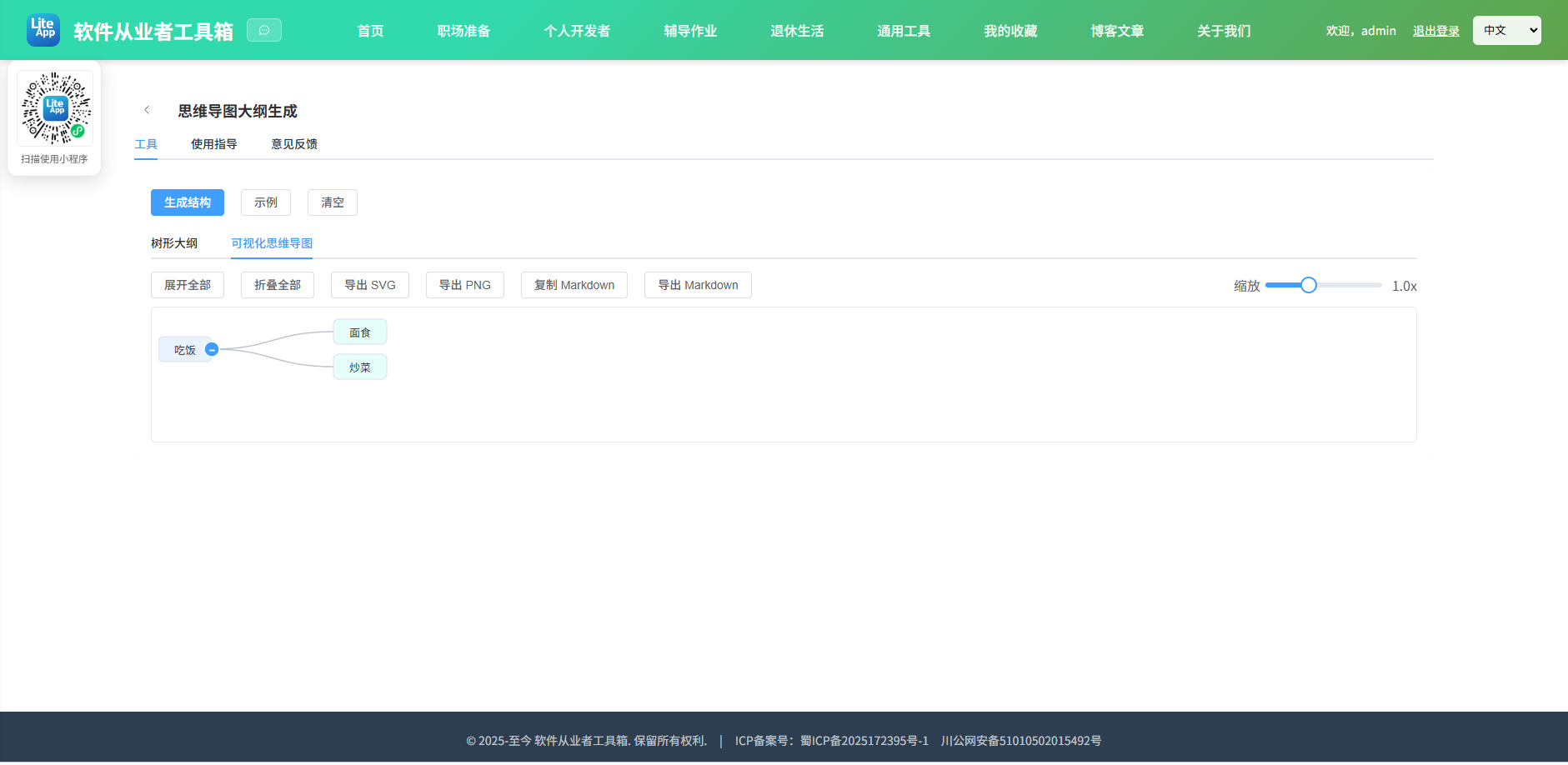
将缩进式大纲文本(用 Tab/空格表示层级)转换为可折叠的树形结构,也可导出 Markdown。新增「可视化思维导图」:将缩进大纲渲染成可交互的树状思维导图(自渲染 SVG,不依赖第三方库),支持节点折叠/展开、双击改名,并可导出 SVG / PNG / Markdown。
使用场景
整理思路、会议记录结构化、知识梳理与脑图绘制。
操作提示
缩进规则:以 Tab 或空格(按 4 空格=1 级)表示层级。在「可视化思维导图」中,点击节点右侧的 +/− 可折叠/展开子节点;双击节点文字可改名;右上角滑块可缩放视图。
2.2 代码实现
2.2.1 组件结构
本工具是一个基于 Vue 3 <script setup> 语法的单文件组件(SFC),统一包裹在 ToolPageShell 组件内,由它提供页面标题、工具 ID、分类与「使用指南」插槽等通用外壳;核心业务逻辑(响应式状态、计算属性、事件处理函数)全部写在 <script setup> 中,输入/输出通过 el-input、el-button 等 Element Plus 组件与用户交互,所有数据均在浏览器本地处理,不会上传服务器。
2.2.2 核心逻辑概览
<script setup> 中定义的主要函数/方法:
indent()assignIds()build()loadSample()clear()nodeWidth()walk()color()toggle()expandAll()collapseAll()rename()toMd()copyMd()saveBlob()downloadMd()serializeSvg()exportSvg()exportPng()
2.2.3 关键实现代码
以下是该工具的完整 <script setup> 实现(核心代码)。模板(<template>)与样式(<style>)已省略。
vue
import { ref, reactive, computed, h } from 'vue'
import { ElMessage } from 'element-plus'
import ToolPageShell from '@/components/ToolPageShell.vue'

const src = ref('')
const tree = ref(null)
const innerTab = ref('tree')
const zoom = ref(1)
const svgRef = ref(null)
const mmWrap = ref(null)

const collapsed = reactive(new Set())
const nodeMap = {}
let idCounter = 0
const nodeH = 30
const ROW_H = 42
const COL_W = 210
const PALETTE = ['#e8f3ff', '#e6fffb', '#f9f0ff', '#fff7e6', '#f6ffed', '#fff1f0', '#f0f5ff', '#fcffe6']

// 递归树节点(HTML 树形大纲用)
const TreeNode = {
  props: { node: Object },
  setup(props) {
    const open = ref(true)
    return () => {
      const n = props.node
      const hasChildren = n.children && n.children.length
      return h('li', {}, [
        h('div', { class: 'node', onClick: () => { if (hasChildren) open.value = !open.value } },
          [hasChildren ? h('span', { class: 'caret' }, open.value ? '▾' : '▸') : h('span', { class: 'caret' }, '•'), n.text]),
        hasChildren && open.value ? h('ul', {}, n.children.map(c => h(TreeNode, { node: c }))) : null
      ])
    }
  }
}

function indent(line) {
  const m = line.match(/^\s*/)[0]
  return { level: m.replace(/\t/g, '    ').length, text: line.trim() }
}

function assignIds(node) {
  node.id = ++idCounter
  nodeMap[node.id] = node
  node.children.forEach(assignIds)
  return node
}

function build() {
  tree.value = null
  for (const k in nodeMap) delete nodeMap[k]
  collapsed.clear()
  const lines = src.value.split('\n').filter(l => l.trim())
  if (!lines.length) return
  const roots = [], stack = []
  for (const l of lines) {
    const { level, text } = indent(l)
    const node = { text, children: [] }
    while (stack.length && stack[stack.length - 1].level >= level) stack.pop()
    if (!stack.length) roots.push(node)
    else stack[stack.length - 1].node.children.push(node)
    stack.push({ level, node })
  }
  const root = roots.length === 1 ? roots[0] : { text: '根', children: roots }
  assignIds(root)
  tree.value = root
}
function loadSample() {
  src.value = [
    '项目计划',
    '  需求分析',
    '    用户访谈',
    '    竞品调研',
    '  设计',
    '    UI 设计',
    '    交互原型',
    '  开发',
    '    前端',
    '    后端',
    '  测试与上线'
  ].join('\n')
  build()
}
function clear() { src.value = ''; tree.value = null; for (const k in nodeMap) delete nodeMap[k]; collapsed.clear() }

function nodeWidth(t) { return Math.min(240, Math.max(64, t.length * 13 + 26)) }

// 计算布局(左→右树),仅展开未被折叠的节点
const layout = computed(() => {
  if (!tree.value) return null
  const nodes = [], links = []
  let leafY = 0
  function walk(node, depth) {
    const w = nodeWidth(node.text)
    const x = depth * COL_W
    const visible = (node.children && node.children.length && !collapsed.has(node.id)) ? node.children : []
    let y
    if (!visible.length) {
      y = leafY * ROW_H + ROW_H / 2
      leafY++
    } else {
      const ys = visible.map(c => walk(c, depth + 1))
      y = (ys[0] + ys[ys.length - 1]) / 2
      visible.forEach((c, i) => {
        links.push({ x1: x + c._pW, y1: y, x2: c._pX, y2: c._pY })
      })
    }
    node._pX = x
    node._pY = y
    node._pW = w
    nodes.push({ id: node.id, text: node.text, x, y, w, depth, hasChildren: !!(node.children && node.children.length), collapsed: collapsed.has(node.id) })
    return y
  }
  walk(tree.value, 0)
  const maxX = Math.max(...nodes.map(n => n.x + n.w))
  const width = maxX + 30
  const height = Math.max(leafY * ROW_H, 120) + 20
  return { nodes, links, width, height }
})

function color(depth) { return PALETTE[depth % PALETTE.length] }

function toggle(n) {
  if (!n.hasChildren) return
  if (collapsed.has(n.id)) collapsed.delete(n.id)
  else collapsed.add(n.id)
}
function expandAll() { collapsed.clear() }
function collapseAll() {
  if (!tree.value) return
  // 折叠所有含子节点的节点(保留根展开一层较为直观:折叠根以下所有非叶子)
  const walk = (node) => {
    if (node.children && node.children.length) {
      // 根节点本身不折叠,方便查看
      if (node !== tree.value) collapsed.add(node.id)
      node.children.forEach(walk)
    }
  }
  walk(tree.value)
}
function rename(id) {
  const node = nodeMap[id]
  if (!node) return
  const v = window.prompt('修改节点文字', node.text)
  if (v != null && v.trim()) node.text = v.trim()
}

function toMd(node, d = 0) {
  let s = '  '.repeat(d) + '- ' + node.text + '\n'
  for (const c of (node.children || [])) s += toMd(c, d + 1)
  return s
}
function copyMd() {
  if (!tree.value) return
  const md = toMd(tree.value)
  if (navigator.clipboard?.writeText) navigator.clipboard.writeText(md)
  else ElMessage.warning('当前环境不支持自动复制')
}
function saveBlob(blob, name) {
  const a = document.createElement('a')
  a.href = URL.createObjectURL(blob)
  a.download = name
  document.body.appendChild(a)
  a.click()
  a.remove()
  setTimeout(() => URL.revokeObjectURL(a.href), 1000)
}
function downloadMd() {
  if (!tree.value) return
  saveBlob(new Blob([toMd(tree.value)], { type: 'text/markdown;charset=utf-8' }), 'mindmap.md')
}

function serializeSvg() {
  const svg = svgRef.value
  if (!svg) return null
  const clone = svg.cloneNode(true)
  clone.setAttribute('width', layout.value.width)
  clone.setAttribute('height', layout.value.height)
  clone.removeAttribute('style')
  clone.setAttribute('xmlns', 'http://www.w3.org/2000/svg')
  return '<?xml version="1.0" encoding="UTF-8"?>\n' + new XMLSerializer().serializeToString(clone)
}
function exportSvg() {
  const str = serializeSvg()
  if (!str) return
  saveBlob(new Blob([str], { type: 'image/svg+xml;charset=utf-8' }), 'mindmap.svg')
}
function exportPng() {
  const str = serializeSvg()
  if (!str) return
  const blob = new Blob([str], { type: 'image/svg+xml;charset=utf-8' })
  const url = URL.createObjectURL(blob)
  const img = new Image()
  img.onload = () => {
    const scale = 2
    const canvas = document.createElement('canvas')
    canvas.width = layout.value.width * scale
    canvas.height = layout.value.height * scale
    const ctx = canvas.getContext('2d')
    ctx.fillStyle = '#ffffff'
    ctx.fillRect(0, 0, canvas.width, canvas.height)
    ctx.drawImage(img, 0, 0, canvas.width, canvas.height)
    canvas.toBlob(b => {
      if (b) saveBlob(b, 'mindmap.png')
      else ElMessage.error('PNG 导出失败')
      URL.revokeObjectURL(url)
    }, 'image/png')
  }
  img.onerror = () => { ElMessage.error('PNG 导出失败'); URL.revokeObjectURL(url) }
  img.src = url
}
2.3 效果截图