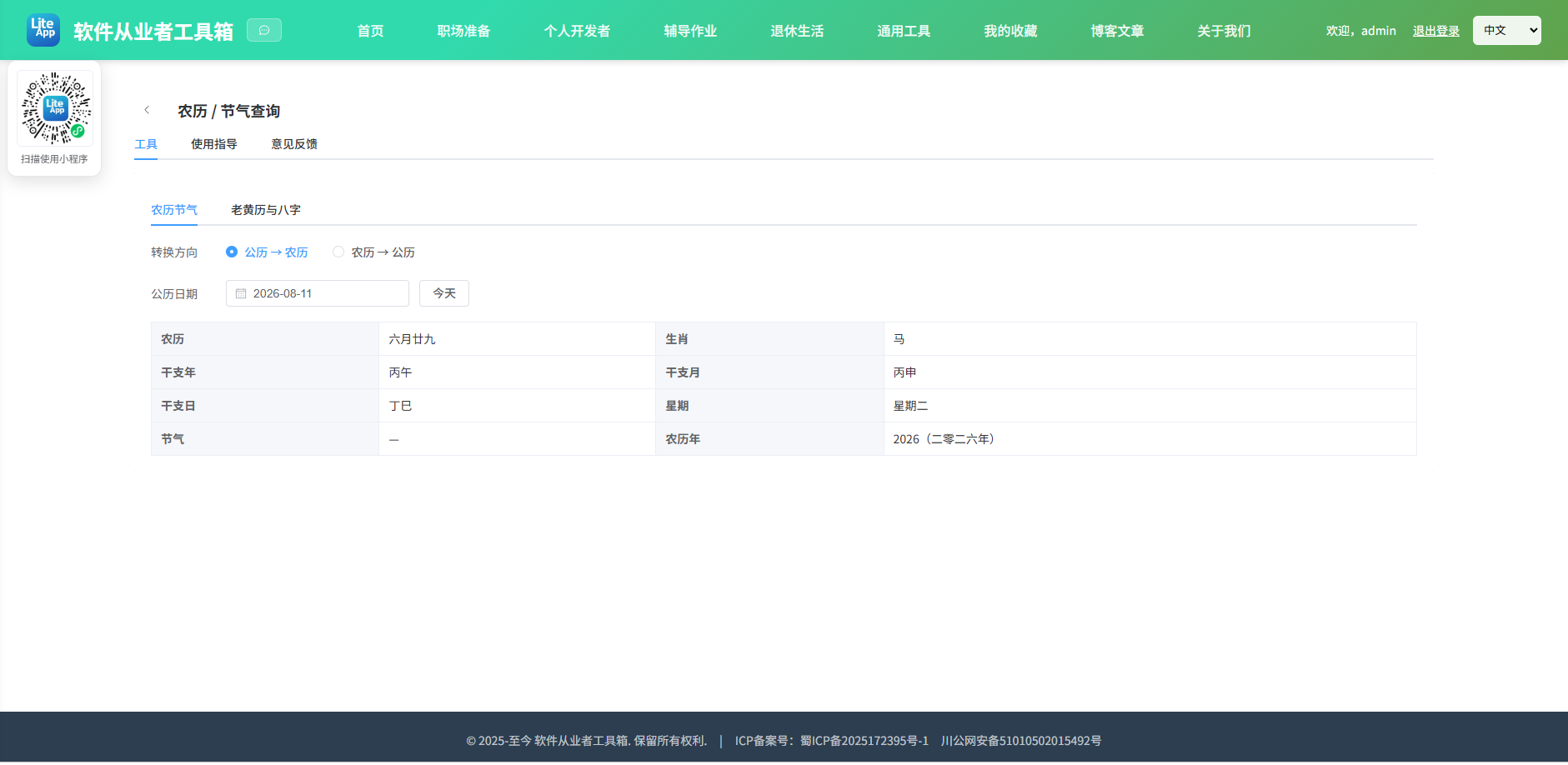
Appearance
实现 农历节气查询 工具
分类:general | 标签:农历、节气、生肖 公历转农历、节气、生肖
2.1 功能说明
公历转农历、节气、生肖
核心能力
- 农历节气
- 转换方向
- 公历日期
- 农历
- 闰月
2.1.1 使用指南
公历与农历互查,含生肖、干支、节气与星期;并新增「老黄历与八字」:查询每日宜忌、值神、冲煞、生肖,以及生辰八字(四柱),附万年历翻月。
- 农历节气页支持 1900–2100 年;节气仅在特定公历日返回。
- 老黄历页基于 lunar-javascript 计算,出生时辰用于八字「时柱」,留空默认午时。
- 万年历可逐月翻看,点击任意日期即查看当日黄历与八字。
2.2 代码实现
2.2.1 组件结构
本工具是一个基于 Vue 3 <script setup> 语法的单文件组件(SFC),统一包裹在 ToolPageShell 组件内,由它提供页面标题、工具 ID、分类与「使用指南」插槽等通用外壳;核心业务逻辑(响应式状态、计算属性、事件处理函数)全部写在 <script setup> 中,输入/输出通过 el-input、el-button 等 Element Plus 组件与用户交互,所有数据均在浏览器本地处理,不会上传服务器。
2.2.2 核心逻辑概览
<script setup> 中定义的主要函数/方法:
fromSolar()fromLunar()todayStr()computeHuangli()hlToday()lunarDayLabel()isSel()calPick()calPrev()calNext()calToday()
2.2.3 关键实现代码
以下是该工具的完整 <script setup> 实现(核心代码)。模板(<template>)与样式(<style>)已省略。
vue
import { ref, reactive, computed } from 'vue'
import { ElMessage } from 'element-plus'
import ToolPageShell from '@/components/ToolPageShell.vue'
import solarLunar from 'solarlunar'
import { Solar } from '@/vendor/lunar/index.mjs'

const innerTab = ref('basic')

/* ===== 原农历节气功能 ===== */
const mode = ref('s2l')
const solar = ref('')
const ly = ref(2026)
const lm = ref(1)
const ld = ref(1)
const lLeap = ref(false)
const error = ref('')
const result = ref(null)
const rows = ref([])

const lunarMonths = ['正月', '二月', '三月', '四月', '五月', '六月', '七月', '八月', '九月', '十月', '冬月', '腊月']
const lunarDays = ['初一', '初二', '初三', '初四', '初五', '初六', '初七', '初八', '初九', '初十', '十一', '十二', '十三', '十四', '十五', '十六', '十七', '十八', '十九', '二十', '廿一', '廿二', '廿三', '廿四', '廿五', '廿六', '廿七', '廿八', '廿九', '三十']

function fromSolar() {
  error.value = ''
  result.value = null
  if (!solar.value) return
  const [y, m, d] = solar.value.split('-').map(Number)
  if (!y || !m || !d) {
    error.value = '请选择有效日期'
    return
  }
  try {
    const r = solarLunar.solar2lunar(y, m, d)
    result.value = r
    rows.value = [
      ['农历', (r.isLeap ? '闰' : '') + r.monthCn + r.dayCn],
      ['生肖', r.animal],
      ['干支年', r.gzYear],
      ['干支月', r.gzMonth],
      ['干支日', r.gzDay],
      ['星期', r.ncWeek],
      ['节气', r.isTerm ? r.term : '—'],
      ['农历年', r.lYear + '(' + r.yearCn + ')']
    ]
  } catch (e) {
    error.value = '转换失败:' + (e && e.message ? e.message : String(e))
  }
}

function fromLunar() {
  error.value = ''
  result.value = null
  try {
    const r = solarLunar.lunar2solar(ly.value, lm.value, ld.value, lLeap.value)
    if (!r) {
      error.value = '该农历日期不存在'
      return
    }
    result.value = r
    rows.value = [
      ['公历', `${r.cYear}-${String(r.cMonth).padStart(2, '0')}-${String(r.cDay).padStart(2, '0')}`],
      ['星期', r.ncWeek],
      ['生肖', r.animal],
      ['干支年', r.gzYear],
      ['节气', r.isTerm ? r.term : '—']
    ]
  } catch (e) {
    error.value = '转换失败:' + (e && e.message ? e.message : String(e))
  }
}

function useToday() {
  const n = new Date()
  solar.value = `${n.getFullYear()}-${String(n.getMonth() + 1).padStart(2, '0')}-${String(n.getDate()).padStart(2, '0')}`
  fromSolar()
}
useToday()

/* ===== 老黄历与八字 ===== */
const hlDate = ref('')
const hlTime = ref('12:00')
const hlError = ref('')
const hl = ref(null)
const baziPillars = [
  { label: '年柱' },
  { label: '月柱' },
  { label: '日柱' },
  { label: '时柱' }
]

function todayStr() {
  const n = new Date()
  return `${n.getFullYear()}-${String(n.getMonth() + 1).padStart(2, '0')}-${String(n.getDate()).padStart(2, '0')}`
}

function computeHuangli() {
  hlError.value = ''
  hl.value = null
  if (!hlDate.value) return
  const [y, m, d] = hlDate.value.split('-').map(Number)
  const [hh, mm] = (hlTime.value || '12:00').split(':').map(Number)
  try {
    const lunar = Solar.fromYmdHms(y, m, d, hh || 0, mm || 0, 0).getLunar()
    const ec = lunar.getEightChar()
    hl.value = {
      lunarText: `${lunar.getYearInChinese()}年${lunar.getMonthInChinese()}月${lunar.getDayInChinese()}`,
      yearSx: lunar.getYearShengXiao(),
      daySx: lunar.getDayShengXiao(),
      yi: lunar.getDayYi(),
      ji: lunar.getDayJi(),
      tianshen: lunar.getDayTianShen(),
      chong: (lunar.getDayChongDesc() || '').replace(/[()]/g, '') || '—',
      sha: lunar.getDaySha() || '—',
      zhixing: lunar.getZhiXing(),
      xiu: lunar.getXiu(),
      bazi: [ec.getYear(), ec.getMonth(), ec.getDay(), ec.getTime()],
      dayWuxing: lunar.getEightChar().getDayWuXing()
    }
  } catch (e) {
    hlError.value = '计算失败:' + (e && e.message ? e.message : String(e))
  }
}

function hlToday() {
  hlDate.value = todayStr()
  computeHuangli()
}
hlToday()

/* 万年历 */
const weekH = ['日', '一', '二', '三', '四', '五', '六']
const now = new Date()
const cal = reactive({ y: now.getFullYear(), m: now.getMonth() + 1 })

const calCells = computed(() => {
  const first = new Date(cal.y, cal.m - 1, 1)
  const startW = first.getDay()
  const days = new Date(cal.y, cal.m, 0).getDate()
  const cells = []
  for (let i = 0; i < startW; i++) cells.push(null)
  for (let d = 1; d <= days; d++) cells.push(d)
  while (cells.length % 7 !== 0) cells.push(null)
  return cells
})

function lunarDayLabel(d) {
  try {
    return Solar.fromYmd(cal.y, cal.m, d).getLunar().getDayInChinese()
  } catch (e) {
    return ''
  }
}
function isSel(d) {
  if (!d || !hlDate.value) return false
  return hlDate.value === `${cal.y}-${String(cal.m).padStart(2, '0')}-${String(d).padStart(2, '0')}`
}
function calPick(d) {
  if (!d) return
  hlDate.value = `${cal.y}-${String(cal.m).padStart(2, '0')}-${String(d).padStart(2, '0')}`
  computeHuangli()
}
function calPrev() {
  if (cal.m === 1) { cal.m = 12; cal.y-- } else cal.m--
}
function calNext() {
  if (cal.m === 12) { cal.m = 1; cal.y++ } else cal.m++
}
function calToday() {
  const n = new Date()
  cal.y = n.getFullYear()
  cal.m = n.getMonth() + 1
}
2.3 效果截图