Appearance
实现 手持弹幕 工具
分类:developer | 标签:弹幕、手持、滚动 全屏滚动大字弹幕,适合手机端
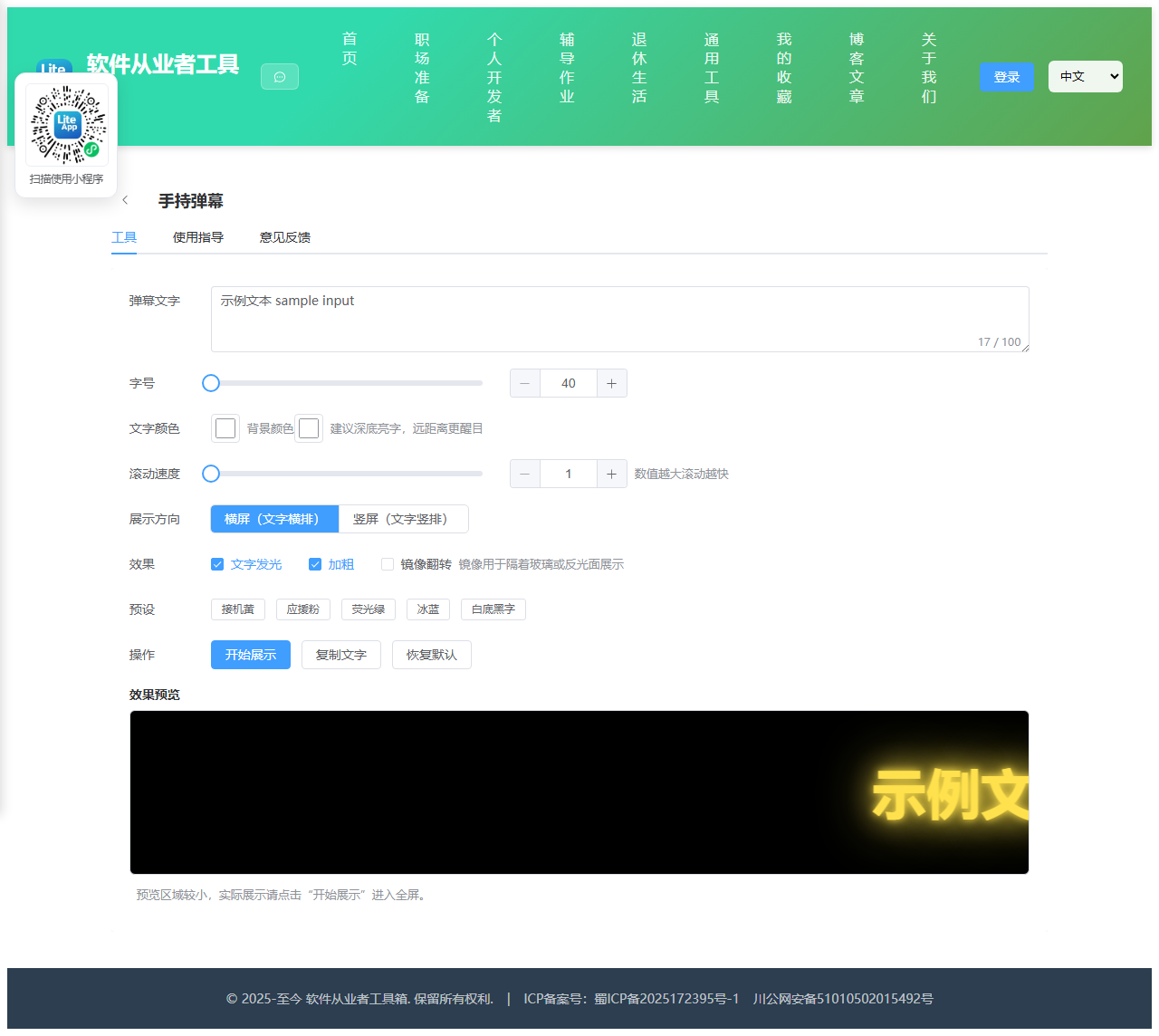
2.1 功能说明
全屏滚动大字弹幕,适合手机端
核心能力
- 弹幕文字
- 字号
- 文字颜色
- 滚动速度
- 展示方向
- landscape
- portrait
- 效果
- 预设
2.1.1 使用指南
手持弹幕使用说明
把手机或平板变成一块滚动的大字灯牌。常用于机场车站接机举牌、演唱会应援、迎宾提示、 展会引导、集合找人等场景。纯前端实现,不联网、不上传文字,离线也能用。
使用步骤
1. 输入要展示的文字,建议控制在十几个字以内,太长会看不清。
2. 调整字号、颜色与滚动速度,通过下方预览区确认效果。
3. 选择横屏或竖屏。竖屏模式下文字会竖着排列并从上往下滚动,适合手机竖着举。
4. 点击“开始展示”进入全屏。展示中点击画面可隐藏或显示退出按钮,按 Esc 键也能退出。
参数说明
字号:单位是像素,手机上举牌建议 150 以上。字号过大时文字会超出屏幕,这正是滚动展示需要的效果。
滚动速度:1 最慢,20 最快。远距离展示建议放慢,让对方有时间看完整句。
文字发光:给文字加一圈同色光晕,暗环境下更醒目,白天户外可以关掉以提高对比度。
镜像翻转:把文字左右翻转,隔着车窗玻璃从内向外展示时对方看到的才是正的。
实用建议
展示前请把手机屏幕亮度调到最高,并关闭自动旋转与自动锁屏,避免中途息屏。
深色背景配亮色文字(例如黑底黄字、黑底亮绿)在人群中最醒目;白底黑字则适合光线很强的户外。
横屏展示时把手机横过来举,屏幕可视面积更大,字也能更大。
常见问题
进入全屏后自动退出:部分浏览器在切换应用或来电时会强制退出全屏,重新点击展示即可。
浏览器不允许全屏:工具会自动退化为铺满整个浏览器窗口的展示层,效果基本一致,只是保留了系统状态栏。
文字滚动一半就消失:属于正常循环,一轮走完会从另一侧重新进入。若觉得间隔太长,可以调快速度或缩短文字。
2.2 代码实现
2.2.1 组件结构
本工具是一个基于 Vue 3 <script setup> 语法的单文件组件(SFC),统一包裹在 ToolPageShell 组件内,由它提供页面标题、工具 ID、分类与「使用指南」插槽等通用外壳;核心业务逻辑(响应式状态、计算属性、事件处理函数)全部写在 <script setup> 中,输入/输出通过 el-input、el-button 等 Element Plus 组件与用户交互,所有数据均在浏览器本地处理,不会上传服务器。
2.2.2 核心逻辑概览
<script setup> 中定义的主要函数/方法:
applyPreset()onKey()toggleBar()startShow()exitShow()copyText()resetAll()
2.2.3 关键实现代码
以下是该工具的完整 <script setup> 实现(核心代码)。模板(<template>)与样式(<style>)已省略。
vue
import { ref, computed, onBeforeUnmount } from 'vue'
import ToolPageShell from '@/components/ToolPageShell.vue'

const text = ref('欢迎回家')
const fontSize = ref(160)
const color = ref('#ffe14d')
const bgColor = ref('#000000')
const speed = ref(8)
const orientation = ref('landscape')
const glow = ref(true)
const bold = ref(true)
const mirror = ref(false)
const showing = ref(false)
const barVisible = ref(true)
const stageEl = ref(null)

const presets = [
  { label: '接机黄', color: '#ffe14d', bg: '#000000', size: 180, speed: 7 },
  { label: '应援粉', color: '#ff5fa2', bg: '#1a0016', size: 160, speed: 9 },
  { label: '荧光绿', color: '#39ff14', bg: '#000000', size: 170, speed: 8 },
  { label: '冰蓝', color: '#4fd1ff', bg: '#001220', size: 160, speed: 8 },
  { label: '白底黑字', color: '#111111', bg: '#ffffff', size: 170, speed: 7 }
]

// 速度换算为动画时长:速度越大时长越短
const duration = computed(() => {
  const s = Math.min(20, Math.max(1, speed.value))
  return (22 - s) + 's'
})

// 轨道与文字使用同一份动画时长,两层位移叠加后正好走完一整趟
const animStyle = computed(() => ({
  animationDuration: duration.value
}))

const textStyle = computed(() => {
  const style = {
    fontSize: fontSize.value + 'px',
    color: color.value,
    fontWeight: bold.value ? '900' : '500'
  }
  if (glow.value) {
    style.textShadow = '0 0 10px ' + color.value + ', 0 0 30px ' + color.value + ', 0 0 60px ' + color.value
  }
  return style
})

// 镜像放在内层,避免覆盖外层动画使用的 transform
const mirrorStyle = computed(() => (mirror.value ? { display: 'inline-block', transform: 'scaleX(-1)' } : {}))

function applyPreset(p) {
  color.value = p.color
  bgColor.value = p.bg
  fontSize.value = p.size
  speed.value = p.speed
}

function onKey(e) {
  if (e.key === 'Escape') exitShow()
}

function toggleBar() {
  barVisible.value = !barVisible.value
}

async function startShow() {
  if (!text.value.trim()) return
  showing.value = true
  barVisible.value = true
  await new Promise((resolve) => window.setTimeout(resolve, 0))
  try {
    const el = stageEl.value
    if (el && el.requestFullscreen) await el.requestFullscreen()
    else if (el && el.webkitRequestFullscreen) el.webkitRequestFullscreen()
  } catch (e) {
    // 全屏被拒绝时退化为铺满窗口的浮层,不影响展示
  }
  window.addEventListener('keydown', onKey)
}

function exitShow() {
  window.removeEventListener('keydown', onKey)
  try {
    if (document.fullscreenElement && document.exitFullscreen) document.exitFullscreen()
  } catch (e) {
    // 忽略退出全屏的异常
  }
  showing.value = false
}

async function copyText() {
  const content = text.value
  if (!content) return
  try {
    if (navigator.clipboard && window.isSecureContext) {
      await navigator.clipboard.writeText(content)
    } else {
      const ta = document.createElement('textarea')
      ta.value = content
      ta.style.position = 'fixed'
      ta.style.opacity = '0'
      document.body.appendChild(ta)
      ta.select()
      document.execCommand('copy')
      document.body.removeChild(ta)
    }
  } catch (e) {
    // 复制失败时静默降级,用户可手动选中复制
  }
}

function resetAll() {
  fontSize.value = 160
  color.value = '#ffe14d'
  bgColor.value = '#000000'
  speed.value = 8
  orientation.value = 'landscape'
  glow.value = true
  bold.value = true
  mirror.value = false
}

onBeforeUnmount(() => {
  window.removeEventListener('keydown', onKey)
  try {
    if (document.fullscreenElement && document.exitFullscreen) document.exitFullscreen()
  } catch (e) {
    // 忽略卸载时的异常
  }
})
2.3 效果截图