Appearance
实现 图片转 ASCII 字符画 工具
分类:developer | 标签:ASCII、字符画、图片 将图片转换为 ASCII 字符画
2.1 功能说明
将图片转换为 ASCII 字符画
2.1.1 使用指南
功能说明
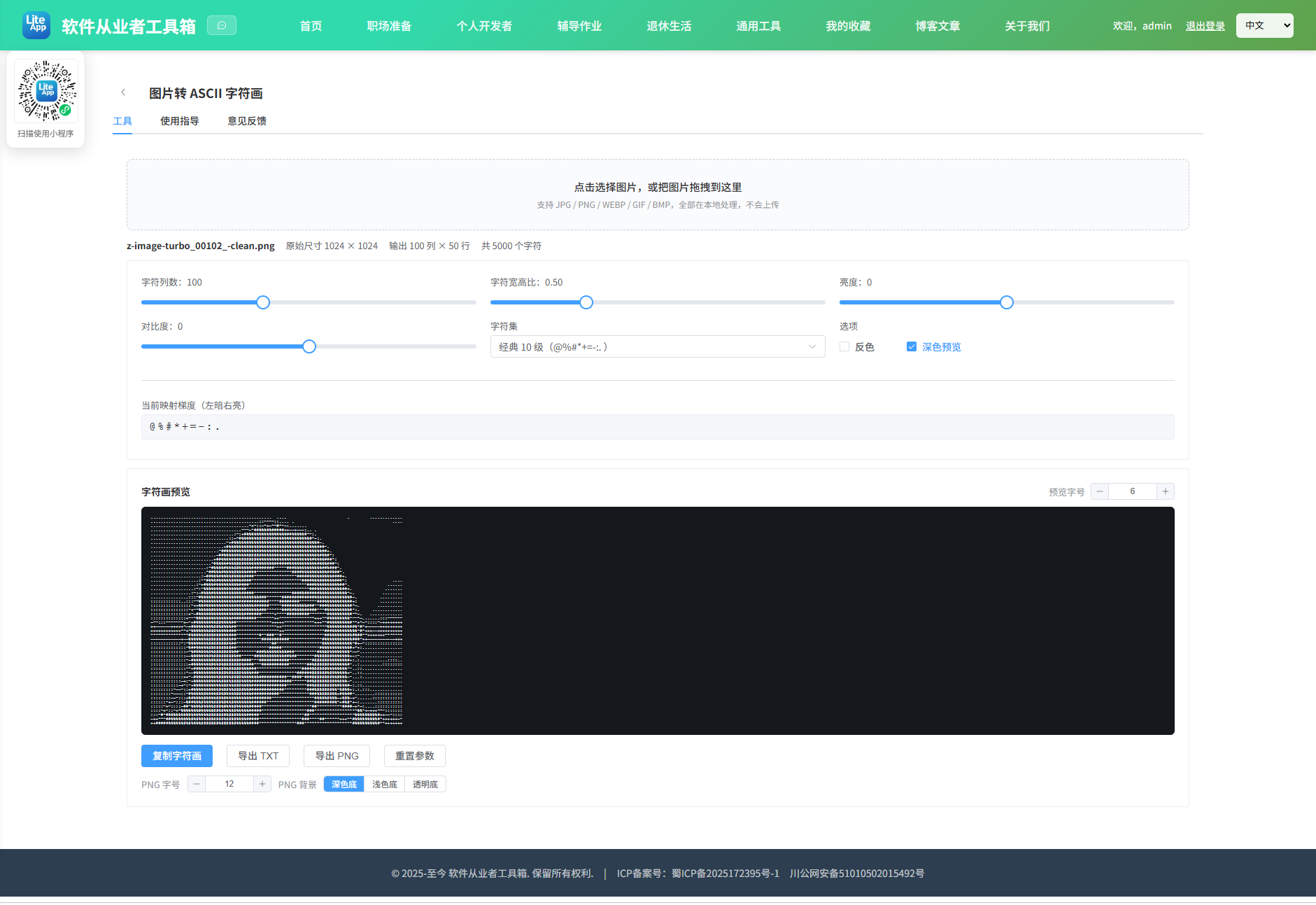
把本地图片转换成等宽字符组成的 ASCII 字符画。原理是先把图片缩放到指定的「字符列数」, 逐像素计算灰度亮度(luminance = 0.299R + 0.587G + 0.114B),再按亮度深浅映射到一个从深到浅排列的字符集, 亮度越低(越暗)用笔画越密的字符(如 @),亮度越高(越亮)用越稀疏的字符(如空格)。
参数说明
字符列数:结果每行的字符个数,数值越大细节越多、文本也越长。一般 80~120 适合正文粘贴,160 以上适合导出图片查看。
字符宽高比:等宽字体的字符通常「高大于宽」,直接按图片比例取行数会导致画面被拉长。默认 0.5 表示按半高采样,可根据实际显示字体微调。
字符集:内置经典 10 级、70 级精细、方块字符、二值等预设,也可以自定义。请务必按「从暗到亮」的顺序书写,第一个字符代表最暗的像素。
反色:适合深色背景上的浅色主体,或者你打算把字符画放在黑底上显示。
亮度 / 对比度:在灰度映射之前做一次调整,可以救回过曝或过暗的图片,让字符层次更分明。
导出说明
导出 TXT:保存为纯文本,粘贴到任何等宽字体环境(终端、代码块)都能正常显示,注意接收方必须使用等宽字体,否则会错位。
导出 PNG:把字符逐行绘制到 canvas 上再导出图片,可选深色底、浅色底或透明底。透明底导出的是深色文字,适合叠加在浅色页面上。
隐私说明
全部处理都在你的浏览器本地完成,图片不会上传到任何服务器,也不产生网络请求。
使用建议
轮廓清晰、主体与背景反差大的图片(人像剪影、logo、图标)效果最好;细节繁杂的风景照建议提高列数并适当增加对比度。
2.2 代码实现
2.2.1 组件结构
本工具是一个基于 Vue 3 <script setup> 语法的单文件组件(SFC),统一包裹在 ToolPageShell 组件内,由它提供页面标题、工具 ID、分类与「使用指南」插槽等通用外壳;核心业务逻辑(响应式状态、计算属性、事件处理函数)全部写在 <script setup> 中,输入/输出通过 el-input、el-button 等 Element Plus 组件与用户交互,所有数据均在浏览器本地处理,不会上传服务器。
2.2.2 核心逻辑概览
<script setup> 中定义的主要函数/方法:
pickFile()onFileChange()onDrop()loadFile()render()scheduleRender()resetParams()copyText()done()baseName()downloadBlob()exportTxt()exportPng()
2.2.3 关键实现代码
以下是该工具的完整 <script setup> 实现(核心代码)。模板(<template>)与样式(<style>)已省略。
vue
import { ref, computed, watch, onBeforeUnmount } from 'vue'
import ToolPageShell from '@/components/ToolPageShell.vue'

const presets = [
  { key: 'classic', label: '经典 10 级(@%#*+=-:. )', ramp: '@%#*+=-:. ' },
  { key: 'fine', label: '精细 70 级(层次最丰富)', ramp: '$@B%8&WM#*oahkbdpqwmZO0QLCJUYXzcvunxrjft/|()1{}[]?-_+~<>i!lI;:,"^`\'. ' },
  { key: 'simple', label: '简约 6 级(#@+-. )', ramp: '#@+-. ' },
  { key: 'block', label: '方块字符(实心到空心)', ramp: '\u2588\u2593\u2592\u2591 ' },
  { key: 'binary', label: '二值(01)', ramp: '01' },
  { key: 'dot', label: '点阵(密到疏)', ramp: '\u25CF\u25D5\u25D1\u25D4\u25CB ' },
  { key: 'custom', label: '自定义…', ramp: '' }
]

const fileInput = ref(null)
const dragOver = ref(false)
const error = ref('')
const loaded = ref(false)
const fileName = ref('')

const imgW = ref(0)
const imgH = ref(0)

const cols = ref(100)
const charAspect = ref(0.5)
const brightness = ref(0)
const contrast = ref(0)
const presetKey = ref('classic')
const customRamp = ref('@%#*+=-:. ')
const invert = ref(false)
const darkPreview = ref(true)
const previewFont = ref(6)
const pngFont = ref(12)
const pngBg = ref('dark')
const copied = ref(false)

const asciiText = ref('')
const outCols = ref(0)
const outRows = ref(0)

let imageEl = null
let objectUrl = ''

const activeRamp = computed(() => {
  if (presetKey.value === 'custom') {
    return customRamp.value.length > 0 ? customRamp.value : '@%#*+=-:. '
  }
  const found = presets.find((p) => p.key === presetKey.value)
  return found ? found.ramp : '@%#*+=-:. '
})

const charCount = computed(() => outCols.value * outRows.value)

function pickFile() {
  if (fileInput.value) fileInput.value.click()
}

function onFileChange(e) {
  const f = e.target.files && e.target.files[0]
  if (f) loadFile(f)
  e.target.value = ''
}

function onDrop(e) {
  dragOver.value = false
  const f = e.dataTransfer.files && e.dataTransfer.files[0]
  if (f) loadFile(f)
}

function loadFile(file) {
  error.value = ''
  copied.value = false
  if (!file.type || !file.type.startsWith('image/')) {
    error.value = '请选择图片文件(JPG / PNG / WEBP / GIF / BMP)'
    return
  }
  if (objectUrl) URL.revokeObjectURL(objectUrl)
  objectUrl = URL.createObjectURL(file)
  fileName.value = file.name

  const img = new Image()
  img.onload = () => {
    imageEl = img
    imgW.value = img.naturalWidth
    imgH.value = img.naturalHeight
    loaded.value = true
    render()
  }
  img.onerror = () => {
    error.value = '图片解码失败,请换一张图片再试'
    loaded.value = false
  }
  img.src = objectUrl
}

function render() {
  if (!imageEl) return
  const ramp = activeRamp.value
  const rampChars = Array.from(ramp)
  if (rampChars.length < 2) {
    error.value = '字符集至少需要 2 个字符'
    return
  }
  error.value = ''

  const w = Math.max(4, Math.min(240, Math.round(cols.value)))
  const ratio = imgH.value / imgW.value
  const h = Math.max(2, Math.round(w * ratio * charAspect.value))

  const canvas = document.createElement('canvas')
  canvas.width = w
  canvas.height = h
  const ctx = canvas.getContext('2d', { willReadFrequently: true })
  ctx.drawImage(imageEl, 0, 0, w, h)

  let data
  try {
    data = ctx.getImageData(0, 0, w, h).data
  } catch (err) {
    error.value = '无法读取像素数据:' + (err && err.message ? err.message : '未知错误')
    return
  }

  // 对比度系数(标准公式)
  const c = contrast.value
  const cf = (259 * (c + 255)) / (255 * (259 - c))
  const b = brightness.value * 2.55
  const maxIndex = rampChars.length - 1

  const lines = new Array(h)
  for (let y = 0; y < h; y++) {
    const row = new Array(w)
    for (let x = 0; x < w; x++) {
      const i = (y * w + x) * 4
      const alpha = data[i + 3] / 255
      // 透明像素按白色(最亮)处理,避免透明区域出现噪点
      let lum = 0.299 * data[i] + 0.587 * data[i + 1] + 0.114 * data[i + 2]
      lum = lum * alpha + 255 * (1 - alpha)
      lum = cf * (lum - 128) + 128 + b
      if (lum < 0) lum = 0
      if (lum > 255) lum = 255
      if (invert.value) lum = 255 - lum
      let idx = Math.round((lum / 255) * maxIndex)
      if (idx < 0) idx = 0
      if (idx > maxIndex) idx = maxIndex
      row[x] = rampChars[idx]
    }
    lines[y] = row.join('')
  }

  outCols.value = w
  outRows.value = h
  asciiText.value = lines.join('\n')
}

let timer = null
function scheduleRender() {
  if (timer) clearTimeout(timer)
  timer = setTimeout(() => {
    timer = null
    render()
  }, 80)
}

watch([cols, charAspect, brightness, contrast, presetKey, customRamp, invert], () => {
  if (loaded.value) scheduleRender()
})

function resetParams() {
  cols.value = 100
  charAspect.value = 0.5
  brightness.value = 0
  contrast.value = 0
  presetKey.value = 'classic'
  invert.value = false
}

function copyText() {
  if (!asciiText.value) return
  const done = () => {
    copied.value = true
    setTimeout(() => {
      copied.value = false
    }, 1800)
  }
  if (navigator.clipboard && navigator.clipboard.writeText) {
    navigator.clipboard.writeText(asciiText.value).then(done).catch(() => {
      error.value = '复制失败,请手动选中文本复制'
    })
  } else {
    error.value = '当前浏览器不支持剪贴板 API,请手动选中文本复制'
  }
}

function baseName() {
  const n = fileName.value || 'ascii'
  const dot = n.lastIndexOf('.')
  return dot > 0 ? n.slice(0, dot) : n
}

function downloadBlob(blob, name) {
  const url = URL.createObjectURL(blob)
  const a = document.createElement('a')
  a.href = url
  a.download = name
  document.body.appendChild(a)
  a.click()
  document.body.removeChild(a)
  setTimeout(() => URL.revokeObjectURL(url), 1000)
}

function exportTxt() {
  if (!asciiText.value) return
  const blob = new Blob([asciiText.value], { type: 'text/plain;charset=utf-8' })
  downloadBlob(blob, baseName() + '-ascii.txt')
}

function exportPng() {
  if (!asciiText.value) return
  const lines = asciiText.value.split('\n')
  const fontSize = pngFont.value
  const fontSpec = fontSize + 'px "Courier New", Consolas, Menlo, monospace'

  const measure = document.createElement('canvas').getContext('2d')
  measure.font = fontSpec
  const cellW = measure.measureText('M').width || fontSize * 0.6
  const cellH = fontSize
  const pad = Math.round(fontSize * 1.5)

  const canvas = document.createElement('canvas')
  canvas.width = Math.max(1, Math.ceil(outCols.value * cellW + pad * 2))
  canvas.height = Math.max(1, Math.ceil(lines.length * cellH + pad * 2))

  const ctx = canvas.getContext('2d')
  if (pngBg.value === 'dark') {
    ctx.fillStyle = '#111418'
    ctx.fillRect(0, 0, canvas.width, canvas.height)
    ctx.fillStyle = '#e6e8eb'
  } else if (pngBg.value === 'light') {
    ctx.fillStyle = '#ffffff'
    ctx.fillRect(0, 0, canvas.width, canvas.height)
    ctx.fillStyle = '#1f2329'
  } else {
    ctx.fillStyle = '#1f2329'
  }

  ctx.font = fontSpec
  ctx.textBaseline = 'top'
  ctx.textAlign = 'left'
  for (let i = 0; i < lines.length; i++) {
    ctx.fillText(lines[i], pad, pad + i * cellH)
  }

  canvas.toBlob((blob) => {
    if (blob) downloadBlob(blob, baseName() + '-ascii.png')
  }, 'image/png')
}

onBeforeUnmount(() => {
  if (timer) clearTimeout(timer)
  if (objectUrl) URL.revokeObjectURL(objectUrl)
})
2.3 效果截图