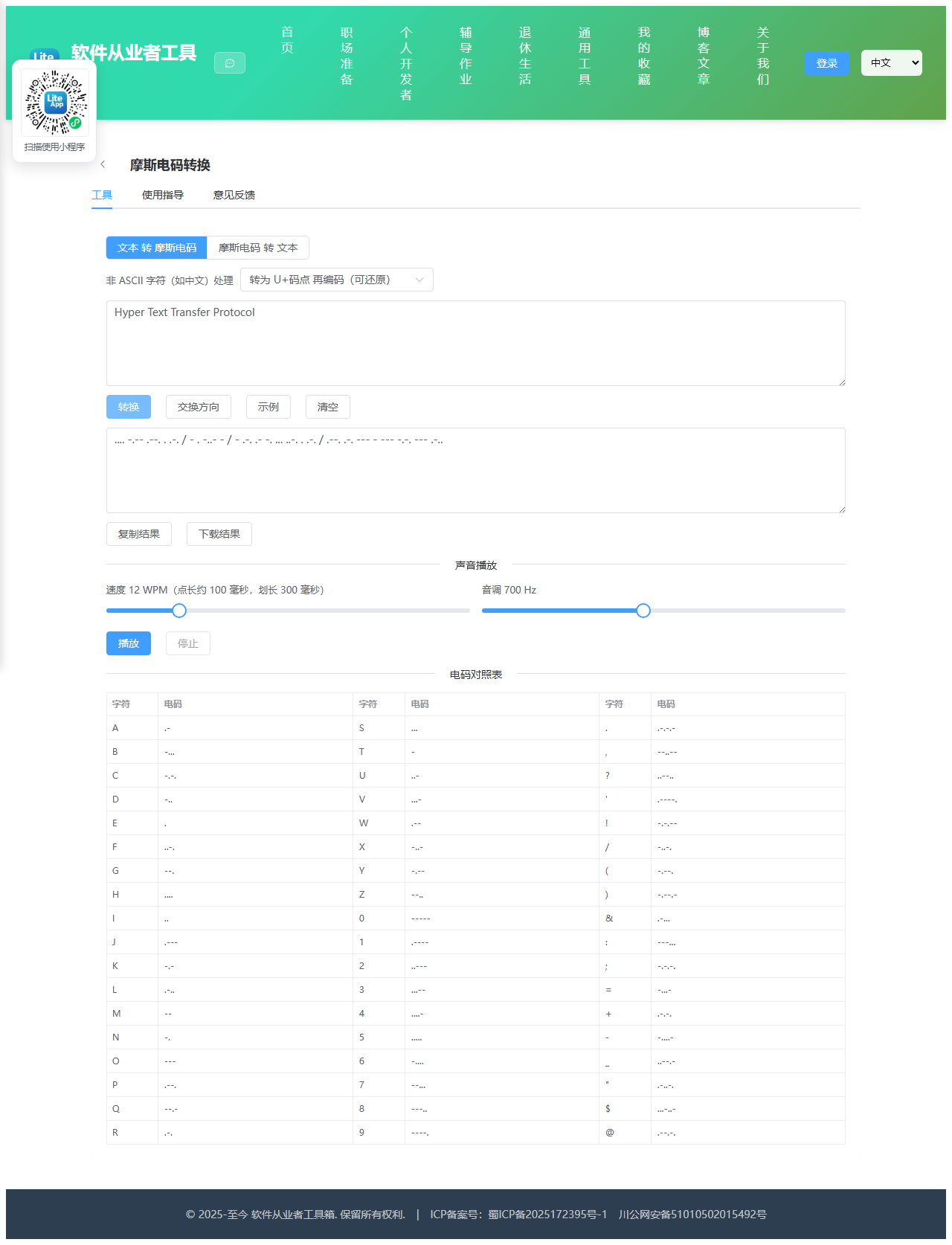
Appearance
实现 摩斯电码转换 工具
分类:developer | 标签:摩斯、Morse、电码 文本与摩斯电码互转,支持声音播放
2.1 功能说明
文本与摩斯电码互转,支持声音播放
核心能力
- encode
- decode
- 转为 U+码点 再编码(可还原)
- 跳过并忽略
- 标记为未知符号 ..--..
2.1.1 使用指南
功能说明
摩斯电码(Morse Code)用点(.)与划(-)的组合表示字符,是最早的远距离数字通信编码之一。本工具支持文本与摩斯电码的双向转换,并可通过浏览器 Web Audio 直接把电码播放成蜂鸣声,全部计算在本地完成,不会上传任何数据。
书写约定
点用半角句点 . 表示,划用半角连字符 - 表示;同一个字母的点划之间不留空格;字母与字母之间用一个空格分隔;单词与单词之间用斜杠 / 分隔。例如 SOS 编码为 ... --- ...,HI OK 编码为 .... .. / --- -.-。解码时对空格数量比较宽容,多个连续空格会被视作一个字母间隔。
支持范围与中文限制
国际摩斯电码只定义了 26 个英文字母、10 个数字与十余个常用标点,没有中文汉字的标准电码(历史上的「中文电码」是另一套四位数字体系,与摩斯电码并非同一标准)。因此遇到汉字等非 ASCII 字符时,本工具提供三种处理方式:
转为 U+码点再编码:把每个汉字转成形如 U+4E2D 的码点文本再编码,虽然会明显变长,但解码时勾选还原选项即可无损恢复原字,适合需要往返转换的场景。跳过并忽略:直接丢弃这些字符。标记为未知符号:统一输出 ..--..(问号电码)作为占位。若你想让中文更接近电报习惯,可以先手工把中文写成拼音再来编码,本工具不内置拼音库以保持零依赖。
声音播放
播放使用标准的摩斯节奏单位:点为 1 单位,划为 3 单位,同一字母内的点划间隔 1 单位,字母间隔 3 单位,单词间隔 7 单位。速度以 WPM(每分钟单词数)计量,业内以单词 PARIS 为基准,单位时长等于 1200 除以 WPM 毫秒,例如 12 WPM 对应点长 100 毫秒。音调可在 300 至 1200 Hz 之间调节,700 Hz 附近最接近真实电台的听感。点击播放前请确保页面已被点击过,部分浏览器会阻止未经用户交互的音频自动播放。
使用场景
业余无线电(HAM)练习、CTF 与解谜游戏、影视道具与剧本创作、无障碍信号设计、以及编码原理教学演示。
2.2 代码实现
2.2.1 组件结构
本工具是一个基于 Vue 3 <script setup> 语法的单文件组件(SFC),统一包裹在 ToolPageShell 组件内,由它提供页面标题、工具 ID、分类与「使用指南」插槽等通用外壳;核心业务逻辑(响应式状态、计算属性、事件处理函数)全部写在 <script setup> 中,输入/输出通过 el-input、el-button 等 Element Plus 组件与用户交互,所有数据均在浏览器本地处理,不会上传服务器。
2.2.2 核心逻辑概览
<script setup> 中定义的主要函数/方法:
showHint()encodeText()decodeMorse()convert()swap()loadSample()clearAll()copyOut()downloadOut()stop()play()
2.2.3 关键实现代码
以下是该工具的完整 <script setup> 实现(核心代码)。模板(<template>)与样式(<style>)已省略。
vue
import { computed, onBeforeUnmount, ref } from 'vue'
import ToolPageShell from '@/components/ToolPageShell.vue'

const MORSE_MAP = {
  A: '.-', B: '-...', C: '-.-.', D: '-..', E: '.', F: '..-.', G: '--.', H: '....',
  I: '..', J: '.---', K: '-.-', L: '.-..', M: '--', N: '-.', O: '---', P: '.--.',
  Q: '--.-', R: '.-.', S: '...', T: '-', U: '..-', V: '...-', W: '.--', X: '-..-',
  Y: '-.--', Z: '--..',
  0: '-----', 1: '.----', 2: '..---', 3: '...--', 4: '....-',
  5: '.....', 6: '-....', 7: '--...', 8: '---..', 9: '----.',
  '.': '.-.-.-', ',': '--..--', '?': '..--..', "'": '.----.', '!': '-.-.--',
  '/': '-..-.', '(': '-.--.', ')': '-.--.-', '&': '.-...', ':': '---...',
  ';': '-.-.-.', '=': '-...-', '+': '.-.-.', '-': '-....-', '_': '..--.-',
  '"': '.-..-.', $: '...-..-', '@': '.--.-.'
}

const REVERSE_MAP = Object.keys(MORSE_MAP).reduce((acc, key) => {
  acc[MORSE_MAP[key]] = key
  return acc
}, {})

const mode = ref('encode')
const nonAsciiMode = ref('codepoint')
const restoreCodepoint = ref(true)
const input = ref('')
const output = ref('')
const warning = ref('')
const hint = ref('')
const wpm = ref(12)
const freq = ref(700)
const playing = ref(false)
const playSeconds = ref(0)

const audioSupported = typeof window !== 'undefined' &&
  !!(window.AudioContext || window.webkitAudioContext)

const unitMs = computed(() => Math.round(1200 / wpm.value))

// 播放使用的电码:编码模式取结果,解码模式取输入
const morseForPlay = computed(() => {
  const raw = mode.value === 'encode' ? output.value : input.value
  return raw.replace(/[^.\-/\s]/g, '').trim()
})

// 显式指定对照表顺序,避免对象数字键被引擎提前排序
const TABLE_ORDER = Array.from('ABCDEFGHIJKLMNOPQRSTUVWXYZ0123456789')
  .concat(['.', ',', '?', "'", '!', '/', '(', ')', '&', ':', ';', '=', '+', '-', '_', '"', '$', '@'])

const tableRows = computed(() => {
  const keys = TABLE_ORDER
  const rows = []
  const perColumn = Math.ceil(keys.length / 3)
  for (let i = 0; i < perColumn; i++) {
    const a = keys[i]
    const b = keys[i + perColumn]
    const c = keys[i + perColumn * 2]
    rows.push({
      a: a || '', ac: a ? MORSE_MAP[a] : '',
      b: b || '', bc: b ? MORSE_MAP[b] : '',
      c: c || '', cc: c ? MORSE_MAP[c] : ''
    })
  }
  return rows
})

function showHint(text) {
  hint.value = text
  window.setTimeout(() => { hint.value = '' }, 2000)
}

function encodeText(text) {
  const unsupported = new Set()
  const words = []
  let current = []
  // 使用 Array.from 按码点遍历,避免破坏 Emoji 与增补平面字符
  const chars = Array.from(text)
  for (const rawChar of chars) {
    if (rawChar === ' ' || rawChar === '\t' || rawChar === '\n' || rawChar === '\r') {
      if (current.length) { words.push(current); current = [] }
      continue
    }
    const upper = rawChar.toUpperCase()
    if (MORSE_MAP[upper]) {
      current.push(MORSE_MAP[upper])
      continue
    }
    const codePoint = rawChar.codePointAt(0)
    if (codePoint < 128) {
      unsupported.add(rawChar)
      if (nonAsciiMode.value === 'mark') current.push(MORSE_MAP['?'])
      continue
    }
    if (nonAsciiMode.value === 'skip') {
      unsupported.add(rawChar)
    } else if (nonAsciiMode.value === 'mark') {
      unsupported.add(rawChar)
      current.push(MORSE_MAP['?'])
    } else {
      // 码点方案:U+XXXX 逐字符编码,可在解码端还原
      const literal = 'U+' + codePoint.toString(16).toUpperCase().padStart(4, '0')
      for (const ch of Array.from(literal)) {
        if (MORSE_MAP[ch]) current.push(MORSE_MAP[ch])
      }
    }
  }
  if (current.length) words.push(current)

  const list = Array.from(unsupported)
  if (list.length) {
    const preview = list.slice(0, 10).join(' ')
    if (nonAsciiMode.value === 'skip') {
      warning.value = '以下字符无对应电码已被忽略:' + preview + (list.length > 10 ? ' 等' : '')
    } else if (nonAsciiMode.value === 'mark') {
      warning.value = '以下字符无对应电码已替换为未知符号:' + preview + (list.length > 10 ? ' 等' : '')
    } else {
      warning.value = '以下字符无对应电码,已按 U+码点 方式编码:' + preview + (list.length > 10 ? ' 等' : '')
    }
  }
  return words.map(word => word.join(' ')).join(' / ')
}

function decodeMorse(code) {
  const bad = new Set()
  const normalized = code.replace(/[||]/g, '/').replace(/[·•]/g, '.').replace(/[—–−]/g, '-')
  const words = normalized.split('/')
  const decodedWords = words.map(word => {
    const letters = word.trim().split(/\s+/).filter(Boolean)
    return letters.map(letter => {
      const cleaned = letter.replace(/[^.\-]/g, '')
      if (!cleaned) return ''
      if (REVERSE_MAP[cleaned] !== undefined) return REVERSE_MAP[cleaned]
      bad.add(letter)
      return '\u25A1'
    }).join('')
  })
  let text = decodedWords.join(' ').replace(/\s+/g, ' ').trim()
  if (restoreCodepoint.value) {
    text = text.replace(/U\+([0-9A-F]{4,6})/gi, (match, hex) => {
      const value = parseInt(hex, 16)
      if (!Number.isFinite(value) || value > 0x10FFFF) return match
      try {
        return String.fromCodePoint(value)
      } catch {
        return match
      }
    })
  }
  if (bad.size) {
    const list = Array.from(bad).slice(0, 8).join(' ')
    warning.value = '以下电码序列无法识别,已用方框占位:' + list + (bad.size > 8 ? ' 等' : '')
  }
  return text
}

function convert() {
  warning.value = ''
  const raw = input.value
  if (!raw.trim()) { output.value = ''; return }
  output.value = mode.value === 'encode' ? encodeText(raw) : decodeMorse(raw)
}

function swap() {
  stop()
  const previous = output.value
  mode.value = mode.value === 'encode' ? 'decode' : 'encode'
  input.value = previous
  convert()
}

function loadSample() {
  stop()
  input.value = mode.value === 'encode' ? 'SOS Hello World 2024' : '... --- ... / .... . .-.. .-.. ---'
  convert()
}

function clearAll() {
  stop()
  input.value = ''
  output.value = ''
  warning.value = ''
}

async function copyOut() {
  try {
    await navigator.clipboard.writeText(output.value)
    showHint('已复制到剪贴板')
  } catch {
    showHint('复制失败,请手动选择文本复制')
  }
}

function downloadOut() {
  const blob = new Blob([output.value], { type: 'text/plain;charset=utf-8' })
  const url = URL.createObjectURL(blob)
  const link = document.createElement('a')
  link.href = url
  link.download = mode.value === 'encode' ? 'morse-code.txt' : 'morse-decoded.txt'
  document.body.appendChild(link)
  link.click()
  document.body.removeChild(link)
  URL.revokeObjectURL(url)
  showHint('已开始下载')
}

let audioContext = null
let oscillator = null
let gainNode = null
let stopTimer = null

function stop() {
  if (stopTimer) { window.clearTimeout(stopTimer); stopTimer = null }
  if (oscillator) {
    try { oscillator.stop() } catch { /* 已停止时忽略 */ }
    try { oscillator.disconnect() } catch { /* 忽略 */ }
    oscillator = null
  }
  if (gainNode) {
    try { gainNode.disconnect() } catch { /* 忽略 */ }
    gainNode = null
  }
  if (audioContext) {
    const context = audioContext
    audioContext = null
    if (typeof context.close === 'function') context.close().catch(() => {})
  }
  playing.value = false
}

function play() {
  const code = morseForPlay.value
  if (!code || !audioSupported) return
  stop()

  const Ctor = window.AudioContext || window.webkitAudioContext
  audioContext = new Ctor()
  oscillator = audioContext.createOscillator()
  gainNode = audioContext.createGain()
  oscillator.type = 'sine'
  oscillator.frequency.value = freq.value
  gainNode.gain.setValueAtTime(0, audioContext.currentTime)
  oscillator.connect(gainNode)
  gainNode.connect(audioContext.destination)

  const unit = unitMs.value / 1000
  const ramp = Math.min(0.005, unit / 4)
  let cursor = audioContext.currentTime + 0.08

  const words = code.split('/').map(word => word.trim()).filter(Boolean)
  words.forEach((word, wordIndex) => {
    const letters = word.split(/\s+/).filter(Boolean)
    letters.forEach((letter, letterIndex) => {
      for (const symbol of letter) {
        const duration = symbol === '-' ? unit * 3 : unit
        gainNode.gain.setValueAtTime(0, cursor)
        gainNode.gain.linearRampToValueAtTime(0.3, cursor + ramp)
        gainNode.gain.setValueAtTime(0.3, cursor + duration - ramp)
        gainNode.gain.linearRampToValueAtTime(0, cursor + duration)
        cursor += duration + unit // 符号间隔 1 单位
      }
      // 字母间隔共 3 单位,符号循环已计入 1 单位
      if (letterIndex < letters.length - 1) cursor += unit * 2
    })
    // 单词间隔共 7 单位,前面已计入 3 单位
    if (wordIndex < words.length - 1) cursor += unit * 4
  })

  const total = cursor - audioContext.currentTime
  if (total <= 0.1) { stop(); return }

  oscillator.start()
  oscillator.stop(cursor + 0.05)
  playing.value = true
  playSeconds.value = Math.max(1, Math.round(total))
  stopTimer = window.setTimeout(stop, (total + 0.2) * 1000)
}

onBeforeUnmount(stop)
2.3 效果截图