Appearance
实现 JS 代码混淆 / 格式化 工具
分类:developer | 标签:混淆、obfuscator、格式化 JavaScript 代码混淆与美化格式化
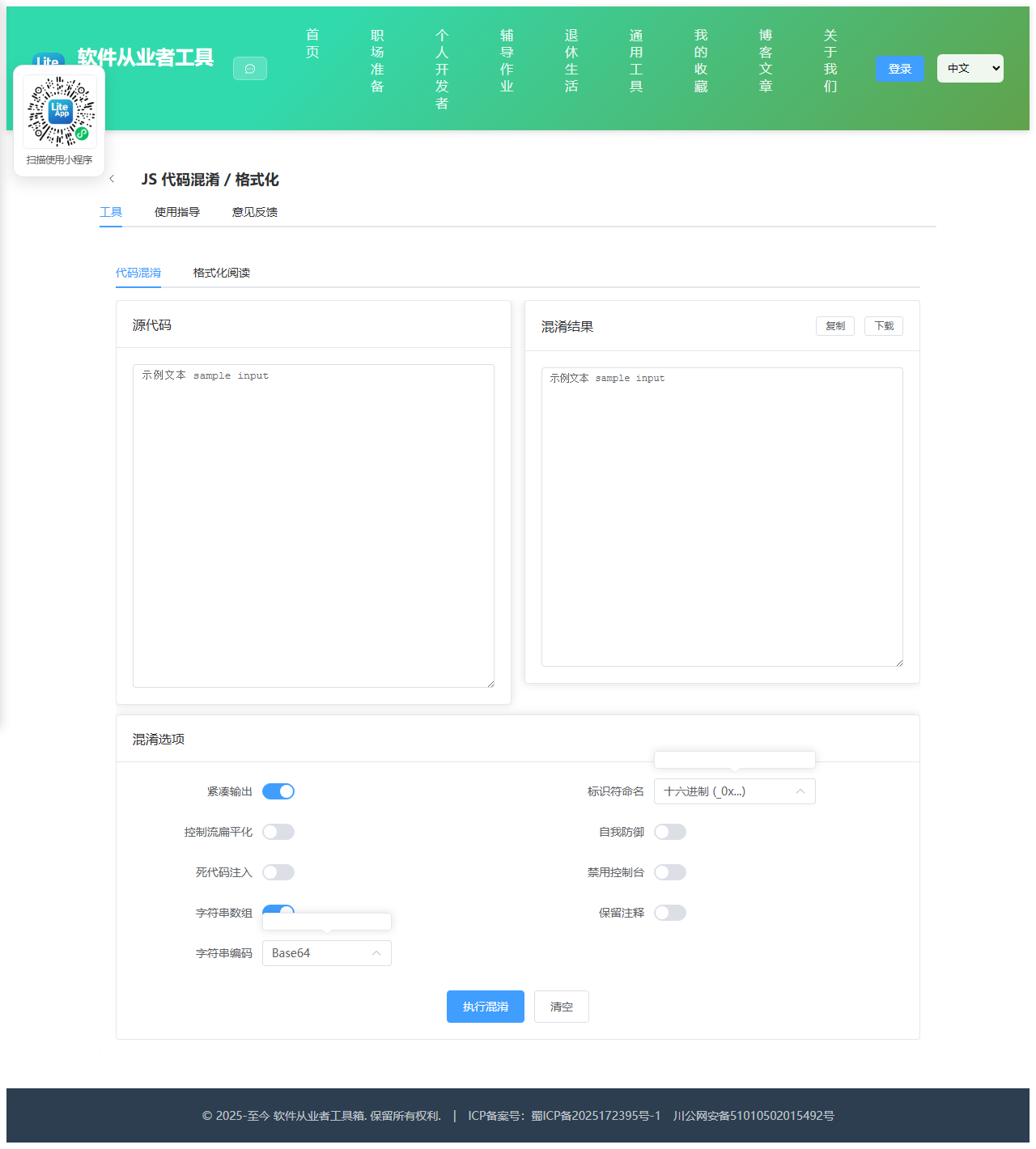
2.1 功能说明
JavaScript 代码混淆与美化格式化
2.1.1 使用指南
功能说明
本工具提供两项能力:一是使用 javascript-obfuscator 引擎对 JavaScript 源码做混淆保护, 二是把压缩过的代码重新缩进排版,便于阅读。所有运算都在浏览器本地完成,代码不会上传到任何服务器。
重要提示:混淆不可逆
「格式化阅读」标签页无法反向还原 javascript-obfuscator 的混淆结果。 混淆过程会不可逆地丢弃原始变量名、拆散字符串、重排控制流,这些信息在产物中已不存在,任何工具都无法恢复。 格式化只做一件事:按大括号与分号重新缩进换行,把挤成一行的代码排版开,让人能够阅读和调试。 变量名仍然是 _0x1a2b3c 这种形式,控制流仍然是被打散的状态。
混淆选项说明
紧凑输出:把结果压成一行,去掉多余空白,体积最小。
控制流扁平化:把顺序执行的代码改写成 switch 状态机,极大增加阅读难度,但会带来 1.5 倍左右的性能损耗,阈值可控制作用比例。
死代码注入:插入永不执行的分支干扰分析,会显著增大体积,需要与字符串数组配合使用。
字符串数组:把源码中的字符串抽取到统一数组中,通过下标函数访问,让人无法直接搜索到明文字符串。编码方式可选 Base64 或 RC4,RC4 更难还原但更慢。
标识符命名:hexadecimal 生成 _0x 十六进制名,mangled 生成 a、b、c 短名(体积更小)。
自我防御:产物被格式化或美化后会自动失效或崩溃,用于防止逆向。
禁用控制台输出:在产物中插入定时器检测 console 是否被打开,若被打开则无限循环清空控制台。
2.2 代码实现
2.2.1 组件结构
本工具是一个基于 Vue 3 <script setup> 语法的单文件组件(SFC),统一包裹在 ToolPageShell 组件内,由它提供页面标题、工具 ID、分类与「使用指南」插槽等通用外壳;核心业务逻辑(响应式状态、计算属性、事件处理函数)全部写在 <script setup> 中,输入/输出通过 el-input、el-button 等 Element Plus 组件与用户交互,所有数据均在浏览器本地处理,不会上传服务器。
2.2.2 核心逻辑概览
<script setup> 中定义的主要函数/方法:
doObfuscate()beautifyCode()doBeautify()copyOut()downloadOut()copyBeauty()downloadBeauty()
2.2.3 关键实现代码
以下是该工具的完整 <script setup> 实现(核心代码)。模板(<template>)与样式(<style>)已省略。
vue
import { ref, reactive } from 'vue'
import ToolPageShell from '@/components/ToolPageShell.vue'

const activeTab = ref('obfuscate')
const src = ref('')
const out = ref('')
const err = ref('')
const busy = ref(false)

const opts = reactive({
  compact: true,
  controlFlowFlattening: false,
  controlFlowFlatteningThreshold: 0.75,
  deadCodeInjection: false,
  stringArray: true,
  stringArrayEncoding: 'base64',
  identifierNamesGenerator: 'hexadecimal',
  selfDefending: false,
  disableConsoleOutput: false,
  formatComments: false,
})

// Beautify inputs
const beautyIn = ref('')
const beautyOut = ref('')
const beautyErr = ref('')

async function doObfuscate() {
  err.value = ''
  if (!src.value.trim()) { err.value = '请输入源代码'; return }
  busy.value = true
  try {
    const { obfuscate } = await import('@/vendor/javascript-obfuscator/index.mjs')
    const result = obfuscate(src.value, {
      compact: opts.compact,
      controlFlowFlattening: opts.controlFlowFlattening,
      controlFlowFlatteningThreshold: opts.controlFlowFlatteningThreshold,
      deadCodeInjection: opts.deadCodeInjection,
      stringArray: opts.stringArray,
      stringArrayEncoding: opts.stringArrayEncoding === 'none' ? false : opts.stringArrayEncoding,
      identifierNamesGenerator: opts.identifierNamesGenerator,
      selfDefending: opts.selfDefending,
      disableConsoleOutput: opts.disableConsoleOutput,
      format: opts.formatComments ? 'beautify' : undefined,
    })
    out.value = result.getObfuscatedCode()
  } catch (e) {
    err.value = '混淆失败:' + (e.message || String(e))
  } finally {
    busy.value = false
  }
}

// Simple JS beautifier (indentation-based, no AST)
function beautifyCode(code) {
  let out = ''
  let indent = 0
  let inStr = null
  let inComment = false
  let inLineComment = false

  for (let i = 0; i < code.length; i++) {
    const ch = code[i]
    const next = code[i + 1] || ''

    // Handle line comments
    if (!inStr && !inComment && ch === '/' && next === '/') {
      inLineComment = true
    }
    if (inLineComment) {
      out += ch
      if (ch === '\n') { inLineComment = false; out += '\n' + '  '.repeat(indent); continue }
      continue
    }

    // Handle block comments
    if (!inStr && !inLineComment && ch === '/' && next === '*') {
      inComment = true
      out += '/*'
      i++
      continue
    }
    if (inComment) {
      if (ch === '*' && next === '/') {
        out += '*/'
        i++
        inComment = false
        continue
      }
      out += ch
      continue
    }

    // Handle strings
    if (!inComment && !inLineComment) {
      if (ch === '"' || ch === "'" || ch === '`') {
        if (inStr === ch) {
          // Check for escape
          if (code[i - 1] !== '\\') inStr = null
          out += ch
          continue
        } else if (!inStr) {
          inStr = ch
          out += ch
          continue
        }
      }
    }

    if (inStr) { out += ch; continue }

    // Handle braces
    if (ch === '{') {
      out += ' {\n' + '  '.repeat(indent + 1)
      indent++
    } else if (ch === '}') {
      indent = Math.max(0, indent - 1)
      out = out.trimEnd() + '\n' + '  '.repeat(indent) + '}\n' + '  '.repeat(indent)
    } else if (ch === ';') {
      out += ';\n' + '  '.repeat(indent)
    } else if (ch === '\n') {
      // Skip extra newlines
    } else if (ch === ' ' || ch === '\t') {
      // Collapse whitespace
      if (out && out[out.length - 1] !== ' ' && out[out.length - 1] !== '\n') {
        out += ' '
      }
    } else {
      out += ch
    }
  }

  // Clean up
  return out.replace(/\n{3,}/g, '\n\n').replace(/^[\s\t]+$/gm, '').trim() + '\n'
}

function doBeautify() {
  beautyErr.value = ''
  if (!beautyIn.value.trim()) { beautyErr.value = '请输入代码'; return }
  try {
    beautyOut.value = beautifyCode(beautyIn.value)
  } catch (e) {
    beautyErr.value = '格式化失败:' + (e.message || String(e))
  }
}

function copyOut() {
  navigator.clipboard.writeText(out.value)
}
function downloadOut() {
  const blob = new Blob([out.value], { type: 'text/javascript' })
  const url = URL.createObjectURL(blob)
  const a = document.createElement('a')
  a.href = url
  a.download = 'obfuscated.js'
  a.click()
  URL.revokeObjectURL(url)
}
function copyBeauty() {
  navigator.clipboard.writeText(beautyOut.value)
}
function downloadBeauty() {
  const blob = new Blob([beautyOut.value], { type: 'text/javascript' })
  const url = URL.createObjectURL(blob)
  const a = document.createElement('a')
  a.href = url
  a.download = 'beautified.js'
  a.click()
  URL.revokeObjectURL(url)
}
2.3 效果截图