Appearance
实现 硬件自检套件 工具
分类:general | 标签:硬件、自检、设备 键盘摄像头麦克风屏幕坏点检测
2.1 功能说明
键盘摄像头麦克风屏幕坏点检测
核心能力
- 键盘检测
2.1.1 使用指南
硬件自检套件使用说明
把常用的设备自检项目集中到一个页面:键盘按键、摄像头、麦克风、屏幕坏点、屏幕常亮。 全部依赖浏览器原生能力,不安装任何插件,采集到的画面与声音只在本机处理,不上传、不留存。 适合验机、二手交易验货、远程会议前的设备检查。
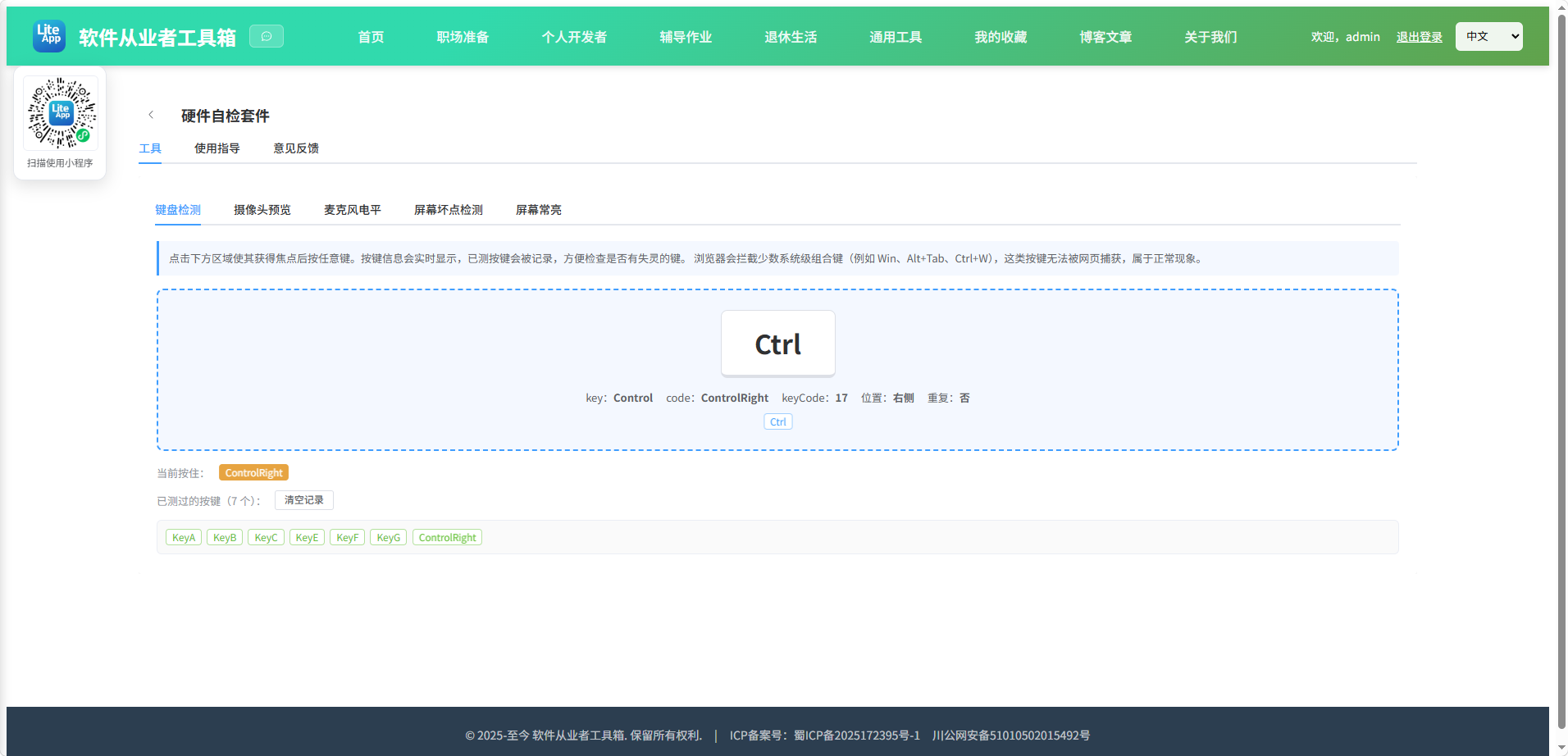
键盘检测
点击检测区使其聚焦后按键,会显示 key(字符含义)、code(物理键位)、 keyCode(旧版兼容码)以及左右位置。左右 Shift、Ctrl、Alt 的 code 不同,可以据此分辨。 已按过的键会被记录成绿色标签,逐一按遍键盘即可发现失灵的键位。
少数按键网页无法捕获:Windows 徽标键单击、Alt+Tab、Ctrl+Alt+Del、部分笔记本的 Fn 组合键与多媒体键, 它们在到达页面前就被系统或浏览器截获,测不到不代表键坏了。检测时建议先退出输入法。
摄像头预览
选择设备后点击打开,可查看分辨率与实时画面,并支持保存一帧图片到本地用于对比。 若下拉框里的设备名称为空,是因为浏览器在未授权前会隐藏设备名,授权一次后重新进入即可看到。
麦克风电平
使用 Web Audio 的分析节点计算实时音量,电平条与下方波形同步跳动。 正常说话时电平应在 30 到 70 之间起伏;始终为 0 说明没有拾到音;始终顶格说明增益过高或存在啸叫。
屏幕坏点检测
依次铺满红、绿、蓝、白、黑、灰六种纯色。亮点指黑屏时仍发光的点,暗点指白屏时不发光的点, 坏点在任何颜色下都保持同一颜色。红绿蓝三色用于检查子像素缺失,白色查暗点与污渍,黑色查亮点与背光漏光。 请在暗环境下检查黑色画面,并把屏幕擦干净以免把灰尘误判为坏点。
浏览器全屏由用户手势触发,若系统拒绝进入全屏,工具会退化为铺满浏览器窗口的检测层,同样可用。
屏幕常亮
调用屏幕唤醒锁接口阻止设备息屏。该能力需要 https 或 localhost 环境, 目前 Chrome、Edge、Android Chrome 与 iOS 16.4 以上的 Safari 支持,其它浏览器会提示不支持。 系统电量过低或用户手动锁屏时,唤醒锁会被系统强制释放,回到页面后工具会自动重新申请。
隐私说明
摄像头与麦克风仅在你点击“打开”后启动,切换标签页或离开本页会立即停止采集并释放设备, 指示灯随之熄灭。所有数据都在浏览器内存中,页面关闭即消失。
2.2 代码实现
2.2.1 组件结构
本工具是一个基于 Vue 3 <script setup> 语法的单文件组件(SFC),统一包裹在 ToolPageShell 组件内,由它提供页面标题、工具 ID、分类与「使用指南」插槽等通用外壳;核心业务逻辑(响应式状态、计算属性、事件处理函数)全部写在 <script setup> 中,输入/输出通过 el-input、el-button 等 Element Plus 组件与用户交互,所有数据均在浏览器本地处理,不会上传服务器。
2.2.2 核心逻辑概览
<script setup> 中定义的主要函数/方法:
keyDisplay()onKeyDown()onKeyUp()clearKeys()refreshDevices()mediaErrorText()startCamera()stopCamera()snapshot()drawWave()startMic()stopMic()paintColor()nextColor()prevColor()onFsKey()onResize()enterScreenTest()exitScreenTest()requestWake()releaseWake()onVisibility()onTabChange()
2.2.3 关键实现代码
以下是该工具的完整 <script setup> 实现(核心代码)。模板(<template>)与样式(<style>)已省略。
vue
import { ref, onMounted, onBeforeUnmount } from 'vue'
import ToolPageShell from '@/components/ToolPageShell.vue'

const activeName = ref('keyboard')

/* ---------- 键盘检测 ---------- */
const lastKey = ref(null)
const heldKeys = ref([])
const testedKeys = ref([])

const locationNames = ['标准', '左侧', '右侧', '小键盘']

function keyDisplay(e) {
  const map = {
    ' ': '空格',
    Escape: 'Esc',
    ArrowUp: '上',
    ArrowDown: '下',
    ArrowLeft: '左',
    ArrowRight: '右',
    Enter: '回车',
    Backspace: '退格',
    Tab: 'Tab',
    Control: 'Ctrl',
    Meta: 'Meta',
    CapsLock: 'Caps',
    Delete: 'Del',
    Insert: 'Ins',
    PageUp: 'PgUp',
    PageDown: 'PgDn'
  }
  if (map[e.key]) return map[e.key]
  return Array.from(e.key).length === 1 ? e.key.toUpperCase() : e.key
}

function onKeyDown(e) {
  e.preventDefault()
  const mods = []
  if (e.ctrlKey) mods.push('Ctrl')
  if (e.shiftKey) mods.push('Shift')
  if (e.altKey) mods.push('Alt')
  if (e.metaKey) mods.push('Meta')
  lastKey.value = {
    display: keyDisplay(e),
    key: e.key === ' ' ? 'Space' : e.key,
    code: e.code || '未知',
    keyCode: e.keyCode,
    location: locationNames[e.location] || '标准',
    repeat: e.repeat,
    modifiers: mods
  }
  const id = e.code || e.key
  if (!heldKeys.value.includes(id)) heldKeys.value.push(id)
  if (!testedKeys.value.includes(id)) testedKeys.value.push(id)
}

function onKeyUp(e) {
  const id = e.code || e.key
  heldKeys.value = heldKeys.value.filter((k) => k !== id)
}

function clearKeys() {
  testedKeys.value = []
  heldKeys.value = []
  lastKey.value = null
}

/* ---------- 设备列表 ---------- */
const cameraList = ref([])
const micList = ref([])

async function refreshDevices() {
  if (!navigator.mediaDevices || !navigator.mediaDevices.enumerateDevices) return
  try {
    const list = await navigator.mediaDevices.enumerateDevices()
    cameraList.value = list
      .filter((d) => d.kind === 'videoinput')
      .map((d, i) => ({ deviceId: d.deviceId, label: d.label || '摄像头 ' + (i + 1) }))
    micList.value = list
      .filter((d) => d.kind === 'audioinput')
      .map((d, i) => ({ deviceId: d.deviceId, label: d.label || '麦克风 ' + (i + 1) }))
  } catch (e) {
    // 枚举失败不影响主流程,使用默认设备即可
  }
}

function mediaErrorText(e, what) {
  const name = e && e.name ? e.name : ''
  if (name === 'NotAllowedError') return what + '权限被拒绝,请点击地址栏权限图标重新允许后重试。'
  if (name === 'NotFoundError') return '没有找到可用的' + what + '设备。'
  if (name === 'NotReadableError') return what + '被其它程序占用,请关闭正在使用它的软件后重试。'
  if (name === 'OverconstrainedError') return '所选' + what + '不支持请求的参数,请换一个设备。'
  if (name === 'SecurityError') return what + '只能在 https 或 localhost 环境下使用。'
  if (!navigator.mediaDevices) return '当前浏览器不支持媒体设备访问,请更换浏览器。'
  return '打开' + what + '失败:' + (e && e.message ? e.message : String(e))
}

/* ---------- 摄像头 ---------- */
const cameraEl = ref(null)
const cameraOn = ref(false)
const cameraError = ref('')
const cameraId = ref('')
const cameraInfo = ref('')
let cameraStream = null

async function startCamera() {
  cameraError.value = ''
  if (!navigator.mediaDevices || !navigator.mediaDevices.getUserMedia) {
    cameraError.value = '当前浏览器不支持摄像头访问,或页面不在 https / localhost 环境下。'
    return
  }
  try {
    const constraints = cameraId.value ? { video: { deviceId: { exact: cameraId.value } } } : { video: true }
    cameraStream = await navigator.mediaDevices.getUserMedia(constraints)
    if (cameraEl.value) {
      cameraEl.value.srcObject = cameraStream
      await cameraEl.value.play().catch(() => {})
    }
    cameraOn.value = true
    const track = cameraStream.getVideoTracks()[0]
    const s = track && track.getSettings ? track.getSettings() : {}
    cameraInfo.value = (s.width || '?') + ' x ' + (s.height || '?') + ',' + Math.round(s.frameRate || 0) + ' fps'
    await refreshDevices()
  } catch (e) {
    cameraError.value = mediaErrorText(e, '摄像头')
    stopCamera()
  }
}

function stopCamera() {
  if (cameraStream) {
    try {
      cameraStream.getTracks().forEach((t) => t.stop())
    } catch (e) {
      // 忽略停止异常
    }
    cameraStream = null
  }
  if (cameraEl.value) cameraEl.value.srcObject = null
  cameraOn.value = false
  cameraInfo.value = ''
}

function snapshot() {
  const v = cameraEl.value
  if (!v || !v.videoWidth) return
  const canvas = document.createElement('canvas')
  canvas.width = v.videoWidth
  canvas.height = v.videoHeight
  canvas.getContext('2d').drawImage(v, 0, 0)
  canvas.toBlob((blob) => {
    if (!blob) return
    const href = URL.createObjectURL(blob)
    const a = document.createElement('a')
    a.href = href
    a.download = 'camera-snapshot.png'
    a.click()
    window.setTimeout(() => URL.revokeObjectURL(href), 1000)
  }, 'image/png')
}

/* ---------- 麦克风 ---------- */
const micOn = ref(false)
const micError = ref('')
const micId = ref('')
const micLevel = ref(0)
const micPeak = ref(0)
const waveEl = ref(null)
let micStream = null
let micCtx = null
let analyser = null
let micRaf = null
let dataArray = null

function drawWave() {
  if (!analyser) return
  analyser.getByteTimeDomainData(dataArray)
  let sum = 0
  let peak = 0
  for (let i = 0; i < dataArray.length; i += 1) {
    const v = (dataArray[i] - 128) / 128
    sum += v * v
    const abs = Math.abs(v)
    if (abs > peak) peak = abs
  }
  const rms = Math.sqrt(sum / dataArray.length)
  const level = Math.min(100, Math.round(rms * 300))
  micLevel.value = level
  if (level > micPeak.value) micPeak.value = level

  const canvas = waveEl.value
  if (canvas) {
    const ctx = canvas.getContext('2d')
    const w = canvas.width
    const h = canvas.height
    ctx.clearRect(0, 0, w, h)
    ctx.fillStyle = '#f5f7fa'
    ctx.fillRect(0, 0, w, h)
    ctx.strokeStyle = '#dcdfe6'
    ctx.beginPath()
    ctx.moveTo(0, h / 2)
    ctx.lineTo(w, h / 2)
    ctx.stroke()
    ctx.lineWidth = 2
    ctx.strokeStyle = '#409eff'
    ctx.beginPath()
    const step = w / dataArray.length
    for (let i = 0; i < dataArray.length; i += 1) {
      const y = h / 2 + ((dataArray[i] - 128) / 128) * (h / 2) * 0.9
      if (i === 0) ctx.moveTo(0, y)
      else ctx.lineTo(i * step, y)
    }
    ctx.stroke()
  }
  micRaf = window.requestAnimationFrame(drawWave)
}

async function startMic() {
  micError.value = ''
  if (!navigator.mediaDevices || !navigator.mediaDevices.getUserMedia) {
    micError.value = '当前浏览器不支持麦克风访问,或页面不在 https / localhost 环境下。'
    return
  }
  try {
    const constraints = micId.value ? { audio: { deviceId: { exact: micId.value } } } : { audio: true }
    micStream = await navigator.mediaDevices.getUserMedia(constraints)
    const Ctx = window.AudioContext || window.webkitAudioContext
    if (!Ctx) {
      micError.value = '当前浏览器不支持 Web Audio,无法计算电平。'
      stopMic()
      return
    }
    micCtx = new Ctx()
    if (micCtx.state === 'suspended') await micCtx.resume().catch(() => {})
    analyser = micCtx.createAnalyser()
    analyser.fftSize = 2048
    dataArray = new Uint8Array(analyser.fftSize)
    micCtx.createMediaStreamSource(micStream).connect(analyser)
    micOn.value = true
    micPeak.value = 0
    drawWave()
    await refreshDevices()
  } catch (e) {
    micError.value = mediaErrorText(e, '麦克风')
    stopMic()
  }
}

function stopMic() {
  if (micRaf) {
    window.cancelAnimationFrame(micRaf)
    micRaf = null
  }
  if (micStream) {
    try {
      micStream.getTracks().forEach((t) => t.stop())
    } catch (e) {
      // 忽略停止异常
    }
    micStream = null
  }
  if (micCtx) {
    try {
      micCtx.close()
    } catch (e) {
      // 忽略关闭异常
    }
    micCtx = null
  }
  analyser = null
  dataArray = null
  micOn.value = false
  micLevel.value = 0
}

/* ---------- 屏幕坏点检测 ---------- */
const colors = [
  { name: '红色', value: '#ff0000', usage: '检查红色子像素是否缺失' },
  { name: '绿色', value: '#00ff00', usage: '检查绿色子像素是否缺失' },
  { name: '蓝色', value: '#0000ff', usage: '检查蓝色子像素是否缺失' },
  { name: '白色', value: '#ffffff', usage: '检查暗点、污渍与色斑' },
  { name: '黑色', value: '#000000', usage: '检查亮点与边缘漏光' },
  { name: '灰色', value: '#808080', usage: '检查均匀性与偏色' }
]
const screenTesting = ref(false)
const colorIndex = ref(0)
const autoCycle = ref(false)
const cycleSeconds = ref(3)
const fsLayer = ref(null)
const colorCanvas = ref(null)
let cycleTimer = null

function paintColor() {
  const canvas = colorCanvas.value
  if (!canvas) return
  canvas.width = window.innerWidth
  canvas.height = window.innerHeight
  const ctx = canvas.getContext('2d')
  ctx.fillStyle = colors[colorIndex.value].value
  ctx.fillRect(0, 0, canvas.width, canvas.height)
}

function nextColor() {
  colorIndex.value = (colorIndex.value + 1) % colors.length
  paintColor()
}

function prevColor() {
  colorIndex.value = (colorIndex.value - 1 + colors.length) % colors.length
  paintColor()
}

function onFsKey(e) {
  if (e.key === 'Escape') exitScreenTest()
  else if (e.key === 'ArrowRight' || e.key === ' ') nextColor()
  else if (e.key === 'ArrowLeft') prevColor()
}

function onResize() {
  if (screenTesting.value) paintColor()
}

async function enterScreenTest() {
  screenTesting.value = true
  colorIndex.value = 0
  await new Promise((resolve) => window.setTimeout(resolve, 0))
  paintColor()
  try {
    const el = fsLayer.value
    if (el && el.requestFullscreen) await el.requestFullscreen()
    else if (el && el.webkitRequestFullscreen) el.webkitRequestFullscreen()
  } catch (e) {
    // 进入全屏失败时退化为铺满窗口的浮层,功能不受影响
  }
  window.addEventListener('keydown', onFsKey)
  window.addEventListener('resize', onResize)
  if (autoCycle.value) {
    cycleTimer = window.setInterval(nextColor, Math.max(1, cycleSeconds.value) * 1000)
  }
}

function exitScreenTest() {
  if (cycleTimer) {
    window.clearInterval(cycleTimer)
    cycleTimer = null
  }
  window.removeEventListener('keydown', onFsKey)
  window.removeEventListener('resize', onResize)
  try {
    if (document.fullscreenElement && document.exitFullscreen) document.exitFullscreen()
  } catch (e) {
    // 忽略退出全屏异常
  }
  screenTesting.value = false
}

/* ---------- 屏幕常亮 ---------- */
const wakeSupported = ref(false)
const wakeUnsupportedReason = ref('')
const wakeOn = ref(false)
const wakeError = ref('')
let wakeLock = null

async function requestWake() {
  wakeError.value = ''
  if (!wakeSupported.value) return
  try {
    wakeLock = await navigator.wakeLock.request('screen')
    wakeOn.value = true
    wakeLock.addEventListener('release', () => {
      wakeOn.value = false
      wakeLock = null
    })
  } catch (e) {
    wakeOn.value = false
    wakeLock = null
    wakeError.value = '开启失败:' + (e && e.message ? e.message : String(e)) + '。设备电量过低时系统会拒绝该请求。'
  }
}

async function releaseWake() {
  if (!wakeLock) {
    wakeOn.value = false
    return
  }
  try {
    await wakeLock.release()
  } catch (e) {
    // 忽略释放异常
  }
  wakeLock = null
  wakeOn.value = false
}

async function onVisibility() {
  if (document.visibilityState === 'visible') {
    // 回到页面时若之前是开启状态则重新申请
    if (wakeOn.value && !wakeLock) await requestWake()
  } else {
    stopCamera()
    stopMic()
  }
}

/* ---------- tab 切换时释放资源 ---------- */
function onTabChange(name) {
  if (name !== 'camera') stopCamera()
  if (name !== 'mic') stopMic()
}

onMounted(() => {
  refreshDevices()
  if (typeof navigator !== 'undefined' && navigator.wakeLock && navigator.wakeLock.request) {
    wakeSupported.value = true
  } else {
    wakeSupported.value = false
    const insecure =
      typeof window !== 'undefined' &&
      window.location.protocol !== 'https:' &&
      window.location.hostname !== 'localhost' &&
      window.location.hostname !== '127.0.0.1'
    wakeUnsupportedReason.value = insecure
      ? '屏幕唤醒锁只能在 https 或 localhost 下使用,当前页面是明文访问。'
      : '未检测到 navigator.wakeLock。Firefox 与较旧版本的 Safari 暂不支持该能力,可改用 Chrome 或 Edge。'
  }
  document.addEventListener('visibilitychange', onVisibility)
})

onBeforeUnmount(() => {
  stopCamera()
  stopMic()
  exitScreenTest()
  releaseWake()
  document.removeEventListener('visibilitychange', onVisibility)
})
2.3 效果截图