Appearance
实现 Markdown 表格编辑器 工具
分类:developer | 标签:Markdown、表格、CSV 可视化编辑表格生成 Markdown/HTML/CSV
2.1 功能说明
可视化编辑表格生成 Markdown/HTML/CSV
2.1.1 使用指南
功能说明
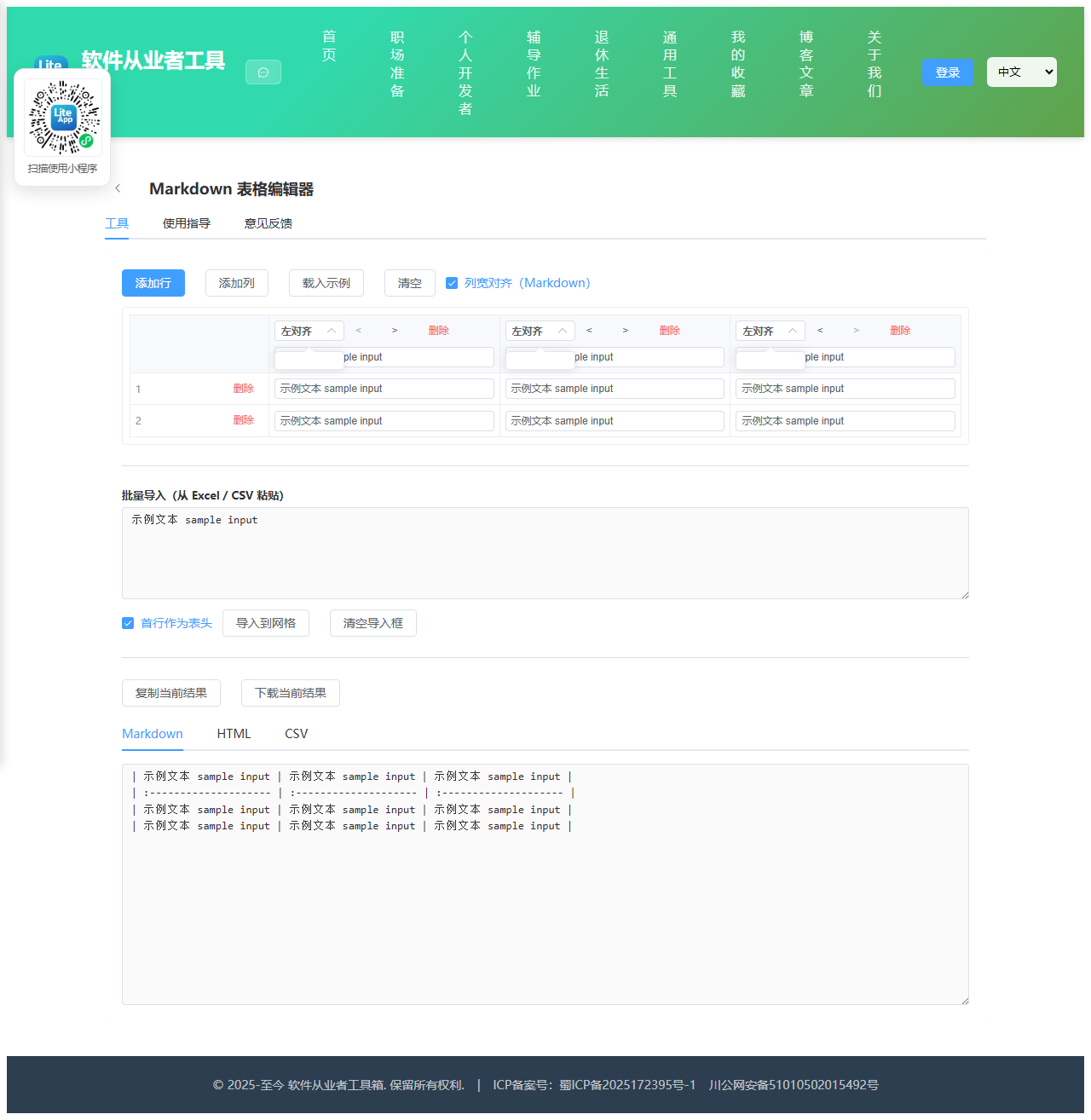
用可视化网格编辑表格内容,实时生成 Markdown、HTML、CSV 三种格式,免去手写管道符和对齐分隔行的麻烦。所有数据只保存在当前浏览器页面中,不会上传,刷新页面即清空。
编辑网格
顶部一行是表头,直接在输入框里改列名;每列右上角的下拉框用来设置该列的对齐方式(左对齐、居中、右对齐),会同步反映到 Markdown 的分隔行与 HTML 的 text-align 样式上。
用「添加行」「添加列」按钮扩展表格,每行行首的删除按钮可移除该行,每列列头的删除按钮可移除整列,也可以用列头的左右箭头调整列顺序。
从表格软件导入
在 Excel、WPS、Numbers 或 Google Sheets 中选中区域复制,粘贴到「批量导入」文本框后点击导入,工具会按制表符切分并填充网格;若粘贴的是逗号分隔的 CSV 文本,会自动切换到 CSV 解析模式,支持双引号包裹、字段内含逗号与换行的标准写法。勾选「首行作为表头」可把第一行直接当作列名。
输出说明
Markdown:单元格中的 | 会转义为 \|,换行会转成 <br> 以免破坏表格结构;勾选「列宽对齐」后会用空格把各列补齐到同宽,源码更整齐(中文按两个字符宽度计算),生成结果在渲染上完全等价。
HTML:输出标准的 table/thead/tbody 结构,特殊字符已做实体转义,可直接嵌入网页;下方提供渲染预览便于确认效果。
CSV:含逗号、双引号或换行的字段会自动用双引号包裹并把内部引号翻倍。下载时会写入 UTF-8 BOM,避免 Excel 打开中文出现乱码。
2.2 代码实现
2.2.1 组件结构
本工具是一个基于 Vue 3 <script setup> 语法的单文件组件(SFC),统一包裹在 ToolPageShell 组件内,由它提供页面标题、工具 ID、分类与「使用指南」插槽等通用外壳;核心业务逻辑(响应式状态、计算属性、事件处理函数)全部写在 <script setup> 中,输入/输出通过 el-input、el-button 等 Element Plus 组件与用户交互,所有数据均在浏览器本地处理,不会上传服务器。
2.2.2 核心逻辑概览
<script setup> 中定义的主要函数/方法:
addRow()removeRow()addColumn()removeColumn()moveColumn()resetTable()loadSample()parseCsv()parseDelimited()importPaste()displayWidth()padCell()mdCell()sepFor()escapeHtml()csvCell()copyOutput()downloadOutput()
2.2.3 关键实现代码
以下是该工具的完整 <script setup> 实现(核心代码)。模板(<template>)与样式(<style>)已省略。
vue
import { ref, computed } from 'vue'
import ToolPageShell from '@/components/ToolPageShell.vue'
const columns = ref([
{ name: '列1', align: 'left' },
{ name: '列2', align: 'left' },
{ name: '列3', align: 'left' }
])
const rows = ref([
['', '', ''],
['', '', '']
])
const prettyAlign = ref(true)
const pasteText = ref('')
const firstRowIsHeader = ref(true)
const importMsg = ref('')
const importError = ref(false)
const activeOutput = ref('markdown')
function addRow() {
rows.value.push(columns.value.map(() => ''))
}
function removeRow(index) {
if (rows.value.length <= 1) return
rows.value.splice(index, 1)
}
function addColumn() {
columns.value.push({ name: '列' + (columns.value.length + 1), align: 'left' })
rows.value.forEach(r => r.push(''))
}
function removeColumn(index) {
if (columns.value.length <= 1) return
columns.value.splice(index, 1)
rows.value.forEach(r => r.splice(index, 1))
}
function moveColumn(index, delta) {
const target = index + delta
if (target < 0 || target >= columns.value.length) return
const cols = columns.value
const tmp = cols[index]
cols[index] = cols[target]
cols[target] = tmp
rows.value.forEach(r => {
const t = r[index]
r[index] = r[target]
r[target] = t
})
}
function resetTable() {
columns.value = [
{ name: '列1', align: 'left' },
{ name: '列2', align: 'left' },
{ name: '列3', align: 'left' }
]
rows.value = [['', '', ''], ['', '', '']]
importMsg.value = ''
}
function loadSample() {
columns.value = [
{ name: '组件', align: 'left' },
{ name: '说明', align: 'left' },
{ name: '版本', align: 'center' },
{ name: '体积(KB)', align: 'right' }
]
rows.value = [
['Vue', '渐进式前端框架', '3.4.0', '34.2'],
['Element Plus', '桌面端组件库', '2.5.6', '812.5'],
['Vite', '前端构建工具', '5.1.0', '128.0']
]
importMsg.value = ''
}
/* ---------- 导入解析 ---------- */
function parseCsv(text) {
const out = []
let row = []
let field = ''
let inQuotes = false
const s = String(text).replace(/\r\n?/g, '\n')
for (let i = 0; i < s.length; i++) {
const ch = s[i]
if (inQuotes) {
if (ch === '"') {
if (s[i + 1] === '"') { field += '"'; i++ } else { inQuotes = false }
} else {
field += ch
}
continue
}
if (ch === '"') { inQuotes = true; continue }
if (ch === ',') { row.push(field); field = ''; continue }
if (ch === '\n') { row.push(field); out.push(row); row = []; field = ''; continue }
field += ch
}
if (field !== '' || row.length) { row.push(field); out.push(row) }
return out.filter(r => r.some(c => String(c).trim() !== ''))
}
function parseDelimited(text) {
const normalized = String(text).replace(/\r\n?/g, '\n')
if (normalized.indexOf('\t') !== -1) {
return normalized
.split('\n')
.filter(line => line.trim() !== '')
.map(line => line.split('\t'))
}
return parseCsv(normalized)
}
function importPaste() {
importMsg.value = ''
importError.value = false
const text = pasteText.value
if (!text.trim()) {
importError.value = true
importMsg.value = '导入内容为空'
return
}
const matrix = parseDelimited(text)
if (!matrix.length) {
importError.value = true
importMsg.value = '未解析到有效数据'
return
}
const width = matrix.reduce((max, r) => Math.max(max, r.length), 0)
const normalized = matrix.map(r => {
const copy = r.slice(0, width).map(c => String(c).trim())
while (copy.length < width) copy.push('')
return copy
})
let headerRow
let bodyRows
if (firstRowIsHeader.value) {
headerRow = normalized[0]
bodyRows = normalized.slice(1)
} else {
headerRow = normalized[0].map((_, i) => '列' + (i + 1))
bodyRows = normalized
}
if (!bodyRows.length) bodyRows = [headerRow.map(() => '')]
const oldAligns = columns.value.map(c => c.align)
columns.value = headerRow.map((name, i) => ({
name: name || '列' + (i + 1),
align: oldAligns[i] || 'left'
}))
rows.value = bodyRows
importMsg.value = '已导入 ' + bodyRows.length + ' 行 × ' + width + ' 列'
}
/* ---------- 输出生成 ---------- */
function displayWidth(str) {
let w = 0
for (const ch of Array.from(String(str))) {
w += /[\u1100-\u115F\u2E80-\uA4CF\uAC00-\uD7A3\uF900-\uFAFF\uFE30-\uFE4F\uFF00-\uFF60\uFFE0-\uFFE6]/.test(ch) ? 2 : 1
}
return w
}
function padCell(text, width, align) {
const diff = width - displayWidth(text)
if (diff <= 0) return text
if (align === 'right') return ' '.repeat(diff) + text
if (align === 'center') {
const left = Math.floor(diff / 2)
return ' '.repeat(left) + text + ' '.repeat(diff - left)
}
return text + ' '.repeat(diff)
}
function mdCell(text) {
return String(text == null ? '' : text)
.replace(/\|/g, '\\|')
.replace(/\r\n?|\n/g, '<br>')
.trim()
}
const markdownOutput = computed(() => {
const cols = columns.value
if (!cols.length) return ''
const header = cols.map(c => mdCell(c.name))
const body = rows.value.map(r => cols.map((_, i) => mdCell(r[i])))
const widths = cols.map((c, i) => {
let w = Math.max(3, displayWidth(header[i]))
body.forEach(r => { w = Math.max(w, displayWidth(r[i])) })
return w
})
const sepFor = (align, width) => {
const w = prettyAlign.value ? Math.max(width, 3) : 3
if (align === 'left') return ':' + '-'.repeat(Math.max(2, w - 1))
if (align === 'right') return '-'.repeat(Math.max(2, w - 1)) + ':'
if (align === 'center') return ':' + '-'.repeat(Math.max(1, w - 2)) + ':'
return '-'.repeat(w)
}
const line = cells => '| ' + cells.join(' | ') + ' |'
const headerLine = prettyAlign.value
? line(header.map((h, i) => padCell(h, widths[i], cols[i].align)))
: line(header)
const sepLine = line(cols.map((c, i) => sepFor(c.align, widths[i])))
const bodyLines = body.map(r =>
prettyAlign.value ? line(r.map((cell, i) => padCell(cell, widths[i], cols[i].align))) : line(r)
)
return [headerLine, sepLine].concat(bodyLines).join('\n')
})
function escapeHtml(text) {
return String(text == null ? '' : text)
.replace(/&/g, '&')
.replace(/</g, '<')
.replace(/>/g, '>')
.replace(/"/g, '"')
.replace(/'/g, ''')
}
const htmlOutput = computed(() => {
const cols = columns.value
if (!cols.length) return ''
const lines = ['<table>', ' <thead>', ' <tr>']
cols.forEach(c => {
lines.push(' <th style="text-align: ' + c.align + ';">' + escapeHtml(c.name) + '</th>')
})
lines.push(' </tr>', ' </thead>', ' <tbody>')
rows.value.forEach(r => {
lines.push(' <tr>')
cols.forEach((c, i) => {
const cell = escapeHtml(r[i]).replace(/\r\n?|\n/g, '<br>')
lines.push(' <td style="text-align: ' + c.align + ';">' + cell + '</td>')
})
lines.push(' </tr>')
})
lines.push(' </tbody>', '</table>')
return lines.join('\n')
})
function csvCell(text) {
const s = String(text == null ? '' : text)
if (/[",\n\r]/.test(s)) return '"' + s.replace(/"/g, '""') + '"'
return s
}
const csvOutput = computed(() => {
const cols = columns.value
if (!cols.length) return ''
const lines = [cols.map(c => csvCell(c.name)).join(',')]
rows.value.forEach(r => {
lines.push(cols.map((_, i) => csvCell(r[i])).join(','))
})
return lines.join('\n')
})
const currentOutput = computed(() => {
if (activeOutput.value === 'html') return htmlOutput.value
if (activeOutput.value === 'csv') return csvOutput.value
return markdownOutput.value
})
function copyOutput() {
const text = currentOutput.value
if (text && navigator.clipboard) navigator.clipboard.writeText(text)
}
function downloadOutput() {
const text = currentOutput.value
if (!text) return
const map = {
markdown: { name: 'table.md', type: 'text/markdown;charset=utf-8', bom: false },
html: { name: 'table.html', type: 'text/html;charset=utf-8', bom: false },
csv: { name: 'table.csv', type: 'text/csv;charset=utf-8', bom: true }
}
const meta = map[activeOutput.value] || map.markdown
const parts = meta.bom ? ['\uFEFF' + text] : [text]
const blob = new Blob(parts, { type: meta.type })
const url = URL.createObjectURL(blob)
const a = document.createElement('a')
a.href = url
a.download = meta.name
document.body.appendChild(a)
a.click()
document.body.removeChild(a)
URL.revokeObjectURL(url)
}2.3 效果截图