Appearance
实现 GIF 制作 工具
分类:general | 标签:GIF、动图、合成 多图合成为 GIF 动图
2.1 功能说明
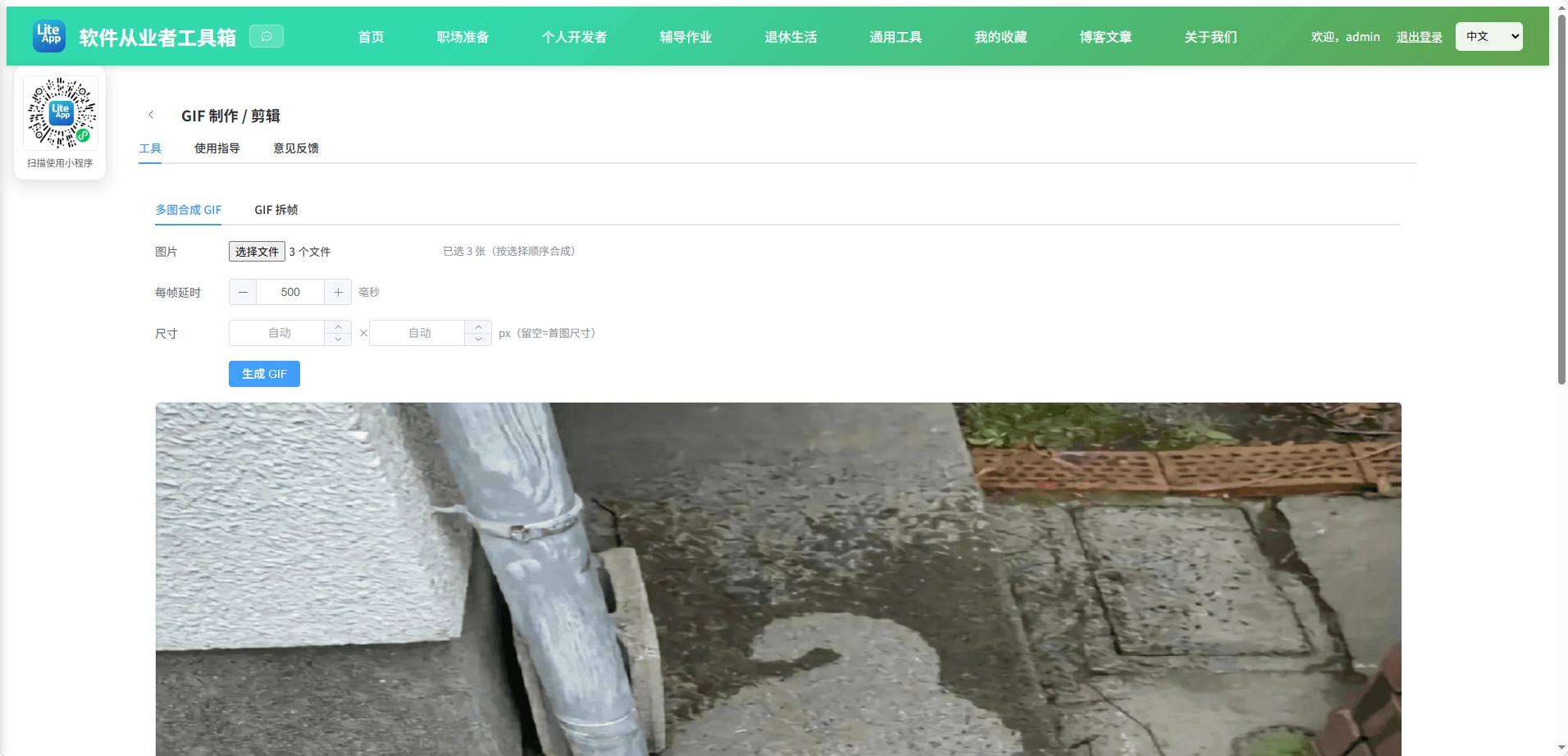
多图合成为 GIF 动图
核心能力
- 多图合成 GIF
- 图片
- 每帧延时
- 尺寸
- GIF 拆帧
- GIF 文件
- 播放速度
- 当前帧
- 缩放
- 启用裁剪
- 起点
- 宽高
2.1.1 使用指南
多图合成 GIF
把多张图片按序合成为 GIF 动图,可设置每帧延时与统一尺寸(表情包、教程动图常用)。
- 至少选择 2 张图片;尺寸留空则按首图自动。
- 合成在浏览器本地完成,图片不会上传服务器。
GIF 拆帧
把一个 GIF 动图反向拆解成一张张静态画面,用于提取表情包素材、逐帧分析动画、截取某一瞬间。
- 在「GIF 拆帧」页选择一个 .gif 文件,工具会自动解码出全部帧。
- 解码时会按 GIF 规范还原每帧的完整画面:GIF 内部只存储与上一帧的差异区域(patch), 并带有「处置方式」标记(保留上一帧 / 清空该区域 / 恢复到更早画面),本工具已逐帧还原, 因此导出的每张 PNG 都是完整可用的图片,而不是残缺的差异块。
- 用播放条可以调速(0.1×–4×)与逆序播放,拖动滑块或点击下方缩略图可跳到任意一帧。
- 右侧可设置缩放比例与裁剪区域,设置会同时作用于「导出帧」和「重新合成 GIF」。
导出说明
- 导出当前帧 PNG:只保存当前正在预览的那一帧。
- 导出全部帧 PNG:逐张触发下载,浏览器可能会询问「是否允许下载多个文件」, 请选择允许;帧数较多时耗时较长,请勿中途切换页面。
- 重新合成 GIF:把裁剪/缩放后的帧重新编码成一个新的 GIF,原始每帧延时会被保留。
- 透明背景的 GIF 导出 PNG 时会保留透明通道;重新合成时透明区域会被填充为白色(GIF 编码限制)。
2.2 代码实现
2.2.1 组件结构
本工具是一个基于 Vue 3 <script setup> 语法的单文件组件(SFC),统一包裹在 ToolPageShell 组件内,由它提供页面标题、工具 ID、分类与「使用指南」插槽等通用外壳;核心业务逻辑(响应式状态、计算属性、事件处理函数)全部写在 <script setup> 中,输入/输出通过 el-input、el-button 等 Element Plus 组件与用户交互,所有数据均在浏览器本地处理,不会上传服务器。
2.2.2 核心逻辑概览
<script setup> 中定义的主要函数/方法:
onFiles()loadImage()generate()download()resetCrop()releaseFrames()onGifFile()canvasToBlob()loadImageFromUrl()decodeGif()drawFrame()selectFrame()onSeek()stepFrame()tick()startPlay()stopPlay()togglePlay()saveBlob()renderOutCanvas()baseName()exportCurrentFrame()exportAllFrames()rebuildGif()downloadRebuilt()
2.2.3 关键实现代码
以下是该工具的完整 <script setup> 实现(核心代码)。模板(<template>)与样式(<style>)已省略。
vue
import { ref, computed, nextTick, onBeforeUnmount } from 'vue'
import { ElMessage } from 'element-plus'
import { VideoPlay, VideoPause } from '@element-plus/icons-vue'
import ToolPageShell from '@/components/ToolPageShell.vue'
import GIF from 'gif.js'
import { parseGIF, decompressFrames } from '@/vendor/gifuct/index.mjs'

const innerTab = ref('make')

const files = ref([])
const delay = ref(500)
const width = ref(null)
const height = ref(null)
const error = ref('')
const rendering = ref(false)
const progress = ref(0)
const url = ref('')

function onFiles(e) {
  error.value = ''
  const list = Array.from(e.target.files || [])
  if (list.length < 2) {
    error.value = '请至少选择 2 张图片'
    return
  }
  files.value = list
}

function loadImage(file) {
  return new Promise((resolve, reject) => {
    const img = new Image()
    img.onload = () => resolve(img)
    img.onerror = reject
    img.src = URL.createObjectURL(file)
  })
}

function generate() {
  error.value = ''
  if (files.value.length < 2) {
    error.value = '请至少选择 2 张图片'
    return
  }
  rendering.value = true
  progress.value = 0
  if (url.value) URL.revokeObjectURL(url.value)

  Promise.all(files.value.map(loadImage))
    .then((imgs) => {
      const W = width.value || imgs[0].naturalWidth
      const H = height.value || imgs[0].naturalHeight
      const gif = new GIF({
        workers: 2,
        quality: 10,
        workerScript: '/gif.worker.js',
        width: W,
        height: H,
        background: '#000'
      })
      imgs.forEach((img) => {
        const c = document.createElement('canvas')
        c.width = W
        c.height = H
        const ctx = c.getContext('2d')
        ctx.drawImage(img, 0, 0, W, H)
        gif.addFrame(c, { delay: delay.value, copy: true })
      })
      gif.on('progress', (p) => {
        progress.value = Math.round(p * 100)
      })
      gif.on('finished', (blob) => {
        url.value = URL.createObjectURL(blob)
        rendering.value = false
      })
      gif.render()
    })
    .catch((e) => {
      error.value = '生成失败:' + (e && e.message ? e.message : String(e))
      rendering.value = false
    })
}

function download() {
  if (!url.value) return
  const a = document.createElement('a')
  a.href = url.value
  a.download = 'output.gif'
  a.click()
}

/* ================== GIF 拆帧 ================== */

const gifInput = ref(null)
const playCanvas = ref(null)
const splitError = ref('')
const splitInfo = ref(null)
const frames = ref([]) // { url, delay, image }
const decoding = ref(false)
const decodeProgress = ref(0)
const currentIndex = ref(0)
const playing = ref(false)
const reverse = ref(false)
const speed = ref(1)

const scalePct = ref(100)
const cropOn = ref(false)
const cropX = ref(0)
const cropY = ref(0)
const cropW = ref(1)
const cropH = ref(1)

const exportingAll = ref(false)
const exportProgress = ref(0)
const rebuilding = ref(false)
const rebuildProgress = ref(0)
const rebuiltUrl = ref('')

let rafId = 0
let lastTs = 0
let acc = 0

const totalDuration = computed(() => frames.value.reduce((s, f) => s + (f.delay || 0), 0))

// 实际参与输出的源区域(裁剪后)
const srcRect = computed(() => {
  const W = splitInfo.value ? splitInfo.value.width : 0
  const H = splitInfo.value ? splitInfo.value.height : 0
  if (!cropOn.value) return { x: 0, y: 0, w: W, h: H }
  const x = Math.min(Math.max(0, cropX.value), Math.max(0, W - 1))
  const y = Math.min(Math.max(0, cropY.value), Math.max(0, H - 1))
  return {
    x,
    y,
    w: Math.max(1, Math.min(cropW.value, W - x)),
    h: Math.max(1, Math.min(cropH.value, H - y))
  }
})

const outSize = computed(() => {
  const r = srcRect.value
  const k = scalePct.value / 100
  return { w: Math.max(1, Math.round(r.w * k)), h: Math.max(1, Math.round(r.h * k)) }
})

function resetCrop() {
  if (!splitInfo.value) return
  cropX.value = 0
  cropY.value = 0
  cropW.value = splitInfo.value.width
  cropH.value = splitInfo.value.height
}

function releaseFrames() {
  for (const f of frames.value) {
    if (f.url) URL.revokeObjectURL(f.url)
  }
  frames.value = []
}

function onGifFile(e) {
  const file = (e.target.files || [])[0]
  if (file) decodeGif(file)
}

function canvasToBlob(canvas, type, quality) {
  return new Promise((resolve, reject) => {
    canvas.toBlob(
      (b) => (b ? resolve(b) : reject(new Error('画布导出失败'))),
      type || 'image/png',
      quality
    )
  })
}

function loadImageFromUrl(src) {
  return new Promise((resolve, reject) => {
    const img = new Image()
    img.onload = () => resolve(img)
    img.onerror = () => reject(new Error('帧图片加载失败'))
    img.src = src
  })
}

/**
 * 解码 GIF:GIF 每帧只存差异区域(patch)与处置方式(disposalType),
 * 需要按规范逐帧叠加还原成完整画面。
 * disposalType: 0/1=保留当前画面,2=把本帧区域清空为背景,3=恢复到本帧绘制前的画面
 */
async function decodeGif(file) {
  stopPlay()
  splitError.value = ''
  releaseFrames()
  splitInfo.value = null
  decoding.value = true
  decodeProgress.value = 0
  currentIndex.value = 0
  if (rebuiltUrl.value) {
    URL.revokeObjectURL(rebuiltUrl.value)
    rebuiltUrl.value = ''
  }

  try {
    const buf = await file.arrayBuffer()
    const gif = parseGIF(buf)
    const raw = decompressFrames(gif, true)
    if (!raw.length) throw new Error('未解析到任何帧')

    const W = gif.lsd.width
    const H = gif.lsd.height

    // 主画布:累积完整画面
    const main = document.createElement('canvas')
    main.width = W
    main.height = H
    const mctx = main.getContext('2d')

    // 补丁画布:放置单帧差异区域
    const patchCanvas = document.createElement('canvas')
    const pctx = patchCanvas.getContext('2d')

    const list = []
    let restore = null // disposalType===3 时保存的还原点

    for (let i = 0; i < raw.length; i++) {
      const f = raw[i]
      const d = f.dims

      if (f.disposalType === 3) {
        restore = mctx.getImageData(0, 0, W, H)
      }

      patchCanvas.width = d.width
      patchCanvas.height = d.height
      pctx.putImageData(new ImageData(f.patch, d.width, d.height), 0, 0)
      // 用 drawImage 而非 putImageData,才能让透明像素与底层画面正确合成
      mctx.drawImage(patchCanvas, d.left, d.top)

      const blob = await canvasToBlob(main, 'image/png')
      const objUrl = URL.createObjectURL(blob)
      const image = await loadImageFromUrl(objUrl)
      list.push({
        url: objUrl,
        image,
        // GIF 的 delay 单位为 1/100 秒,gifuct 已换算为毫秒;0 按浏览器习惯兜底为 100ms
        delay: f.delay && f.delay > 0 ? f.delay : 100,
        dims: d,
        disposalType: f.disposalType
      })

      // 处置:为下一帧准备画面
      if (f.disposalType === 2) {
        mctx.clearRect(d.left, d.top, d.width, d.height)
      } else if (f.disposalType === 3 && restore) {
        mctx.putImageData(restore, 0, 0)
      }

      decodeProgress.value = Math.round(((i + 1) / raw.length) * 100)
      // 让出主线程,避免长 GIF 卡死界面
      if (i % 8 === 7) await new Promise((r) => setTimeout(r, 0))
    }

    frames.value = list
    splitInfo.value = { name: file.name, width: W, height: H }
    cropX.value = 0
    cropY.value = 0
    cropW.value = W
    cropH.value = H
    decoding.value = false
    await nextTick()
    drawFrame(0)
    ElMessage.success(`解码完成,共 ${list.length} 帧`)
  } catch (err) {
    decoding.value = false
    splitError.value = '解析失败:' + (err && err.message ? err.message : String(err))
  }
}

/** 把第 i 帧按裁剪+缩放画到预览画布 */
function drawFrame(i) {
  const f = frames.value[i]
  const cvs = playCanvas.value
  if (!f || !cvs) return
  const r = srcRect.value
  const o = outSize.value
  cvs.width = o.w
  cvs.height = o.h
  const ctx = cvs.getContext('2d')
  ctx.clearRect(0, 0, o.w, o.h)
  ctx.imageSmoothingEnabled = true
  ctx.imageSmoothingQuality = 'high'
  ctx.drawImage(f.image, r.x, r.y, r.w, r.h, 0, 0, o.w, o.h)
}

function selectFrame(i) {
  stopPlay()
  currentIndex.value = i
  drawFrame(i)
}

function onSeek(v) {
  currentIndex.value = v
  drawFrame(v)
}

function stepFrame(dir) {
  stopPlay()
  const n = frames.value.length
  if (!n) return
  currentIndex.value = (currentIndex.value + dir + n) % n
  drawFrame(currentIndex.value)
}

function tick(ts) {
  if (!playing.value) return
  if (!lastTs) lastTs = ts
  const dt = ts - lastTs
  lastTs = ts
  acc += dt * speed.value

  const cur = frames.value[currentIndex.value]
  const need = cur ? cur.delay : 100
  if (acc >= need) {
    acc -= need
    const n = frames.value.length
    currentIndex.value = reverse.value
      ? (currentIndex.value - 1 + n) % n
      : (currentIndex.value + 1) % n
    drawFrame(currentIndex.value)
  }
  rafId = requestAnimationFrame(tick)
}

function startPlay() {
  if (!frames.value.length) return
  playing.value = true
  lastTs = 0
  acc = 0
  rafId = requestAnimationFrame(tick)
}

function stopPlay() {
  playing.value = false
  if (rafId) cancelAnimationFrame(rafId)
  rafId = 0
}

function togglePlay() {
  if (playing.value) stopPlay()
  else startPlay()
}

function saveBlob(blob, name) {
  const objUrl = URL.createObjectURL(blob)
  const a = document.createElement('a')
  a.href = objUrl
  a.download = name
  a.click()
  URL.revokeObjectURL(objUrl)
}

/** 生成指定帧的输出画布(应用裁剪+缩放) */
function renderOutCanvas(i, fillWhite) {
  const f = frames.value[i]
  const r = srcRect.value
  const o = outSize.value
  const c = document.createElement('canvas')
  c.width = o.w
  c.height = o.h
  const ctx = c.getContext('2d')
  if (fillWhite) {
    ctx.fillStyle = '#ffffff'
    ctx.fillRect(0, 0, o.w, o.h)
  }
  ctx.imageSmoothingEnabled = true
  ctx.imageSmoothingQuality = 'high'
  ctx.drawImage(f.image, r.x, r.y, r.w, r.h, 0, 0, o.w, o.h)
  return c
}

function baseName() {
  const n = splitInfo.value ? splitInfo.value.name : 'frame'
  return n.replace(/\.[^.]+$/, '')
}

async function exportCurrentFrame() {
  if (!frames.value.length) return
  const c = renderOutCanvas(currentIndex.value, false)
  const blob = await canvasToBlob(c, 'image/png')
  saveBlob(blob, `${baseName()}-frame-${String(currentIndex.value + 1).padStart(3, '0')}.png`)
}

async function exportAllFrames() {
  if (!frames.value.length) return
  stopPlay()
  exportingAll.value = true
  exportProgress.value = 0
  try {
    for (let i = 0; i < frames.value.length; i++) {
      const c = renderOutCanvas(i, false)
      const blob = await canvasToBlob(c, 'image/png')
      saveBlob(blob, `${baseName()}-frame-${String(i + 1).padStart(3, '0')}.png`)
      exportProgress.value = Math.round(((i + 1) / frames.value.length) * 100)
      // 间隔触发,避免浏览器拦截连续下载
      await new Promise((r) => setTimeout(r, 120))
    }
    ElMessage.success('全部帧已导出')
  } catch (e) {
    splitError.value = '导出失败:' + (e && e.message ? e.message : String(e))
  } finally {
    exportingAll.value = false
  }
}

/** 用当前裁剪/缩放设置重新编码成 GIF(保留原每帧延时,支持逆序) */
function rebuildGif() {
  if (!frames.value.length) return
  stopPlay()
  rebuilding.value = true
  rebuildProgress.value = 0
  if (rebuiltUrl.value) {
    URL.revokeObjectURL(rebuiltUrl.value)
    rebuiltUrl.value = ''
  }
  try {
    const o = outSize.value
    const gif = new GIF({
      workers: 2,
      quality: 10,
      workerScript: '/gif.worker.js',
      width: o.w,
      height: o.h,
      background: '#fff'
    })
    const order = frames.value.map((_, i) => i)
    if (reverse.value) order.reverse()
    for (const i of order) {
      // GIF 不支持半透明,透明区域填白后再编码
      gif.addFrame(renderOutCanvas(i, true), {
        delay: Math.max(20, Math.round(frames.value[i].delay / speed.value)),
        copy: true
      })
    }
    gif.on('progress', (p) => {
      rebuildProgress.value = Math.round(p * 100)
    })
    gif.on('finished', (blob) => {
      rebuiltUrl.value = URL.createObjectURL(blob)
      rebuilding.value = false
      ElMessage.success('重新合成完成')
    })
    gif.render()
  } catch (e) {
    rebuilding.value = false
    splitError.value = '合成失败:' + (e && e.message ? e.message : String(e))
  }
}

function downloadRebuilt() {
  if (!rebuiltUrl.value) return
  const a = document.createElement('a')
  a.href = rebuiltUrl.value
  a.download = `${baseName()}-edited.gif`
  a.click()
}

onBeforeUnmount(() => {
  if (url.value) URL.revokeObjectURL(url.value)
  stopPlay()
  releaseFrames()
  if (rebuiltUrl.value) URL.revokeObjectURL(rebuiltUrl.value)
})
2.3 效果截图