Appearance
实现 文件类型识别 Magic Bytes 工具
分类:developer | 标签:Magic、文件头、签名 通过文件头魔数识别真实文件类型
2.1 功能说明
通过文件头魔数识别真实文件类型
2.1.1 使用指南
功能说明
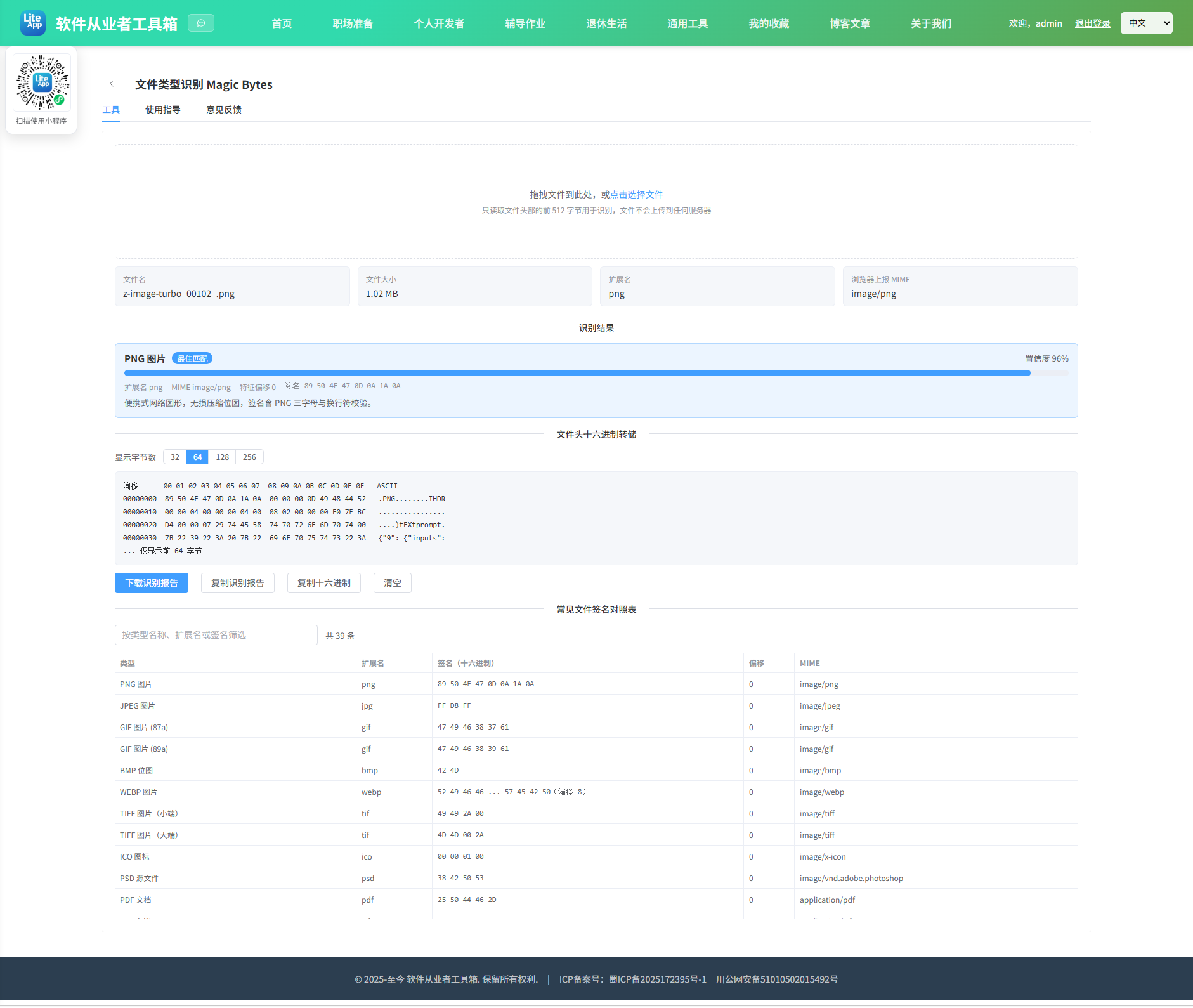
绝大多数二进制文件格式都会在开头写入一段固定的标识字节,业内称为 Magic Bytes(魔数)或文件签名。例如 PNG 文件永远以 89 50 4E 47 0D 0A 1A 0A 开头,其中 50 4E 47 正是 ASCII 的 PNG 三个字母。本工具读取你选择的文件头部字节,与内置的三十余条签名规则逐条比对,给出真实类型判断、置信度评分与完整的十六进制转储。所有读取通过 FileReader 在本地完成,文件不会上传到任何服务器。
为什么不能只看扩展名
扩展名只是文件名的一部分,任何人都可以随手改掉,它不代表文件的真实内容。把 trojan.exe 改名成 photo.jpg,扩展名会骗过肉眼,但文件头的 4D 5A(即 ASCII 的 MZ,DOS 可执行文件标识)骗不了人。这正是文件上传接口必须做服务端魔数校验的原因——只校验扩展名或前端 MIME 类型是典型的安全漏洞,因为两者都可以被客户端任意伪造。
置信度是怎么算的
评分主要看三个因素:签名越长越可信(八字节的 PNG 签名比两字节的 4D 5A 可靠得多,因为随机数据撞上八字节特定序列的概率是二的六十四次方分之一);需要同时匹配多处特征的规则加分(如 WAV 要求开头是 RIFF 且第 8 字节起是 WAVE);扩展名与识别结果吻合再小幅加分。当多条规则同时命中时,工具会按分数从高到低全部列出,方便你自行判断。
关于误判的坦诚说明
魔数识别不是万无一失的,以下几类情况需要特别留意。
容器格式共用签名:DOCX、XLSX、PPTX、JAR、APK、EPUB、ODT 本质上都是 ZIP 压缩包,头部完全相同都是 50 4B 03 04。本工具会进一步读取 ZIP 第一个条目的文件名做二次判断(例如以 word/ 开头判定为 DOCX,以 xl/ 开头判定为 XLSX),但这依赖打包顺序,某些工具生成的文件可能把 [Content_Types].xml 排在最前,此时只能给出「ZIP 或基于 ZIP 的文档」这一较宽泛的结论。RIFF 家族的 WAV、AVI、WEBP 同理,靠第 8 字节起的四字节子类型区分。
短签名易误报:4D 5A(EXE)与 42 4D(BMP)都只有两字节,任何二进制数据开头恰好是这两个字节都会被命中,置信度因此被压低。无签名格式无法识别:纯文本、CSV、HTML、JSON、SVG、部分 TAR 与老式 MP3 并没有可靠魔数,本工具会尝试识别 BOM 与可打印字符比例给出「疑似文本」的提示,但不会武断下结论。偏移量陷阱:TAR 的 ustar 位于第 257 字节,MP4 的 ftyp 位于第 4 字节,所以工具默认读取 512 字节而非仅仅头部几个字节。
结论是:识别结果应当作为参考与线索,安全敏感场景请结合完整解析、沙箱验证与病毒扫描共同判断,不要仅凭本工具的输出就认定文件安全。
使用场景
排查下载文件损坏或类型不符、分析改过后缀的可疑文件、验证文件上传接口的服务端校验是否可靠、CTF 取证题中的文件头修复、以及学习二进制格式结构。
2.2 代码实现
2.2.1 组件结构
本工具是一个基于 Vue 3 <script setup> 语法的单文件组件(SFC),统一包裹在 ToolPageShell 组件内,由它提供页面标题、工具 ID、分类与「使用指南」插槽等通用外壳;核心业务逻辑(响应式状态、计算属性、事件处理函数)全部写在 <script setup> 中,输入/输出通过 el-input、el-button 等 Element Plus 组件与用户交互,所有数据均在浏览器本地处理,不会上传服务器。
2.2.2 核心逻辑概览
<script setup> 中定义的主要函数/方法:
hexToPattern()matchPattern()bytesToAscii()refineZip()detectText()formatSize()handleFile()buildReport()showHint()copyText()downloadReport()clearAll()
2.2.3 关键实现代码
以下是该工具的完整 <script setup> 实现(核心代码)。模板(<template>)与样式(<style>)已省略。
vue
import { computed, reactive, ref } from 'vue'
import ToolPageShell from '@/components/ToolPageShell.vue'

/*
 * 签名定义:
 * hex        主签名,两位一组,?? 表示通配
 * offset     主签名偏移
 * extraHex   附加特征(用于 RIFF 等容器格式)
 * extraOffset 附加特征偏移
 */
const SIGNATURES = [
  { name: 'PNG 图片', ext: 'png', mime: 'image/png', offset: 0, hex: '89 50 4E 47 0D 0A 1A 0A', desc: '便携式网络图形,无损压缩位图,签名含 PNG 三字母与换行符校验。' },
  { name: 'JPEG 图片', ext: 'jpg', mime: 'image/jpeg', offset: 0, hex: 'FF D8 FF', desc: 'JPEG 有损压缩图片,以 SOI 标记开头,结尾通常为 FF D9。' },
  { name: 'GIF 图片 (87a)', ext: 'gif', mime: 'image/gif', offset: 0, hex: '47 49 46 38 37 61', desc: 'GIF 图形交换格式 1987 年版本。' },
  { name: 'GIF 图片 (89a)', ext: 'gif', mime: 'image/gif', offset: 0, hex: '47 49 46 38 39 61', desc: 'GIF 图形交换格式 1989 年版本,支持动画与透明。' },
  { name: 'BMP 位图', ext: 'bmp', mime: 'image/bmp', offset: 0, hex: '42 4D', desc: 'Windows 位图,签名为 ASCII 的 BM,仅两字节需结合文件大小字段确认。' },
  { name: 'WEBP 图片', ext: 'webp', mime: 'image/webp', offset: 0, hex: '52 49 46 46', extraOffset: 8, extraHex: '57 45 42 50', desc: 'RIFF 容器承载的 WebP 图片,第 8 字节起为 WEBP 标识。' },
  { name: 'TIFF 图片(小端)', ext: 'tif', mime: 'image/tiff', offset: 0, hex: '49 49 2A 00', desc: 'Intel 字节序的 TIFF 图片,常见于扫描件与相机原片。' },
  { name: 'TIFF 图片(大端)', ext: 'tif', mime: 'image/tiff', offset: 0, hex: '4D 4D 00 2A', desc: 'Motorola 字节序的 TIFF 图片。' },
  { name: 'ICO 图标', ext: 'ico', mime: 'image/x-icon', offset: 0, hex: '00 00 01 00', desc: 'Windows 图标文件,可包含多个尺寸的位图。' },
  { name: 'PSD 源文件', ext: 'psd', mime: 'image/vnd.adobe.photoshop', offset: 0, hex: '38 42 50 53', desc: 'Photoshop 文档,签名为 ASCII 的 8BPS。' },
  { name: 'PDF 文档', ext: 'pdf', mime: 'application/pdf', offset: 0, hex: '25 50 44 46 2D', desc: '便携式文档格式,签名为 ASCII 的百分号加 PDF 加连字符。' },
  { name: 'RTF 文档', ext: 'rtf', mime: 'application/rtf', offset: 0, hex: '7B 5C 72 74 66', desc: '富文本格式,本质是带标记的纯文本。' },
  { name: 'ZIP 压缩包', ext: 'zip', mime: 'application/zip', offset: 0, hex: '50 4B 03 04', desc: 'ZIP 本地文件头,DOCX、XLSX、PPTX、JAR、APK、EPUB 均基于此格式。' },
  { name: 'ZIP 空压缩包', ext: 'zip', mime: 'application/zip', offset: 0, hex: '50 4B 05 06', desc: '不含任何条目的空 ZIP,仅有中央目录结束记录。' },
  { name: 'RAR 压缩包 (v1.5-4.x)', ext: 'rar', mime: 'application/vnd.rar', offset: 0, hex: '52 61 72 21 1A 07 00', desc: 'RAR 早期版本,签名为 ASCII 的 Rar 加感叹号。' },
  { name: 'RAR 压缩包 (v5+)', ext: 'rar', mime: 'application/vnd.rar', offset: 0, hex: '52 61 72 21 1A 07 01 00', desc: 'RAR 5.0 及以上版本格式。' },
  { name: '7-Zip 压缩包', ext: '7z', mime: 'application/x-7z-compressed', offset: 0, hex: '37 7A BC AF 27 1C', desc: '7z 格式,采用 LZMA 系列算法,压缩率高。' },
  { name: 'GZIP 压缩数据', ext: 'gz', mime: 'application/gzip', offset: 0, hex: '1F 8B 08', desc: 'Gzip 压缩流,第三字节 08 表示使用 DEFLATE 算法。' },
  { name: 'BZIP2 压缩数据', ext: 'bz2', mime: 'application/x-bzip2', offset: 0, hex: '42 5A 68', desc: 'bzip2 压缩,签名为 ASCII 的 BZh。' },
  { name: 'XZ 压缩数据', ext: 'xz', mime: 'application/x-xz', offset: 0, hex: 'FD 37 7A 58 5A 00', desc: 'XZ 压缩格式,常用于 Linux 软件包分发。' },
  { name: 'TAR 归档', ext: 'tar', mime: 'application/x-tar', offset: 257, hex: '75 73 74 61 72', desc: 'TAR 归档,ustar 标识位于第 257 字节而非文件开头。' },
  { name: 'MP3 音频 (ID3)', ext: 'mp3', mime: 'audio/mpeg', offset: 0, hex: '49 44 33', desc: '带 ID3v2 元数据标签的 MP3 文件。' },
  { name: 'MP3 音频 (帧同步)', ext: 'mp3', mime: 'audio/mpeg', offset: 0, hex: 'FF FB', desc: '无标签的 MPEG-1 Layer3 音频帧起始,也可能出现 FF F3 或 FF F2。' },
  { name: 'MP4 视频', ext: 'mp4', mime: 'video/mp4', offset: 4, hex: '66 74 79 70', desc: 'ISO 基础媒体文件格式,ftyp 盒位于第 4 字节,MOV 与 M4A 同族。' },
  { name: 'WAV 音频', ext: 'wav', mime: 'audio/wav', offset: 0, hex: '52 49 46 46', extraOffset: 8, extraHex: '57 41 56 45', desc: 'RIFF 容器承载的无损波形音频。' },
  { name: 'AVI 视频', ext: 'avi', mime: 'video/x-msvideo', offset: 0, hex: '52 49 46 46', extraOffset: 8, extraHex: '41 56 49 20', desc: 'RIFF 容器承载的 AVI 视频。' },
  { name: 'FLAC 音频', ext: 'flac', mime: 'audio/flac', offset: 0, hex: '66 4C 61 43', desc: '自由无损音频编码,签名为 ASCII 的 fLaC。' },
  { name: 'OGG 媒体', ext: 'ogg', mime: 'audio/ogg', offset: 0, hex: '4F 67 67 53', desc: 'Ogg 容器格式,可承载 Vorbis、Opus、Theora 等编码。' },
  { name: 'MIDI 音乐', ext: 'mid', mime: 'audio/midi', offset: 0, hex: '4D 54 68 64', desc: 'MIDI 序列文件,签名为 ASCII 的 MThd。' },
  { name: 'ELF 可执行文件', ext: '', mime: 'application/x-elf', offset: 0, hex: '7F 45 4C 46', desc: 'Linux 与类 Unix 系统的可执行与链接格式。' },
  { name: 'Windows 可执行文件', ext: 'exe', mime: 'application/x-msdownload', offset: 0, hex: '4D 5A', desc: 'DOS 与 Windows 可执行文件,签名为 ASCII 的 MZ,EXE 与 DLL 通用。' },
  { name: 'Java 类文件', ext: 'class', mime: 'application/java-vm', offset: 0, hex: 'CA FE BA BE', desc: 'JVM 字节码文件,魔数为著名的 CAFEBABE。' },
  { name: 'WebAssembly 模块', ext: 'wasm', mime: 'application/wasm', offset: 0, hex: '00 61 73 6D', desc: 'WebAssembly 二进制模块,签名后接版本号。' },
  { name: 'Android DEX', ext: 'dex', mime: 'application/octet-stream', offset: 0, hex: '64 65 78 0A', desc: 'Dalvik 可执行文件,Android 应用的字节码容器。' },
  { name: 'Windows CAB', ext: 'cab', mime: 'application/vnd.ms-cab-compressed', offset: 0, hex: '4D 53 43 46', desc: 'Microsoft 机柜压缩文件,签名为 ASCII 的 MSCF。' },
  { name: 'SQLite 数据库', ext: 'db', mime: 'application/vnd.sqlite3', offset: 0, hex: '53 51 4C 69 74 65 20 66 6F 72 6D 61 74 20 33 00', desc: 'SQLite 3 数据库,签名为字符串 SQLite format 3 加空字节。' },
  { name: 'Office 97-2003 复合文档', ext: 'doc', mime: 'application/vnd.ms-office', offset: 0, hex: 'D0 CF 11 E0 A1 B1 1A E1', desc: 'OLE2 复合文档,旧版 DOC、XLS、PPT 与 MSI 共用此签名。' },
  { name: 'WOFF 字体', ext: 'woff', mime: 'font/woff', offset: 0, hex: '77 4F 46 46', desc: 'Web 开放字体格式第一代。' },
  { name: 'WOFF2 字体', ext: 'woff2', mime: 'font/woff2', offset: 0, hex: '77 4F 46 32', desc: 'Web 开放字体格式第二代,使用 Brotli 压缩。' }
]

const READ_LENGTH = 512

const fileInfo = reactive({ name: '', size: 0, ext: '', type: '' })
const dumpLength = ref(64)
const tableFilter = ref('')
const readError = ref('')
const hint = ref('')
const headBytes = ref(null)

const filteredSignatures = computed(() => {
  const keyword = tableFilter.value.trim().toLowerCase()
  const rows = SIGNATURES.map(item => ({
    name: item.name,
    ext: item.ext || '无',
    mime: item.mime,
    offset: item.offset,
    signature: item.extraHex
      ? item.hex + ' ... ' + item.extraHex + '(偏移 ' + item.extraOffset + ')'
      : item.hex
  }))
  if (!keyword) return rows
  return rows.filter(row =>
    row.name.toLowerCase().includes(keyword) ||
    row.ext.toLowerCase().includes(keyword) ||
    row.mime.toLowerCase().includes(keyword) ||
    row.signature.toLowerCase().includes(keyword)
  )
})

function hexToPattern(hex) {
  return hex.trim().split(/\s+/).map(token => (token === '??' ? -1 : parseInt(token, 16)))
}

function matchPattern(bytes, offset, pattern) {
  if (offset + pattern.length > bytes.length) return false
  for (let i = 0; i < pattern.length; i++) {
    if (pattern[i] === -1) continue
    if (bytes[offset + i] !== pattern[i]) return false
  }
  return true
}

function bytesToAscii(bytes, start, length) {
  let text = ''
  for (let i = start; i < start + length && i < bytes.length; i++) {
    const code = bytes[i]
    text += code >= 0x20 && code <= 0x7e ? String.fromCharCode(code) : ''
  }
  return text
}

// ZIP 家族细分:读取首个本地文件头中的条目名
function refineZip(bytes) {
  if (bytes.length < 34) return null
  const nameLength = bytes[26] | (bytes[27] << 8)
  if (nameLength <= 0 || nameLength > 200) return null
  const entryName = bytesToAscii(bytes, 30, Math.min(nameLength, bytes.length - 30))
  if (!entryName) return null
  if (entryName.startsWith('word/')) return { name: 'Word 文档 DOCX', ext: 'docx', mime: 'application/vnd.openxmlformats-officedocument.wordprocessingml.document', hitName: entryName }
  if (entryName.startsWith('xl/')) return { name: 'Excel 工作簿 XLSX', ext: 'xlsx', mime: 'application/vnd.openxmlformats-officedocument.spreadsheetml.sheet', hitName: entryName }
  if (entryName.startsWith('ppt/')) return { name: 'PowerPoint 演示文稿 PPTX', ext: 'pptx', mime: 'application/vnd.openxmlformats-officedocument.presentationml.presentation', hitName: entryName }
  if (entryName === 'mimetype') return { name: 'ODF 或 EPUB 文档', ext: 'odt/epub', mime: 'application/vnd.oasis.opendocument', hitName: entryName }
  if (entryName.startsWith('META-INF/')) return { name: 'JAR 或 APK 包', ext: 'jar/apk', mime: 'application/java-archive', hitName: entryName }
  if (entryName === '[Content_Types].xml') return { name: 'OOXML 文档(DOCX/XLSX/PPTX 之一)', ext: 'docx/xlsx/pptx', mime: 'application/vnd.openxmlformats-officedocument', hitName: entryName }
  return null
}

// 无签名时的文本探测
function detectText(bytes) {
  if (!bytes.length) return null
  if (bytes.length >= 3 && bytes[0] === 0xef && bytes[1] === 0xbb && bytes[2] === 0xbf) {
    return { name: 'UTF-8 文本(含 BOM)', ext: 'txt', mime: 'text/plain', signature: 'EF BB BF', confidence: 85, desc: '带字节顺序标记的 UTF-8 纯文本。' }
  }
  if (bytes.length >= 2 && bytes[0] === 0xff && bytes[1] === 0xfe) {
    return { name: 'UTF-16 LE 文本', ext: 'txt', mime: 'text/plain', signature: 'FF FE', confidence: 75, desc: '小端字节序的 UTF-16 文本。' }
  }
  if (bytes.length >= 2 && bytes[0] === 0xfe && bytes[1] === 0xff) {
    return { name: 'UTF-16 BE 文本', ext: 'txt', mime: 'text/plain', signature: 'FE FF', confidence: 75, desc: '大端字节序的 UTF-16 文本。' }
  }
  let printable = 0
  const sample = Math.min(bytes.length, 256)
  for (let i = 0; i < sample; i++) {
    const code = bytes[i]
    if (code === 0x09 || code === 0x0a || code === 0x0d || (code >= 0x20 && code <= 0x7e) || code >= 0x80) printable++
  }
  if (sample > 0 && printable / sample > 0.95) {
    return { name: '疑似纯文本或源代码', ext: 'txt', mime: 'text/plain', signature: '无固定签名', confidence: 45, desc: '头部字节均为可打印字符,可能是 TXT、CSV、JSON、HTML、XML 或源代码。此类格式没有魔数,无法精确判定。' }
  }
  return null
}

const matches = computed(() => {
  const bytes = headBytes.value
  if (!bytes || !bytes.length) return []

  const results = []
  for (const sig of SIGNATURES) {
    const pattern = hexToPattern(sig.hex)
    if (!matchPattern(bytes, sig.offset, pattern)) continue
    if (sig.extraHex && !matchPattern(bytes, sig.extraOffset, hexToPattern(sig.extraHex))) continue

    let confidence = Math.min(92, 46 + pattern.length * 6)
    if (sig.extraHex) confidence = Math.min(96, confidence + 8)
    if (sig.offset > 0) confidence = Math.max(40, confidence - 4)
    if (fileInfo.ext && sig.ext && fileInfo.ext === sig.ext) confidence = Math.min(99, confidence + 4)

    results.push({
      name: sig.name,
      ext: sig.ext || '无',
      mime: sig.mime,
      offset: sig.offset,
      signature: sig.extraHex ? sig.hex + ' + ' + sig.extraHex : sig.hex,
      desc: sig.desc,
      confidence
    })

    // ZIP 命中后尝试细分为具体的 Office 或归档类型
    if (sig.hex === '50 4B 03 04') {
      const refined = refineZip(bytes)
      if (refined) {
        results.push({
          name: refined.name,
          ext: refined.ext,
          mime: refined.mime,
          offset: 30,
          signature: '50 4B 03 04 + 条目名 ' + refined.hitName,
          desc: '该 ZIP 包内首个条目为 ' + refined.hitName + ',据此推断为上述具体格式。此判断依赖打包顺序,仅供参考。',
          confidence: refined.ext.includes('/') ? 70 : 90
        })
      }
    }
  }

  if (!results.length) {
    const text = detectText(bytes)
    if (text) results.push({ ...text, offset: 0 })
  }

  return results.sort((a, b) => b.confidence - a.confidence)
})

const extMismatch = computed(() => {
  if (!matches.value.length || !fileInfo.ext) return false
  const best = matches.value[0]
  if (!best.ext || best.ext === '无') return false
  return !best.ext.split('/').includes(fileInfo.ext)
})

const hexDump = computed(() => {
  const bytes = headBytes.value
  if (!bytes || !bytes.length) return ''
  const limit = Math.min(dumpLength.value, bytes.length)
  const lines = ['偏移      00 01 02 03 04 05 06 07  08 09 0A 0B 0C 0D 0E 0F   ASCII']
  for (let offset = 0; offset < limit; offset += 16) {
    const left = []
    const right = []
    let ascii = ''
    for (let i = 0; i < 16; i++) {
      const index = offset + i
      let cell = '  '
      if (index < limit) {
        const code = bytes[index]
        cell = code.toString(16).toUpperCase().padStart(2, '0')
        ascii += code >= 0x20 && code <= 0x7e ? String.fromCharCode(code) : '.'
      } else {
        ascii += ' '
      }
      if (i < 8) left.push(cell)
      else right.push(cell)
    }
    const offsetLabel = offset.toString(16).toUpperCase().padStart(8, '0')
    lines.push(offsetLabel + '  ' + left.join(' ') + '  ' + right.join(' ') + '   ' + ascii)
  }
  if (bytes.length > limit) lines.push('... 仅显示前 ' + limit + ' 字节')
  return lines.join('\n')
})

function formatSize(bytes) {
  if (bytes < 1024) return bytes + ' B'
  if (bytes < 1024 * 1024) return (bytes / 1024).toFixed(2) + ' KB'
  if (bytes < 1024 * 1024 * 1024) return (bytes / 1024 / 1024).toFixed(2) + ' MB'
  return (bytes / 1024 / 1024 / 1024).toFixed(2) + ' GB'
}

function handleFile(file) {
  const raw = file.raw
  if (!raw) return
  readError.value = ''
  headBytes.value = null

  const dotIndex = raw.name.lastIndexOf('.')
  fileInfo.name = raw.name
  fileInfo.size = raw.size
  fileInfo.ext = dotIndex > 0 ? raw.name.slice(dotIndex + 1).toLowerCase() : ''
  fileInfo.type = raw.type

  const slice = raw.slice(0, READ_LENGTH)
  const reader = new FileReader()
  reader.onload = () => {
    headBytes.value = new Uint8Array(reader.result)
  }
  reader.onerror = () => {
    readError.value = '文件读取失败,请重试或更换文件'
  }
  reader.readAsArrayBuffer(slice)
}

function buildReport() {
  const lines = []
  lines.push('文件类型识别报告')
  lines.push('文件名:' + fileInfo.name)
  lines.push('文件大小:' + formatSize(fileInfo.size))
  lines.push('扩展名:' + (fileInfo.ext || '无'))
  lines.push('浏览器上报 MIME:' + (fileInfo.type || '未知'))
  lines.push('')
  lines.push('[识别结果]')
  if (matches.value.length) {
    matches.value.forEach((item, index) => {
      lines.push((index + 1) + '. ' + item.name + '(置信度 ' + item.confidence + '%)')
      lines.push('   扩展名 ' + item.ext + ' | MIME ' + item.mime + ' | 偏移 ' + item.offset)
      lines.push('   签名 ' + item.signature)
      lines.push('   ' + item.desc)
    })
  } else {
    lines.push('未匹配到任何已知签名')
  }
  lines.push('')
  lines.push('[文件头十六进制转储]')
  lines.push(hexDump.value)
  return lines.join('\n')
}

function showHint(text) {
  hint.value = text
  window.setTimeout(() => { hint.value = '' }, 2000)
}

async function copyText(text) {
  if (!text) return
  try {
    await navigator.clipboard.writeText(text)
    showHint('已复制到剪贴板')
  } catch {
    showHint('复制失败,请手动选择文本复制')
  }
}

function downloadReport() {
  const blob = new Blob([buildReport()], { type: 'text/plain;charset=utf-8' })
  const url = URL.createObjectURL(blob)
  const link = document.createElement('a')
  link.href = url
  link.download = (fileInfo.name || 'file') + '-magic-bytes.txt'
  document.body.appendChild(link)
  link.click()
  document.body.removeChild(link)
  URL.revokeObjectURL(url)
  showHint('已开始下载')
}

function clearAll() {
  fileInfo.name = ''
  fileInfo.size = 0
  fileInfo.ext = ''
  fileInfo.type = ''
  headBytes.value = null
  readError.value = ''
}
2.3 效果截图