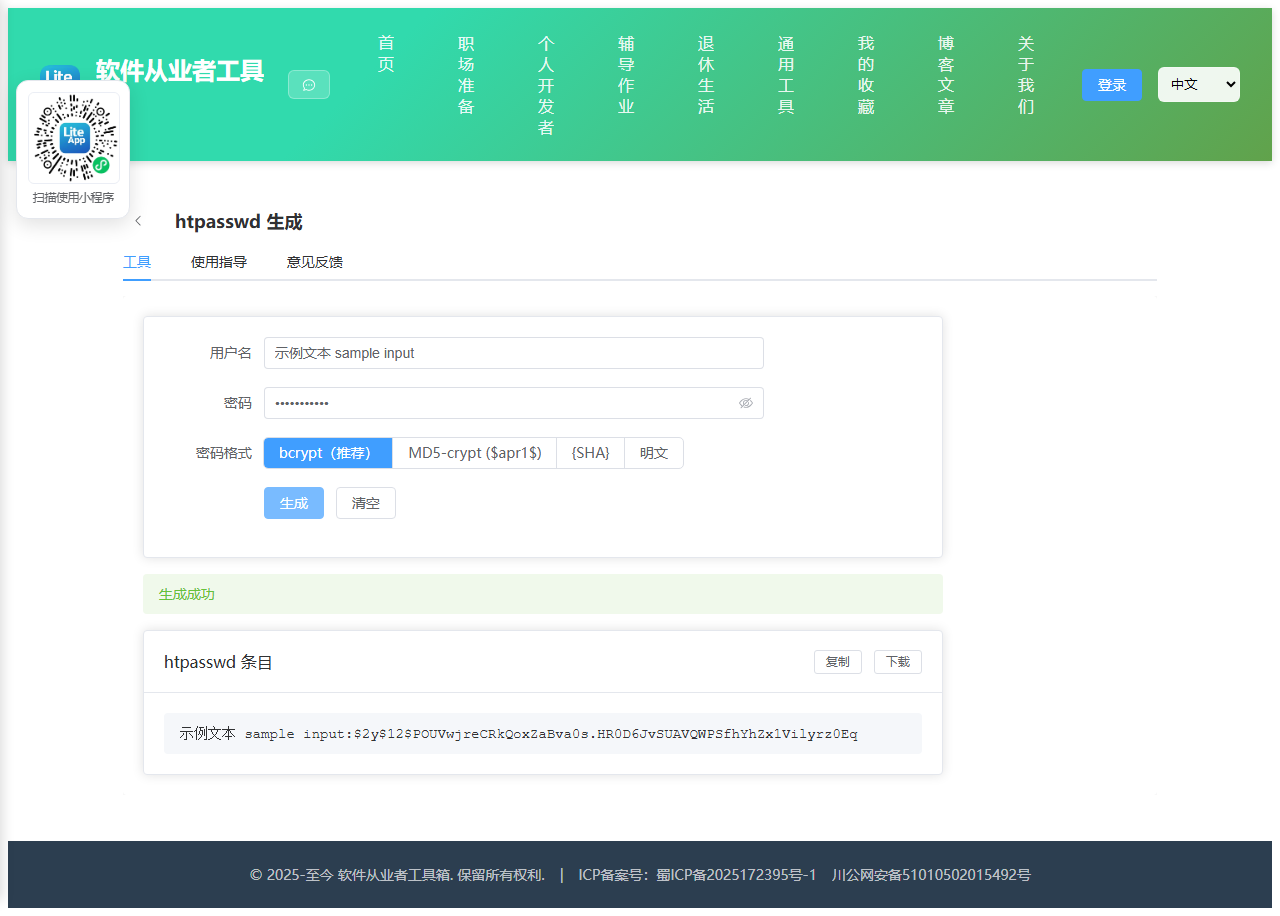
Appearance
实现 htpasswd 生成 工具
分类:developer | 标签:htpasswd、Basic Auth、bcrypt 生成 Nginx/Apache Basic Auth 密码文件
2.1 功能说明
生成 Nginx/Apache Basic Auth 密码文件
2.1.1 使用指南
功能说明
在线生成 Nginx / Apache Basic Auth 的 htpasswd 条目,支持四种密码格式:
- bcrypt(推荐):使用 bcrypt 算法(cost=12),输出
$2y$前缀,Nginx 1.10+ 与 Apache 2.4+ 均支持。安全级别最高。 - MD5-crypt($apr1$):Apache 传统格式,兼容性最好。基于 MD5 的加盐哈希,安全性有限,仅建议在旧系统兼容场景使用。
- SHA1({SHA}):LDAP 形式的 base64(SHA1(password)),轻量但不加盐,安全性低。Nginx 用 auth_basic 时支持。
- 明文:不安全,仅用于测试环境。
关于 $2a$ 与 $2y$:两者算法完全相同,区别仅是前缀标记(PHP 修复的一个历史 bug 导致区分)。bcryptjs 输出 $2a$,此处自动转换为 $2y$ 以符合 htpasswd 习惯。Apache 认 $2y$,Nginx 两者皆认。
浏览器端使用 WebCrypto API 生成随机数,无需联网。
2.2 代码实现
2.2.1 组件结构
本工具是一个基于 Vue 3 <script setup> 语法的单文件组件(SFC),统一包裹在 ToolPageShell 组件内,由它提供页面标题、工具 ID、分类与「使用指南」插槽等通用外壳;核心业务逻辑(响应式状态、计算属性、事件处理函数)全部写在 <script setup> 中,输入/输出通过 el-input、el-button 等 Element Plus 组件与用户交互,所有数据均在浏览器本地处理,不会上传服务器。
2.2.2 核心逻辑概览
<script setup> 中定义的主要函数/方法:
genBcrypt()genSha()md5core()toB64()genSalt()genApr1()genPlain()generate()copyOutput()downloadOutput()
2.2.3 关键实现代码
以下是该工具的完整 <script setup> 实现(核心代码)。模板(<template>)与样式(<style>)已省略。
vue
import { ref, onMounted } from 'vue'
import ToolPageShell from '@/components/ToolPageShell.vue'
import bcrypt from '@/vendor/bcryptjs/bcrypt.js'

const user = ref('')
const pass = ref('')
const fmt = ref('bcrypt')
const output = ref('')
const err = ref('')
const ok = ref('')
const busy = ref(false)

// --- bcrypt ---
function genBcrypt() {
  const h = bcrypt.hashSync(pass.value, 12)
  // $2a$ -> $2y$ (Apache convention; algorithm identical)
  return h.replace(/^\$2a\$/, '$2y$')
}

// --- SHA1 ({SHA}base64) ---
async function genSha() {
  const enc = new TextEncoder()
  const buf = await crypto.subtle.digest('SHA-1', enc.encode(pass.value))
  const bytes = new Uint8Array(buf)
  let bin = ''
  for (let i = 0; i < bytes.length; i++) bin += String.fromCharCode(bytes[i])
  const b64 = btoa(bin)
  return '{SHA}' + b64
}

// --- MD5-crypt ($apr1$) ---
// Apache APR1 MD5 algorithm: standard MD5-crypt variant
function md5core(input) {
  // Use a synchronous MD5 implementation (inline, no deps)
  // Based on RFC 1321 reference implementation
  const s = [7,12,17,22,7,12,17,22,7,12,17,22,7,12,17,22,
             5,9,14,20,5,9,14,20,5,9,14,20,5,9,14,20,
             4,11,16,23,4,11,16,23,4,11,16,23,4,11,16,23,
             6,10,15,21,6,10,15,21,6,10,15,21,6,10,15,21]
  const K = [0xd76aa478,0xe8c7b756,0x242070db,0xc1bdceee,
            0xf57c0faf,0x4787c62a,0xa8304613,0xfd469501,
            0x698098d8,0x8b44f7af,0xffff5bb1,0x895cd7be,
            0x6b901122,0xfd987193,0xa679438e,0x49b40821,
            0xf61e2562,0xc040b340,0x265e5a51,0xe9b6c7aa,
            0xd62f105d,0x02441453,0xd8a1e681,0xe7d3fbc8,
            0x21e1cde6,0xc33707d6,0xf4d50d87,0x455a14ed,
            0xa9e3e905,0xfcefa3f8,0x676f02d9,0x8d2a4c8a,
            0xfffa3942,0x8771f681,0x6d9d6122,0xfde5380c,
            0xa4beea44,0x4bdecfa9,0xf6bb4b60,0xbebfbc70,
            0x289b7ec6,0xeaa127fa,0xd4ef3085,0x04881d05,
            0xd9d4d039,0xe6db99e5,0x1fa27cf8,0xc4ac5665,
            0xf4292244,0x432aff97,0xab9423a7,0xfc93a039,
            0x655b59c3,0x8f0ccc92,0xffeff47d,0x85845dd1,
            0x6fa87e4f,0xfe2ce6e0,0xa3014314,0x4e0811a1,
            0xf7537e82,0xbd3af235,0x2ad7d2bb,0xeb86d391]

  // Convert string to bytes (UTF-8)
  const bytes = typeof input === 'string'
    ? Array.from(new TextEncoder().encode(input))
    : Array.from(input)

  // Pad
  const origLen = bytes.length
  bytes.push(0x80)
  while (bytes.length % 64 !== 56) bytes.push(0)
  const bits = origLen * 8
  // Append length as 64-bit little-endian
  for (let i = 0; i < 8; i++) bytes.push((bits >>> (i * 8)) & 0xFF)

  let a0 = 0x67452301, b0 = 0xefcdab89, c0 = 0x98badcfe, d0 = 0x10325476

  for (let chunk = 0; chunk < bytes.length; chunk += 64) {
    const M = []
    for (let j = 0; j < 16; j++) {
      M[j] = bytes[chunk + j*4] | (bytes[chunk + j*4+1] << 8) | (bytes[chunk + j*4+2] << 16) | (bytes[chunk + j*4+3] << 24)
    }
    let A = a0, B = b0, C = c0, D = d0
    for (let i = 0; i < 64; i++) {
      let F, g
      if (i < 16) { F = (B & C) | (~B & D); g = i }
      else if (i < 32) { F = (D & B) | (~D & C); g = (5*i + 1) % 16 }
      else if (i < 48) { F = B ^ C ^ D; g = (3*i + 5) % 16 }
      else { F = C ^ (B | ~D); g = (7*i) % 16 }
      F = (F + A + K[i] + M[g]) >>> 0
      A = D
      D = C
      C = B
      B = (B + ((F << s[i]) | (F >>> (32 - s[i])))) >>> 0
    }
    a0 = (a0 + A) >>> 0
    b0 = (b0 + B) >>> 0
    c0 = (c0 + C) >>> 0
    d0 = (d0 + D) >>> 0
  }

  // Output as 16 bytes
  const out = []
  for (const v of [a0, b0, c0, d0]) {
    for (let i = 0; i < 4; i++) out.push((v >>> (i * 8)) & 0xFF)
  }
  return out
}

// Base64 encode for apr1 (custom alphabet: ./0-9A-Za-z)
const B64 = './0123456789ABCDEFGHIJKLMNOPQRSTUVWXYZabcdefghijklmnopqrstuvwxyz'
function toB64(bytes, n) {
  let out = ''
  for (let i = 0; i < n; i += 3) {
    const b0 = bytes[i] || 0, b1 = bytes[i+1] || 0, b2 = bytes[i+2] || 0
    out += B64[b0 & 0x3f]
    out += B64[((b0 >> 6) | (b1 << 2)) & 0x3f]
    if (i + 1 < n) {
      out += B64[((b1 >> 4) | (b2 << 4)) & 0x3f]
      if (i + 2 < n) out += B64[b2 >> 2 & 0x3f]
    }
  }
  return out
}

function genSalt() {
  const arr = new Uint8Array(8)
  crypto.getRandomValues(arr)
  let salt = ''
  for (const b of arr) salt += B64[b & 0x3f]
  return salt.substring(0, 8)
}

function genApr1() {
  const pw = pass.value
  const salt = genSalt()
  // APR1 algorithm
  // 1. pw + salt + pw -> md5
  const ctx1 = md5core(Array.from(new TextEncoder().encode(pw + '$apr1$' + salt + pw)))
  // 2. pw + salt + ctx1 + pw alternation
  let final = md5core(Array.from(new TextEncoder().encode(pw + salt + '$apr1$')))
  const pwBytes = Array.from(new TextEncoder().encode(pw))
  const ctx1Bytes = ctx1
  let pl = pw.length
  while (pl > 0) {
    if (pl > 16) {
      final = final.concat(ctx1Bytes.slice(0, 16))
    } else {
      final = final.concat(ctx1Bytes.slice(0, pl))
    }
    pl -= 16
  }
  // 3. bit-by-bit loop
  for (let i = pw.length; i > 0; i >>= 1) {
    if (i & 1) {
      final = final.concat([0])
    } else {
      final = final.concat([pwBytes[0]])
    }
  }
  // 4. 1000 rounds
  let hash = md5core(final)
  for (let i = 0; i < 1000; i++) {
    let input
    if (i & 1) {
      input = pwBytes.concat(hash)
    } else {
      input = hash.concat(pwBytes)
    }
    if (i % 3 !== 0) input = input.concat(Array.from(new TextEncoder().encode(salt)))
    if (i % 7 !== 0) input = input.concat(pwBytes)
    if (i & 1) {
      input = input.concat(hash)
    } else {
      input = input.concat(pwBytes)
    }
    hash = md5core(input)
  }
  // 5. Reorder and base64 encode
  const reordered = []
  const order = [
    [0, 6, 12],
    [1, 7, 13],
    [2, 8, 14],
    [3, 9, 15],
    [4, 10, 5],
  ]
  for (const grp of order) {
    for (const idx of grp) reordered.push(hash[idx])
  }
  reordered.push(hash[11])
  const b64 = toB64(reordered, 22)
  return '$apr1$' + salt + '$' + b64
}

// --- Plaintext ---
function genPlain() {
  return pass.value
}

async function generate() {
  err.value = ''
  ok.value = ''
  if (!user.value.trim()) { err.value = '请输入用户名'; return }
  if (!pass.value) { err.value = '请输入密码'; return }

  busy.value = true
  try {
    let hash
    switch (fmt.value) {
      case 'bcrypt':
        hash = genBcrypt()
        break
      case 'apr1':
        hash = genApr1()
        break
      case 'sha':
        hash = await genSha()
        break
      case 'plain':
        hash = genPlain()
        break
    }
    output.value = user.value + ':' + hash
    ok.value = '生成成功'
  } catch (e) {
    err.value = '生成失败:' + (e.message || String(e))
  } finally {
    busy.value = false
  }
}

function copyOutput() {
  navigator.clipboard.writeText(output.value).then(() => {
    ok.value = '已复制到剪贴板'
  })
}

function downloadOutput() {
  const blob = new Blob([output.value + '\n'], { type: 'text/plain' })
  const url = URL.createObjectURL(blob)
  const a = document.createElement('a')
  a.href = url
  a.download = '.htpasswd'
  a.click()
  URL.revokeObjectURL(url)
}
2.3 效果截图