Appearance
实现 电子签名生成 工具
分类:general | 标签:签名、手写、签名板 手写电子签名,支持导出透明 PNG
2.1 功能说明
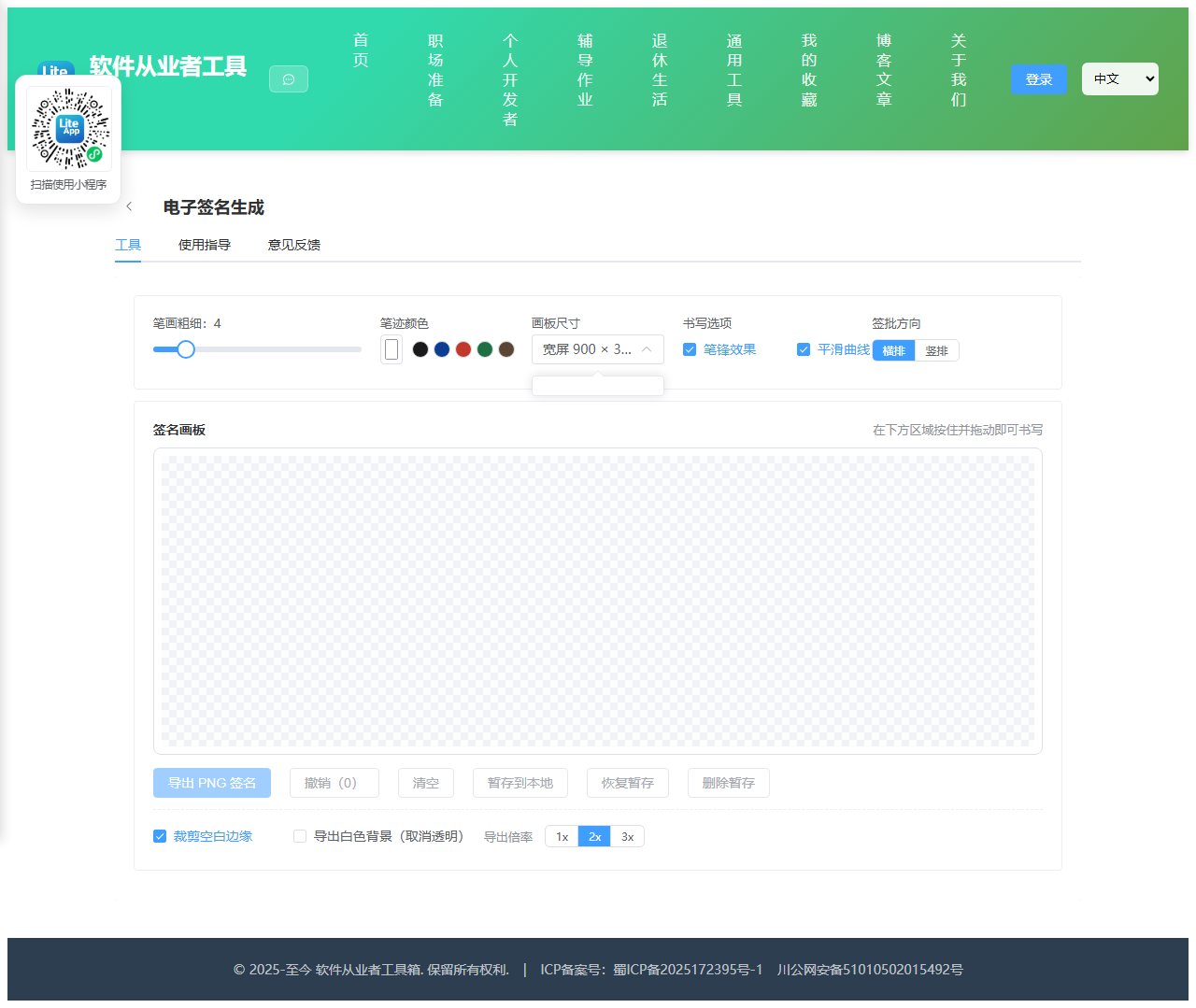
手写电子签名,支持导出透明 PNG
2.1.1 使用指南
功能说明
用鼠标、触控板、手写笔或手机触屏在画板上手写签名,实时生成透明背景的 PNG 图片, 可以直接插入合同、审批单、PDF 或 Word 文档。整个过程在浏览器本地完成,签名笔迹不会上传到任何服务器。
怎么签得好看
用触屏或手写笔书写效果最自然;使用鼠标时建议放慢速度、把笔画粗细调到 3~5,并适当打开「笔锋效果」。
笔锋效果:开启后会根据书写速度自动调节线条粗细,快速划过的地方变细、慢速停顿的地方变粗,接近真实毛笔与钢笔的手感。使用支持压感的手写笔时,会直接采用笔的压力值。
撤销:每一笔都会记录一次快照,最多可回退 20 步。清空操作同样可以撤销。
关于透明背景
画板本身就是透明的,页面上看到的浅灰方格只是提示背景,不会被画进图片。 因此导出的 PNG 天然带透明通道,盖在任何底色的文件上都不会出现白色方块。 如果你需要白底签名(部分老系统不支持透明 PNG),可以在导出前勾选「导出白色背景」。
裁剪空白边缘
开启后导出时会自动扫描像素,找到笔迹的最小外接矩形并只保留这一块(四周留少量安全边距)。 这样得到的图片没有多余空白,插入文档后更容易对齐和缩放。关闭则导出整块画板。
横排与竖排
竖排会把签名整体旋转 90 度导出,适合中式公文、书画落款等需要竖向签批的场景。画板中仍按正常横向书写即可。
本地暂存
「暂存到本地」会把当前笔迹保存在浏览器的 localStorage 中,关闭页面后再回来可以点「恢复暂存」继续修改。 数据仅存在你自己的这台设备的这个浏览器里,清理浏览器数据会一并清除。涉及正式法律效力的签名,请以对方要求的签署方式为准。
法律提示
本工具生成的仅是签名图片,不含时间戳、数字证书等可信要素,不等同于符合电子签名法的可靠电子签名,请勿用于需要严格法律效力的场景。
2.2 代码实现
2.2.1 组件结构
本工具是一个基于 Vue 3 <script setup> 语法的单文件组件(SFC),统一包裹在 ToolPageShell 组件内,由它提供页面标题、工具 ID、分类与「使用指南」插槽等通用外壳;核心业务逻辑(响应式状态、计算属性、事件处理函数)全部写在 <script setup> 中,输入/输出通过 el-input、el-button 等 Element Plus 组件与用户交互,所有数据均在浏览器本地处理,不会上传服务器。
2.2.2 核心逻辑概览
<script setup> 中定义的主要函数/方法:
notify()initCanvas()getPoint()pushHistory()computeWidth()onDown()onMove()onUp()undo()clearBoard()checkEmpty()getBounds()downloadBlob()exportPng()checkDraft()saveDraft()loadDraft()restore()removeDraft()
2.2.3 关键实现代码
以下是该工具的完整 <script setup> 实现(核心代码)。模板(<template>)与样式(<style>)已省略。
vue
import { ref, computed, watch, onMounted, onBeforeUnmount, nextTick } from 'vue'
import ToolPageShell from '@/components/ToolPageShell.vue'

const STORAGE_KEY = 'tool_e_signature_draft'
const MAX_HISTORY = 20

const canvasEl = ref(null)
const lineWidth = ref(4)
const penColor = ref('#1a1a1a')
const boardSize = ref('900x300')
const useTaper = ref(true)
const smooth = ref(true)
const orientation = ref('h')
const trimEdges = ref(true)
const whiteBg = ref(false)
const scale = ref(2)

const isEmpty = ref(true)
const strokeCount = ref(0)
const history = ref([])
const hasDraft = ref(false)
const message = ref('')
const messageType = ref('success')

const swatches = ['#1a1a1a', '#0b3d91', '#c0392b', '#1e6f42', '#5b4636']

let ctx = null
let drawing = false
let lastPoint = null
let lastWidth = 0

const boardW = computed(() => Number(boardSize.value.split('x')[0]))
const boardH = computed(() => Number(boardSize.value.split('x')[1]))

function notify(text, type) {
  message.value = text
  messageType.value = type || 'success'
  setTimeout(() => {
    message.value = ''
  }, 2600)
}

function initCanvas() {
  const cv = canvasEl.value
  if (!cv) return
  cv.width = boardW.value
  cv.height = boardH.value
  ctx = cv.getContext('2d', { willReadFrequently: true })
  ctx.lineCap = 'round'
  ctx.lineJoin = 'round'
  ctx.clearRect(0, 0, cv.width, cv.height)
  history.value = []
  strokeCount.value = 0
  isEmpty.value = true
}

// 把指针坐标从 CSS 像素映射到画布内部像素
function getPoint(e) {
  const cv = canvasEl.value
  const rect = cv.getBoundingClientRect()
  const sx = cv.width / rect.width
  const sy = cv.height / rect.height
  let pressure = 0
  if (e.pointerType !== 'mouse' && typeof e.pressure === 'number' && e.pressure > 0 && e.pressure < 1) {
    pressure = e.pressure
  }
  return {
    x: (e.clientX - rect.left) * sx,
    y: (e.clientY - rect.top) * sy,
    p: pressure,
    t: performance.now()
  }
}

function pushHistory() {
  if (!ctx) return
  try {
    const snap = ctx.getImageData(0, 0, canvasEl.value.width, canvasEl.value.height)
    history.value.push(snap)
    if (history.value.length > MAX_HISTORY) history.value.shift()
  } catch (err) {
    // 快照失败不影响继续书写
  }
}

function computeWidth(from, to) {
  const base = lineWidth.value
  if (!useTaper.value) return base
  if (to.p > 0) {
    // 有压感设备:直接用压力值,范围 40% ~ 160%
    return base * (0.4 + to.p * 1.2)
  }
  const dx = to.x - from.x
  const dy = to.y - from.y
  const dist = Math.sqrt(dx * dx + dy * dy)
  const dt = Math.max(1, to.t - from.t)
  const speed = dist / dt
  // 速度越快线条越细
  const factor = Math.max(0.35, Math.min(1.35, 1.35 - speed * 0.85))
  return base * factor
}

function onDown(e) {
  if (!ctx) return
  e.preventDefault()
  const cv = canvasEl.value
  if (cv.setPointerCapture) {
    try {
      cv.setPointerCapture(e.pointerId)
    } catch (err) {
      // 某些浏览器不支持时忽略
    }
  }
  pushHistory()
  drawing = true
  lastPoint = getPoint(e)
  lastWidth = lineWidth.value

  // 单击点一个圆点,避免点按无痕迹
  ctx.beginPath()
  ctx.fillStyle = penColor.value
  ctx.arc(lastPoint.x, lastPoint.y, lineWidth.value / 2, 0, Math.PI * 2)
  ctx.fill()

  isEmpty.value = false
  strokeCount.value++
}

function onMove(e) {
  if (!drawing || !ctx) return
  e.preventDefault()
  const point = getPoint(e)
  const target = computeWidth(lastPoint, point)
  // 与上一段宽度插值,避免粗细突变
  const w = lastWidth + (target - lastWidth) * 0.35

  ctx.strokeStyle = penColor.value
  ctx.lineWidth = Math.max(0.5, w)
  ctx.beginPath()
  ctx.moveTo(lastPoint.x, lastPoint.y)
  if (smooth.value) {
    const mx = (lastPoint.x + point.x) / 2
    const my = (lastPoint.y + point.y) / 2
    ctx.quadraticCurveTo(lastPoint.x, lastPoint.y, mx, my)
    ctx.lineTo(point.x, point.y)
  } else {
    ctx.lineTo(point.x, point.y)
  }
  ctx.stroke()

  lastPoint = point
  lastWidth = w
}

function onUp(e) {
  if (!drawing) return
  drawing = false
  lastPoint = null
  const cv = canvasEl.value
  if (cv && cv.releasePointerCapture && e && e.pointerId !== undefined) {
    try {
      cv.releasePointerCapture(e.pointerId)
    } catch (err) {
      // 忽略
    }
  }
}

function undo() {
  if (!ctx || history.value.length === 0) return
  const snap = history.value.pop()
  ctx.putImageData(snap, 0, 0)
  strokeCount.value = Math.max(0, strokeCount.value - 1)
  isEmpty.value = checkEmpty()
}

function clearBoard() {
  if (!ctx) return
  pushHistory()
  ctx.clearRect(0, 0, canvasEl.value.width, canvasEl.value.height)
  strokeCount.value = 0
  isEmpty.value = true
}

function checkEmpty() {
  if (!ctx) return true
  try {
    const d = ctx.getImageData(0, 0, canvasEl.value.width, canvasEl.value.height).data
    for (let i = 3; i < d.length; i += 4) {
      if (d[i] !== 0) return false
    }
    return true
  } catch (err) {
    return false
  }
}

// 找到笔迹的最小外接矩形
function getBounds() {
  const cv = canvasEl.value
  const d = ctx.getImageData(0, 0, cv.width, cv.height).data
  let minX = cv.width
  let minY = cv.height
  let maxX = -1
  let maxY = -1
  for (let y = 0; y < cv.height; y++) {
    for (let x = 0; x < cv.width; x++) {
      if (d[(y * cv.width + x) * 4 + 3] !== 0) {
        if (x < minX) minX = x
        if (x > maxX) maxX = x
        if (y < minY) minY = y
        if (y > maxY) maxY = y
      }
    }
  }
  if (maxX < 0) return null
  return { x: minX, y: minY, w: maxX - minX + 1, h: maxY - minY + 1 }
}

function downloadBlob(blob, name) {
  const url = URL.createObjectURL(blob)
  const a = document.createElement('a')
  a.href = url
  a.download = name
  document.body.appendChild(a)
  a.click()
  document.body.removeChild(a)
  setTimeout(() => URL.revokeObjectURL(url), 1000)
}

function exportPng() {
  const cv = canvasEl.value
  if (!cv || isEmpty.value) return

  let sx = 0
  let sy = 0
  let sw = cv.width
  let sh = cv.height

  if (trimEdges.value) {
    const b = getBounds()
    if (!b) {
      notify('画板内没有笔迹', 'warning')
      return
    }
    const pad = Math.round(lineWidth.value * 2 + 6)
    sx = Math.max(0, b.x - pad)
    sy = Math.max(0, b.y - pad)
    sw = Math.min(cv.width - sx, b.w + pad * 2)
    sh = Math.min(cv.height - sy, b.h + pad * 2)
  }

  const s = scale.value
  const vertical = orientation.value === 'v'

  const out = document.createElement('canvas')
  out.width = Math.max(1, Math.round((vertical ? sh : sw) * s))
  out.height = Math.max(1, Math.round((vertical ? sw : sh) * s))
  const octx = out.getContext('2d')

  if (whiteBg.value) {
    octx.fillStyle = '#ffffff'
    octx.fillRect(0, 0, out.width, out.height)
  }

  octx.imageSmoothingEnabled = true
  octx.imageSmoothingQuality = 'high'

  if (vertical) {
    // 顺时针旋转 90 度
    octx.translate(out.width, 0)
    octx.rotate(Math.PI / 2)
    octx.drawImage(cv, sx, sy, sw, sh, 0, 0, sw * s, sh * s)
  } else {
    octx.drawImage(cv, sx, sy, sw, sh, 0, 0, sw * s, sh * s)
  }

  out.toBlob((blob) => {
    if (blob) {
      downloadBlob(blob, 'signature-' + Date.now() + '.png')
      notify('签名已导出,尺寸 ' + out.width + ' × ' + out.height, 'success')
    }
  }, 'image/png')
}

/* ---------------- 本地暂存 ---------------- */

function checkDraft() {
  try {
    hasDraft.value = !!window.localStorage.getItem(STORAGE_KEY)
  } catch (err) {
    hasDraft.value = false
  }
}

function saveDraft() {
  const cv = canvasEl.value
  if (!cv) return
  try {
    const payload = JSON.stringify({
      size: boardSize.value,
      data: cv.toDataURL('image/png'),
      time: Date.now()
    })
    window.localStorage.setItem(STORAGE_KEY, payload)
    checkDraft()
    notify('已暂存到本地浏览器', 'success')
  } catch (err) {
    notify('暂存失败,可能是浏览器存储空间不足', 'error')
  }
}

function loadDraft() {
  let payload = null
  try {
    payload = JSON.parse(window.localStorage.getItem(STORAGE_KEY))
  } catch (err) {
    payload = null
  }
  if (!payload || !payload.data) {
    notify('没有找到可恢复的暂存', 'warning')
    return
  }

  const restore = () => {
    const img = new Image()
    img.onload = () => {
      pushHistory()
      ctx.clearRect(0, 0, canvasEl.value.width, canvasEl.value.height)
      ctx.drawImage(img, 0, 0)
      isEmpty.value = checkEmpty()
      strokeCount.value = isEmpty.value ? 0 : 1
      notify('已恢复暂存的签名', 'success')
    }
    img.onerror = () => notify('暂存数据已损坏', 'error')
    img.src = payload.data
  }

  if (payload.size && payload.size !== boardSize.value) {
    boardSize.value = payload.size
    nextTick(() => {
      initCanvas()
      restore()
    })
  } else {
    restore()
  }
}

function removeDraft() {
  try {
    window.localStorage.removeItem(STORAGE_KEY)
  } catch (err) {
    // 忽略
  }
  checkDraft()
  notify('已删除本地暂存', 'success')
}

watch(boardSize, () => {
  nextTick(initCanvas)
})

onMounted(() => {
  initCanvas()
  checkDraft()
})

onBeforeUnmount(() => {
  history.value = []
})
2.3 效果截图