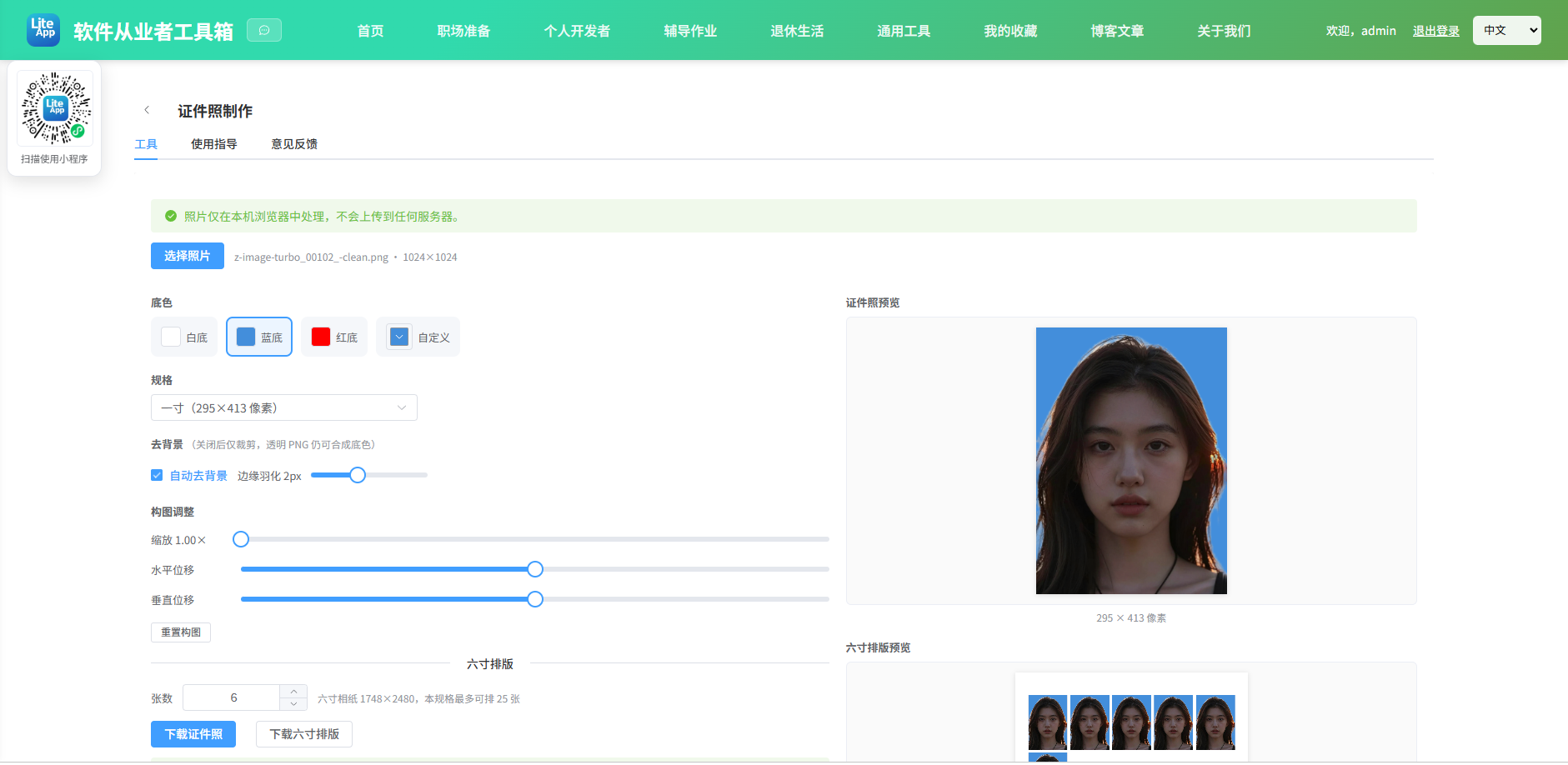
Appearance
实现 证件照制作 工具
分类:developer | 标签:证件照、一寸、二寸 标准证件照尺寸裁剪、换背景色、六寸排版
2.1 功能说明
标准证件照尺寸裁剪、换背景色、六寸排版
2.1.1 使用指南
功能说明
上传一张人像照片,自动抠除背景并换成证件照标准底色,裁剪为一寸、二寸等规格后下载; 还能把多张照片排布到六寸相纸上,拿到照相馆或自助机一次冲印、剪开即用。 全部处理都在浏览器本地完成,照片不会上传到服务器。
拍摄建议
正面免冠、光线均匀、五官清晰,人物与背景颜色差异越大,抠图边缘越干净。避免佩戴反光眼镜,头发蓬松或与背景同色时边缘可能出现毛刺。
操作步骤
1. 点击「选择照片」上传人像;
2. 若照片里人像只占一部分(如上半身范围偏大),先在「裁剪原图」拖拽选框框住要保留的区域,点「应用裁剪」裁掉多余部分;
3. 保持「自动去背景」开启,首次使用会下载约 200KB 的人像分割模型;
4. 选择底色与规格,用缩放和位移滑块把头部放到画面中上部;
5. 点击「下载证件照」,或切到排版区下载六寸拼版。
底色怎么选
白底适用于身份证、驾驶证、护照等大多数证件;蓝底常用于毕业证、简历、工作证;红底多用于结婚证、部分单位证件。具体以受理单位要求为准。
常见规格
一寸 295×413 像素(25×35mm)最常用;二寸 413×579 像素(35×49mm)多用于学历与职称材料;签证照 354×472 像素(30×40mm)用于出入境材料。以上均为 300dpi 下的像素尺寸。
六寸排版
六寸相纸按 300dpi 折算为 1748×2480 像素。系统会根据所选规格自动计算每行每列能放几张,并绘制浅灰色剪裁参考线。冲印时请选择「原图/无边框」模式,避免相纸被二次缩放导致尺寸偏差。
抠图失败怎么办
若分割模型加载失败(例如网络受限),可关闭「自动去背景」。此时若上传的是带透明通道的 PNG,依然能正常合成底色;不透明照片则只做裁剪与排版,底色不会生效。
2.2 代码实现
2.2.1 组件结构
本工具是一个基于 Vue 3 <script setup> 语法的单文件组件(SFC),统一包裹在 ToolPageShell 组件内,由它提供页面标题、工具 ID、分类与「使用指南」插槽等通用外壳;核心业务逻辑(响应式状态、计算属性、事件处理函数)全部写在 <script setup> 中,输入/输出通过 el-input、el-button 等 Element Plus 组件与用户交互,所有数据均在浏览器本地处理,不会上传服务器。
2.2.2 核心逻辑概览
<script setup> 中定义的主要函数/方法:
getDispScale()toSource()onPickFile()buildSegmentInput()runSegment()onToggleRemoveBg()compose()hexToRgb()resetCompose()renderCropCanvas()cloneCanvas()getHandle()insideCrop()onCropDown()onCropMove()onCropUp()onCropTouchStart()onCropTouchMove()onCropTouchEnd()frameCrop()resetCrop()applyCrop()undoCrop()drawPhotoTo()renderPhotoCanvas()drawLayout()repaint()downloadCanvas()currentSizeLabel()downloadPhoto()downloadLayout()
2.2.3 关键实现代码
以下是该工具的完整 <script setup> 实现(核心代码)。模板(<template>)与样式(<style>)已省略。
vue
import {computed, nextTick, reactive, ref, watch} from 'vue'
import {ElMessage} from 'element-plus'
import ToolPageShell from '@/components/ToolPageShell.vue'
// 复用图片处理工具里的人像分割能力(MediaPipe Selfie Segmenter)
import {applyBgColor, ensureSession, segmentPerson} from '@/tools/ImageProcessor/bgSegmenter.js'

const BG_COLORS = [
  {label: '白底', value: '#FFFFFF'},
  {label: '蓝底', value: '#438EDB'},
  {label: '红底', value: '#FF0000'}
]

const SIZES = [
  {key: 'one', label: '一寸', w: 295, h: 413},
  {key: 'two', label: '二寸', w: 413, h: 579},
  {key: 'small-one', label: '小一寸', w: 260, h: 378},
  {key: 'big-one', label: '大一寸', w: 390, h: 567},
  {key: 'small-two', label: '小二寸', w: 413, h: 531},
  {key: 'big-two', label: '大二寸', w: 413, h: 626},
  {key: 'visa', label: '签证照', w: 354, h: 472}
]

// 六寸相纸 @300dpi
const PAPER_W = 1748
const PAPER_H = 2480
const PAPER_MARGIN = 40
const PHOTO_GAP = 20

const fileInput = ref(null)
const photoCanvas = ref(null)
const layoutCanvas = ref(null)

const hasImage = ref(false)
const sourceInfo = ref('')
const bgColor = ref('#FFFFFF')
const sizeKey = ref('one')
const customW = ref(295)
const customH = ref(413)
const autoRemoveBg = ref(true)
const feather = ref(2)
const zoom = ref(1)
const offsetX = ref(0)
const offsetY = ref(0)
const layoutCount = ref(6)
const processing = ref(false)
const statusMsg = ref('')
const statusType = ref('info')

// 原图画布 / 已换底画布 / 分割掩码缓存
let sourceCanvas = null
let composedCanvas = null
let maskCache = null

// 裁剪原图相关
const cropStageRef = ref(null)
const cropCanvas = ref(null)
const cropRect = reactive({x: 0, y: 0, w: 0, h: 0}) // 源图像素坐标下的选区
const viewScale = ref(1) // 源图 → 编辑画布 backing 的缩放
const cropLockRatio = ref(true)
const cropApplied = ref(false)
let originalCanvas = null // 首次载入的原图快照,用于撤销裁剪
const cropDrag = reactive({
  active: false,
  mode: '', // 'new' | 'move' | 'resize'
  handle: '',
  anchorX: 0,
  anchorY: 0,
  startMouseX: 0,
  startMouseY: 0,
  startX: 0,
  startY: 0,
  startW: 0,
  startH: 0
})

// 选区与当前原图整图不一致时才允许「应用裁剪」
const cropDirty = computed(() => {
  if (!sourceCanvas) return false
  const W = sourceCanvas.width
  const H = sourceCanvas.height
  return Math.round(cropRect.x) !== 0 || Math.round(cropRect.y) !== 0 ||
      Math.round(cropRect.w) !== W || Math.round(cropRect.h) !== H
})

// 编辑画布实际显示缩放(含 CSS max-width 缩放),用于选框与命中检测对齐
function getDispScale() {
  const cv = cropCanvas.value
  if (!cv || !sourceCanvas) return 1
  const rect = cv.getBoundingClientRect()
  if (!rect.width) return 1
  return rect.width / sourceCanvas.width
}

const cropBoxStyle = computed(() => {
  const s = getDispScale()
  return {
    left: cropRect.x * s + 'px',
    top: cropRect.y * s + 'px',
    width: cropRect.w * s + 'px',
    height: cropRect.h * s + 'px'
  }
})

// 屏幕坐标 → 源图像素坐标
function toSource(e) {
  const cv = cropCanvas.value
  const rect = cv.getBoundingClientRect()
  const sx = sourceCanvas.width / rect.width
  const sy = sourceCanvas.height / rect.height
  return {
    x: (e.clientX - rect.left) * sx,
    y: (e.clientY - rect.top) * sy
  }
}

const targetSize = computed(() => {
  if (sizeKey.value === 'custom') return {w: customW.value, h: customH.value}
  const s = SIZES.find(i => i.key === sizeKey.value)
  return {w: s.w, h: s.h}
})

const layoutGrid = computed(() => {
  const {w, h} = targetSize.value
  const cols = Math.max(1, Math.floor((PAPER_W - PAPER_MARGIN * 2 + PHOTO_GAP) / (w + PHOTO_GAP)))
  const rows = Math.max(1, Math.floor((PAPER_H - PAPER_MARGIN * 2 + PHOTO_GAP) / (h + PHOTO_GAP)))
  return {cols, rows}
})

const maxLayoutCount = computed(() => layoutGrid.value.cols * layoutGrid.value.rows)

watch(maxLayoutCount, max => {
  if (layoutCount.value > max) layoutCount.value = max
})

watch([bgColor, feather], () => compose())
watch(targetSize, () => repaint())
watch(layoutCount, () => drawLayout())

/* ------------------------- 上传 ------------------------- */

function onPickFile(e) {
  const file = (e.target.files || [])[0]
  e.target.value = ''
  if (!file) return
  if (!file.type.startsWith('image/')) {
    ElMessage.error('请选择图片文件')
    return
  }

  const url = URL.createObjectURL(file)
  const img = new Image()
  img.onload = async () => {
    URL.revokeObjectURL(url)
    sourceCanvas = document.createElement('canvas')
    sourceCanvas.width = img.naturalWidth
    sourceCanvas.height = img.naturalHeight
    sourceCanvas.getContext('2d').drawImage(img, 0, 0)

    maskCache = null
    hasImage.value = true
    sourceInfo.value = `${file.name} · ${img.naturalWidth}×${img.naturalHeight}`
    resetCompose()
    cropApplied.value = false
    originalCanvas = null

    await nextTick()
    renderCropCanvas()
    resetCrop()
    if (autoRemoveBg.value) await runSegment()
    compose()
  }
  img.onerror = () => {
    URL.revokeObjectURL(url)
    ElMessage.error('图片解析失败,请更换文件')
  }
  img.src = url
}

/* ------------------------- 抠图与合成 ------------------------- */

// 分割在缩放后的画布上进行,掩码会在合成时按比例映射回原图
function buildSegmentInput() {
  const maxSide = 1024
  const {width, height} = sourceCanvas
  const scale = Math.min(1, maxSide / Math.max(width, height))
  if (scale === 1) return sourceCanvas
  const c = document.createElement('canvas')
  c.width = Math.round(width * scale)
  c.height = Math.round(height * scale)
  c.getContext('2d').drawImage(sourceCanvas, 0, 0, c.width, c.height)
  return c
}

async function runSegment() {
  if (!sourceCanvas) return false
  processing.value = true
  statusType.value = 'info'
  statusMsg.value = '正在加载人像分割模型并抠图…'
  try {
    await ensureSession()
    maskCache = await segmentPerson(buildSegmentInput())
    statusType.value = 'success'
    statusMsg.value = '已完成人像抠图,可直接切换底色'
    return true
  } catch (err) {
    console.error('[IdPhoto] segment failed:', err)
    maskCache = null
    autoRemoveBg.value = false
    statusType.value = 'warning'
    statusMsg.value = '人像分割模型加载失败,已切换为「仅裁剪」模式(透明 PNG 仍可合成底色)'
    return false
  } finally {
    processing.value = false
  }
}

async function onToggleRemoveBg(val) {
  if (val && !maskCache) {
    await runSegment()
  }
  compose()
}

// 生成"已换底"的整图,后续裁剪与排版都基于它
function compose() {
  if (!sourceCanvas) return

  composedCanvas = document.createElement('canvas')
  composedCanvas.width = sourceCanvas.width
  composedCanvas.height = sourceCanvas.height
  const ctx = composedCanvas.getContext('2d')

  if (autoRemoveBg.value && maskCache) {
    const {r, g, b} = hexToRgb(bgColor.value)
    ctx.drawImage(sourceCanvas, 0, 0)
    const imageData = ctx.getImageData(0, 0, composedCanvas.width, composedCanvas.height)
    applyBgColor(imageData, maskCache.maskData, maskCache.maskWidth, maskCache.maskHeight, r, g, b, feather.value)
    ctx.putImageData(imageData, 0, 0)
  } else {
    // 未抠图:先铺底色再叠加原图,带透明通道的 PNG 同样能换底
    ctx.fillStyle = bgColor.value
    ctx.fillRect(0, 0, composedCanvas.width, composedCanvas.height)
    ctx.drawImage(sourceCanvas, 0, 0)
  }

  repaint()
}

function hexToRgb(hex) {
  let h = (hex || '#FFFFFF').replace('#', '')
  if (h.length === 3) h = h.split('').map(c => c + c).join('')
  return {
    r: parseInt(h.substring(0, 2), 16) || 0,
    g: parseInt(h.substring(2, 4), 16) || 0,
    b: parseInt(h.substring(4, 6), 16) || 0
  }
}

function resetCompose() {
  zoom.value = 1
  offsetX.value = 0
  offsetY.value = 0
}

/* ------------------------- 裁剪原图 ------------------------- */

function renderCropCanvas() {
  const cv = cropCanvas.value
  if (!cv || !sourceCanvas) return
  const W = sourceCanvas.width
  const H = sourceCanvas.height
  const maxW = 480
  const maxH = 460
  const s = Math.min(maxW / W, maxH / H, 1)
  const w = Math.max(1, Math.round(W * s))
  const h = Math.max(1, Math.round(H * s))
  viewScale.value = s
  cv.width = w
  cv.height = h
  const ctx = cv.getContext('2d')
  ctx.clearRect(0, 0, w, h)
  ctx.drawImage(sourceCanvas, 0, 0, w, h)
}

function cloneCanvas(src) {
  const c = document.createElement('canvas')
  c.width = src.width
  c.height = src.height
  c.getContext('2d').drawImage(src, 0, 0)
  return c
}

function getHandle(px, py) {
  const t = 14 / getDispScale()
  const corners = {
    tl: [cropRect.x, cropRect.y],
    tr: [cropRect.x + cropRect.w, cropRect.y],
    bl: [cropRect.x, cropRect.y + cropRect.h],
    br: [cropRect.x + cropRect.w, cropRect.y + cropRect.h]
  }
  for (const k in corners) {
    if (Math.abs(px - corners[k][0]) <= t && Math.abs(py - corners[k][1]) <= t) return k
  }
  return null
}

function insideCrop(px, py) {
  return px >= cropRect.x && px <= cropRect.x + cropRect.w &&
      py >= cropRect.y && py <= cropRect.y + cropRect.h
}

function onCropDown(e) {
  if (!sourceCanvas) return
  const {x, y} = toSource(e)
  const handle = getHandle(x, y)
  cropDrag.active = true
  cropDrag.startMouseX = x
  cropDrag.startMouseY = y
  cropDrag.startX = cropRect.x
  cropDrag.startY = cropRect.y
  cropDrag.startW = cropRect.w
  cropDrag.startH = cropRect.h

  if (handle) {
    cropDrag.mode = 'resize'
    cropDrag.handle = handle
    const anchors = {
      tl: [cropRect.x + cropRect.w, cropRect.y + cropRect.h],
      tr: [cropRect.x, cropRect.y + cropRect.h],
      bl: [cropRect.x + cropRect.w, cropRect.y],
      br: [cropRect.x, cropRect.y]
    }
    cropDrag.anchorX = anchors[handle][0]
    cropDrag.anchorY = anchors[handle][1]
  } else if (insideCrop(x, y)) {
    cropDrag.mode = 'move'
  } else {
    cropDrag.mode = 'new'
    cropRect.x = x
    cropRect.y = y
    cropRect.w = 0
    cropRect.h = 0
  }
  window.addEventListener('mousemove', onCropMove)
  window.addEventListener('mouseup', onCropUp)
}

function onCropMove(e) {
  if (!cropDrag.active || !sourceCanvas) return
  const {x, y} = toSource(e)
  const W = sourceCanvas.width
  const H = sourceCanvas.height

  if (cropDrag.mode === 'move') {
    const dx = x - cropDrag.startMouseX
    const dy = y - cropDrag.startMouseY
    const nx = Math.max(0, Math.min(cropDrag.startX + dx, W - cropDrag.startW))
    const ny = Math.max(0, Math.min(cropDrag.startY + dy, H - cropDrag.startH))
    cropRect.x = nx
    cropRect.y = ny
    cropRect.w = cropDrag.startW
    cropRect.h = cropDrag.startH
    return
  }

  if (cropDrag.mode === 'resize') {
    const x2 = Math.max(0, Math.min(x, W))
    const y2 = Math.max(0, Math.min(y, H))
    let nx = Math.min(cropDrag.anchorX, x2)
    let ny = Math.min(cropDrag.anchorY, y2)
    let nw = Math.abs(x2 - cropDrag.anchorX)
    let nh = Math.abs(y2 - cropDrag.anchorY)
    if (cropLockRatio.value) {
      const r = targetSize.value.w / targetSize.value.h
      nh = nw / r
      if (cropDrag.handle.includes('t')) ny = cropDrag.anchorY - nh
      else ny = cropDrag.anchorY
    }
    nx = Math.max(0, Math.min(nx, W))
    ny = Math.max(0, Math.min(ny, H))
    nw = Math.min(nw, W - nx)
    nh = Math.min(nh, H - ny)
    cropRect.x = nx
    cropRect.y = ny
    cropRect.w = nw
    cropRect.h = nh
    return
  }

  // 新选区
  let nx = Math.min(cropDrag.startMouseX, x)
  let ny = Math.min(cropDrag.startMouseY, y)
  let nw = Math.abs(x - cropDrag.startMouseX)
  let nh = Math.abs(y - cropDrag.startMouseY)
  if (cropLockRatio.value) {
    const r = targetSize.value.w / targetSize.value.h
    if (nh * r > nw) nw = nh * r
    else nh = nw / r
    if (x < cropDrag.startMouseX) nx = cropDrag.startMouseX - nw
    if (y < cropDrag.startMouseY) ny = cropDrag.startMouseY - nh
  }
  nx = Math.max(0, Math.min(nx, W))
  ny = Math.max(0, Math.min(ny, H))
  nw = Math.min(nw, W - nx)
  nh = Math.min(nh, H - ny)
  cropRect.x = nx
  cropRect.y = ny
  cropRect.w = nw
  cropRect.h = nh
}

function onCropUp() {
  cropDrag.active = false
  window.removeEventListener('mousemove', onCropMove)
  window.removeEventListener('mouseup', onCropUp)
}

function onCropTouchStart(e) {
  if (!e.touches.length) return
  onCropDown({clientX: e.touches[0].clientX, clientY: e.touches[0].clientY})
}

function onCropTouchMove(e) {
  if (!e.touches.length) return
  onCropMove({clientX: e.touches[0].clientX, clientY: e.touches[0].clientY})
}

function onCropTouchEnd() {
  onCropUp()
}

// 按当前规格比例(或整图)居中框选
function frameCrop() {
  if (!sourceCanvas) return
  const W = sourceCanvas.width
  const H = sourceCanvas.height
  if (cropLockRatio.value) {
    const r = targetSize.value.w / targetSize.value.h
    let cw, ch
    if (W / H > r) {
      ch = H
      cw = ch * r
    } else {
      cw = W
      ch = cw / r
    }
    cropRect.x = (W - cw) / 2
    cropRect.y = (H - ch) / 2
    cropRect.w = cw
    cropRect.h = ch
  } else {
    resetCrop()
  }
}

// 重置为整图(无裁剪)
function resetCrop() {
  if (!sourceCanvas) return
  cropRect.x = 0
  cropRect.y = 0
  cropRect.w = sourceCanvas.width
  cropRect.h = sourceCanvas.height
}

// 应用裁剪:裁出区域成为新的 sourceCanvas,并重跑流水线
function applyCrop() {
  if (!sourceCanvas) return
  if (!cropDirty.value) {
    ElMessage.info('选区与图片一致,无需裁剪')
    return
  }
  const W = sourceCanvas.width
  const H = sourceCanvas.height
  const x = Math.round(cropRect.x)
  const y = Math.round(cropRect.y)
  const w = Math.round(cropRect.w)
  const h = Math.round(cropRect.h)
  // 铁律:对输入做有效性校验,不静默兜底
  if (!(w > 0 && h > 0) || x < 0 || y < 0 || x + w > W + 1 || y + h > H + 1) {
    ElMessage.error('裁剪区域无效,请重新框选')
    return
  }
  if (!originalCanvas) originalCanvas = cloneCanvas(sourceCanvas)
  const c = document.createElement('canvas')
  c.width = w
  c.height = h
  c.getContext('2d').drawImage(sourceCanvas, x, y, w, h, 0, 0, w, h)
  sourceCanvas = c
  cropApplied.value = true
  const name = sourceInfo.value.split(' · ')[0] || ''
  sourceInfo.value = `${name} · 裁剪后 ${w}×${h}`
  maskCache = null
  resetCompose()
  renderCropCanvas()
  cropRect.x = 0
  cropRect.y = 0
  cropRect.w = w
  cropRect.h = h
  nextTick(async () => {
    if (autoRemoveBg.value) await runSegment()
    compose()
  })
}

// 撤销裁剪,恢复原图
function undoCrop() {
  if (!originalCanvas) return
  sourceCanvas = originalCanvas
  originalCanvas = null
  cropApplied.value = false
  maskCache = null
  const name = sourceInfo.value.split(' · ')[0] || ''
  sourceInfo.value = `${name} · ${sourceCanvas.width}×${sourceCanvas.height}`
  resetCompose()
  renderCropCanvas()
  resetCrop()
  nextTick(async () => {
    if (autoRemoveBg.value) await runSegment()
    compose()
  })
}

/* ------------------------- 绘制 ------------------------- */

// 按"填满目标框"的方式绘制,再叠加缩放与位移
function drawPhotoTo(ctx, w, h) {
  ctx.fillStyle = bgColor.value
  ctx.fillRect(0, 0, w, h)
  if (!composedCanvas) return

  const sw = composedCanvas.width
  const sh = composedCanvas.height
  const scale = Math.max(w / sw, h / sh) * zoom.value
  const dw = sw * scale
  const dh = sh * scale
  const slackX = Math.max(0, (dw - w) / 2)
  const slackY = Math.max(0, (dh - h) / 2)
  const dx = (w - dw) / 2 + (offsetX.value / 100) * slackX
  const dy = (h - dh) / 2 + (offsetY.value / 100) * slackY

  ctx.drawImage(composedCanvas, dx, dy, dw, dh)
}

function renderPhotoCanvas() {
  const canvas = photoCanvas.value
  if (!canvas) return
  const {w, h} = targetSize.value
  canvas.width = w
  canvas.height = h
  drawPhotoTo(canvas.getContext('2d'), w, h)
}

function drawLayout() {
  const canvas = layoutCanvas.value
  if (!canvas || !composedCanvas) return

  canvas.width = PAPER_W
  canvas.height = PAPER_H
  const ctx = canvas.getContext('2d')
  ctx.fillStyle = '#FFFFFF'
  ctx.fillRect(0, 0, PAPER_W, PAPER_H)

  const {w, h} = targetSize.value
  const {cols, rows} = layoutGrid.value

  // 单张照片只绘制一次,之后重复贴到相纸上
  const cell = document.createElement('canvas')
  cell.width = w
  cell.height = h
  drawPhotoTo(cell.getContext('2d'), w, h)

  const gridW = cols * w + (cols - 1) * PHOTO_GAP
  const gridH = rows * h + (rows - 1) * PHOTO_GAP
  const startX = Math.round((PAPER_W - gridW) / 2)
  const startY = Math.round((PAPER_H - gridH) / 2)

  const total = Math.min(layoutCount.value, cols * rows)
  for (let i = 0; i < total; i++) {
    const x = startX + (i % cols) * (w + PHOTO_GAP)
    const y = startY + Math.floor(i / cols) * (h + PHOTO_GAP)
    ctx.drawImage(cell, x, y)
    // 剪裁参考线
    ctx.strokeStyle = '#DCDFE6'
    ctx.lineWidth = 1
    ctx.strokeRect(x + 0.5, y + 0.5, w - 1, h - 1)
  }
}

function repaint() {
  renderPhotoCanvas()
  drawLayout()
}

/* ------------------------- 下载 ------------------------- */

function downloadCanvas(canvas, filename) {
  canvas.toBlob(blob => {
    if (!blob) {
      ElMessage.error('生成图片失败')
      return
    }
    const url = URL.createObjectURL(blob)
    const a = document.createElement('a')
    a.href = url
    a.download = filename
    document.body.appendChild(a)
    a.click()
    document.body.removeChild(a)
    setTimeout(() => URL.revokeObjectURL(url), 1000)
  }, 'image/png')
}

function currentSizeLabel() {
  if (sizeKey.value === 'custom') return `${customW.value}x${customH.value}`
  return SIZES.find(i => i.key === sizeKey.value).label
}

function downloadPhoto() {
  if (!photoCanvas.value || !composedCanvas) return
  renderPhotoCanvas()
  downloadCanvas(photoCanvas.value, `证件照-${currentSizeLabel()}.png`)
  ElMessage.success('证件照已开始下载')
}

function downloadLayout() {
  if (!layoutCanvas.value || !composedCanvas) return
  drawLayout()
  downloadCanvas(layoutCanvas.value, `六寸排版-${currentSizeLabel()}-${layoutCount.value}张.png`)
  ElMessage.success('排版图已开始下载')
}
2.3 效果截图