Appearance
实现 WebSocket 接口测试 工具
分类:developer | 标签:WebSocket、ws、测试 在线 WebSocket 连接测试与消息收发
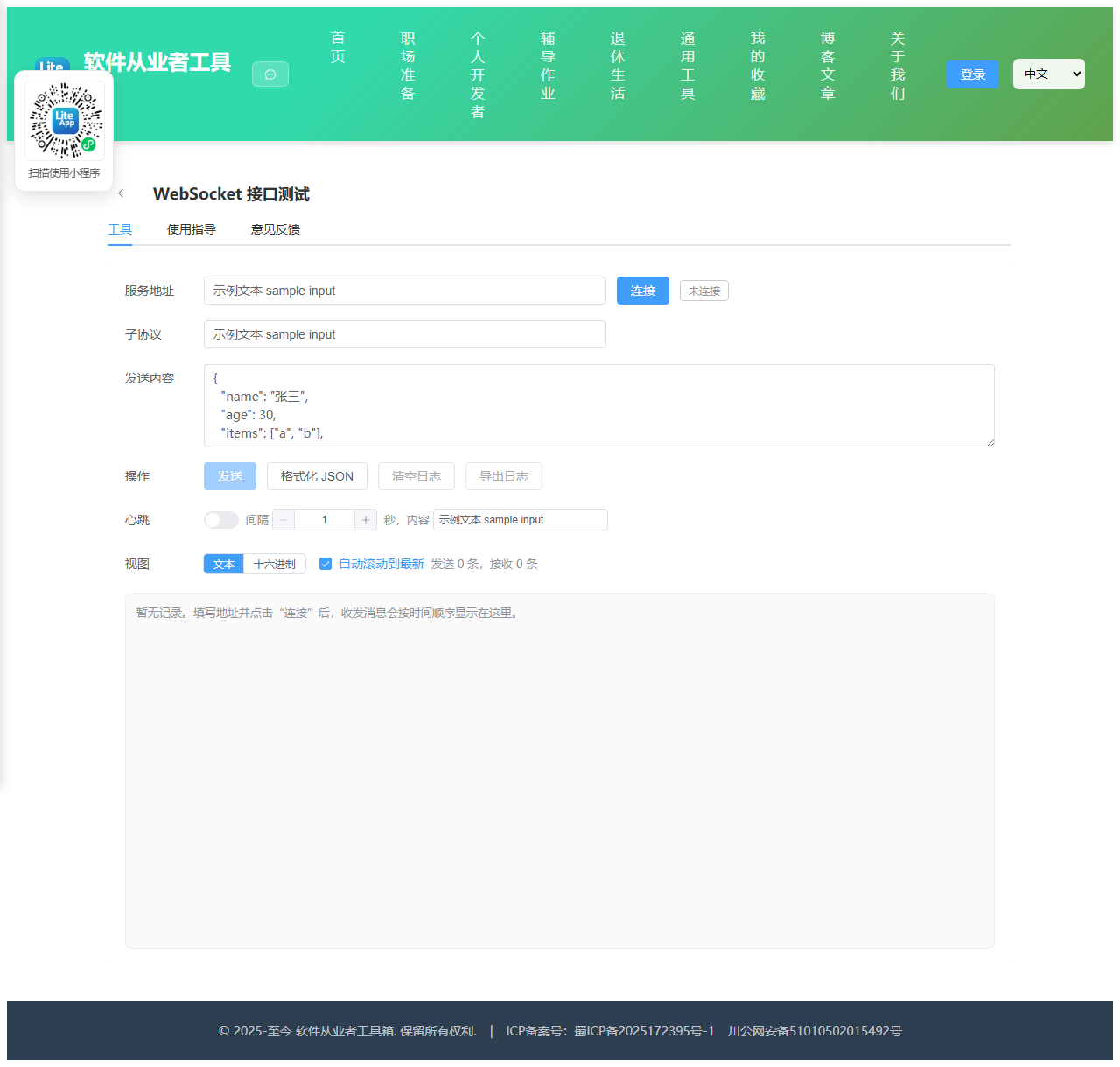
2.1 功能说明
在线 WebSocket 连接测试与消息收发
核心能力
- 服务地址
- 子协议
- 发送内容
- 心跳
- 视图
- text
- hex
2.1.1 使用指南
WebSocket 接口测试使用说明
这是一个纯浏览器端的 WebSocket 调试工具,直接使用原生 WebSocket 建立长连接, 不经过任何中转服务器,你输入的地址与报文只在本机与目标服务之间传输。
基本流程
1. 在“服务地址”填入完整地址,必须以 ws:// 或 wss:// 开头,例如 wss://example.com/ws?token=abc。
2. 如果服务端要求子协议,在“子协议”里填写,多个用英文逗号分隔,留空表示不指定。
3. 点击“连接”,右侧状态标签会从“连接中”变为“已连接”。
4. 在“发送内容”里写报文,点击“发送”或按 Ctrl + Enter。收发记录会带方向、时间与字节数展示在下方日志区。
心跳保活
很多网关会在空闲一段时间后主动断开连接。打开“心跳”开关后,工具会按设定的秒数周期性发送一条固定文本(默认 ping)。 间隔与内容需要在关闭开关的状态下修改,打开后即刻生效,断开连接时自动停止。
文本视图与十六进制视图
文本视图直接显示报文字符串,适合 JSON、纯文本协议。十六进制视图把内容按 UTF-8 编码逐字节展开, 每行 16 字节并附带可打印字符预览,适合排查不可见字符、编码错误、协议头字段。 服务端推送二进制帧(Blob 或 ArrayBuffer)时,工具会自动读取其字节内容并按当前视图渲染。
关于混合内容
浏览器安全策略规定:https 页面只能连接 wss,不能连接明文 ws,否则会被直接拦截且控制台报混合内容错误。 如果你要测试的是本地明文服务,请在 http://localhost 环境下打开本工具,或者给服务配置 TLS 后改用 wss。
常见错误排查
连接立刻关闭且没有任何提示:多为服务端校验失败(鉴权、Origin 白名单)或地址路径写错,可查看关闭码,1006 表示异常断开且没有收到关闭帧。
握手报 403 / 404:说明请求根本没走到 WebSocket 升级,检查反向代理是否透传 Upgrade 与 Connection 头。
发送后无响应:确认报文格式是否符合服务端约定,可先用“格式化 JSON”校验 JSON 是否合法。
跨域:WebSocket 不受同源策略限制,也不存在预检请求,但服务端可能自行校验 Origin 头,被拒绝时通常表现为握手失败。
数据安全
所有日志仅存在于当前页面内存中,刷新即清空。可点击“导出日志”把完整记录保存为本地 txt 文件留档。
2.2 代码实现
2.2.1 组件结构
本工具是一个基于 Vue 3 <script setup> 语法的单文件组件(SFC),统一包裹在 ToolPageShell 组件内,由它提供页面标题、工具 ID、分类与「使用指南」插槽等通用外壳;核心业务逻辑(响应式状态、计算属性、事件处理函数)全部写在 <script setup> 中,输入/输出通过 el-input、el-button 等 Element Plus 组件与用户交互,所有数据均在浏览器本地处理,不会上传服务器。
2.2.2 核心逻辑概览
<script setup> 中定义的主要函数/方法:
nowText()p()dirLabel()pushLog()byteLength()toHexDump()renderBody()stopHeartbeat()startHeartbeat()onHeartbeatToggle()readIncoming()connect()disconnect()send()formatJson()clearLogs()exportLogs()
2.2.3 关键实现代码
以下是该工具的完整 <script setup> 实现(核心代码)。模板(<template>)与样式(<style>)已省略。
vue
import { ref, computed, onBeforeUnmount, nextTick } from 'vue'
import ToolPageShell from '@/components/ToolPageShell.vue'

const url = ref('wss://')
const protocols = ref('')
const message = ref('')
const logs = ref([])
const connected = ref(false)
const connecting = ref(false)
const autoScroll = ref(true)
const viewMode = ref('text')
const heartbeatOn = ref(false)
const heartbeatInterval = ref(30)
const heartbeatText = ref('ping')
const sentCount = ref(0)
const recvCount = ref(0)
const logBox = ref(null)

let ws = null
let heartbeatTimer = null
let logSeq = 0

const mixedContentRisk = computed(() => {
  if (typeof window === 'undefined') return false
  return window.location.protocol === 'https:' && /^ws:\/\//i.test(url.value.trim())
})

const statusText = computed(() => {
  if (connecting.value) return '连接中'
  if (connected.value) return '已连接'
  return '未连接'
})

const statusType = computed(() => {
  if (connecting.value) return 'warning'
  if (connected.value) return 'success'
  return 'info'
})

function nowText() {
  const d = new Date()
  const p = (n, len) => String(n).padStart(len || 2, '0')
  return p(d.getHours()) + ':' + p(d.getMinutes()) + ':' + p(d.getSeconds()) + '.' + p(d.getMilliseconds(), 3)
}

function dirLabel(dir) {
  if (dir === 'send') return '发送'
  if (dir === 'recv') return '接收'
  if (dir === 'error') return '错误'
  return '系统'
}

function pushLog(dir, content, size) {
  logSeq += 1
  logs.value.push({
    id: logSeq,
    dir,
    time: nowText(),
    content,
    size: typeof size === 'number' ? size : null
  })
  if (logs.value.length > 1000) {
    logs.value.splice(0, logs.value.length - 1000)
  }
  if (autoScroll.value) {
    nextTick(() => {
      const el = logBox.value
      if (el) el.scrollTop = el.scrollHeight
    })
  }
}

function byteLength(str) {
  try {
    return new TextEncoder().encode(str).length
  } catch (e) {
    return str.length
  }
}

function toHexDump(str) {
  let bytes
  try {
    bytes = new TextEncoder().encode(str)
  } catch (e) {
    bytes = Uint8Array.from(Array.from(str).map((c) => c.charCodeAt(0) & 0xff))
  }
  const lines = []
  for (let i = 0; i < bytes.length; i += 16) {
    const chunk = bytes.slice(i, i + 16)
    const offset = i.toString(16).padStart(8, '0')
    const hex = Array.from(chunk)
      .map((b) => b.toString(16).padStart(2, '0'))
      .join(' ')
      .padEnd(47, ' ')
    const ascii = Array.from(chunk)
      .map((b) => (b >= 0x20 && b <= 0x7e ? String.fromCharCode(b) : '.'))
      .join('')
    lines.push(offset + '  ' + hex + '  ' + ascii)
  }
  return lines.length > 0 ? lines.join('\n') : '(空内容)'
}

function renderBody(item) {
  if (item.dir === 'error' || item.dir === 'system') return item.content
  if (viewMode.value === 'hex') return toHexDump(item.content)
  return item.content
}

function stopHeartbeat() {
  if (heartbeatTimer) {
    window.clearInterval(heartbeatTimer)
    heartbeatTimer = null
  }
}

function startHeartbeat() {
  stopHeartbeat()
  const sec = Number(heartbeatInterval.value) || 30
  heartbeatTimer = window.setInterval(() => {
    if (!ws || ws.readyState !== 1) return
    const payload = heartbeatText.value === '' ? 'ping' : heartbeatText.value
    try {
      ws.send(payload)
      sentCount.value += 1
      pushLog('send', payload + '  [心跳]', byteLength(payload))
    } catch (e) {
      pushLog('error', '心跳发送失败:' + (e && e.message ? e.message : String(e)))
    }
  }, sec * 1000)
}

function onHeartbeatToggle(val) {
  if (val && connected.value) startHeartbeat()
  else stopHeartbeat()
}

function readIncoming(data) {
  if (typeof data === 'string') {
    recvCount.value += 1
    pushLog('recv', data, byteLength(data))
    return
  }
  if (data instanceof ArrayBuffer) {
    const bytes = new Uint8Array(data)
    let textVal = ''
    try {
      textVal = new TextDecoder().decode(bytes)
    } catch (e) {
      textVal = '(二进制数据,无法按 UTF-8 解码)'
    }
    recvCount.value += 1
    pushLog('recv', textVal, bytes.length)
    return
  }
  if (typeof Blob !== 'undefined' && data instanceof Blob) {
    const reader = new FileReader()
    reader.onload = () => {
      let textVal = ''
      try {
        textVal = new TextDecoder().decode(new Uint8Array(reader.result))
      } catch (e) {
        textVal = '(二进制数据,无法按 UTF-8 解码)'
      }
      recvCount.value += 1
      pushLog('recv', textVal, data.size)
    }
    reader.onerror = () => {
      pushLog('error', '读取二进制消息失败')
    }
    reader.readAsArrayBuffer(data)
    return
  }
  recvCount.value += 1
  pushLog('recv', String(data), null)
}

function connect() {
  const target = url.value.trim()
  if (!target) {
    pushLog('error', '请先填写 WebSocket 地址')
    return
  }
  if (!/^wss?:\/\/.+/i.test(target)) {
    pushLog('error', '地址必须以 ws:// 或 wss:// 开头')
    return
  }
  if (typeof window === 'undefined' || !window.WebSocket) {
    pushLog('error', '当前浏览器不支持 WebSocket')
    return
  }
  disconnect(true)
  connecting.value = true
  pushLog('system', '正在连接 ' + target)
  try {
    const list = protocols.value
      .split(',')
      .map((s) => s.trim())
      .filter((s) => s.length > 0)
    ws = list.length > 0 ? new WebSocket(target, list) : new WebSocket(target)
    ws.binaryType = 'arraybuffer'

    ws.onopen = () => {
      connecting.value = false
      connected.value = true
      const proto = ws.protocol ? ',子协议 ' + ws.protocol : ''
      pushLog('system', '连接已建立' + proto)
      if (heartbeatOn.value) startHeartbeat()
    }
    ws.onmessage = (ev) => {
      readIncoming(ev.data)
    }
    ws.onerror = () => {
      // 浏览器出于安全考虑不暴露具体原因,只能给出通用提示
      pushLog('error', '连接发生错误。常见原因:地址不可达、证书无效、服务端拒绝握手、https 页面连接了明文 ws')
    }
    ws.onclose = (ev) => {
      connecting.value = false
      connected.value = false
      stopHeartbeat()
      const reason = ev.reason ? ',原因 ' + ev.reason : ''
      const clean = ev.wasClean ? '正常关闭' : '异常断开'
      pushLog('system', clean + ',关闭码 ' + ev.code + reason)
      ws = null
    }
  } catch (e) {
    connecting.value = false
    connected.value = false
    pushLog('error', '创建连接失败:' + (e && e.message ? e.message : String(e)))
  }
}

function disconnect(silent) {
  stopHeartbeat()
  if (ws) {
    try {
      ws.onopen = null
      ws.onmessage = null
      ws.onerror = null
      ws.onclose = null
      if (ws.readyState === 0 || ws.readyState === 1) ws.close(1000, 'client close')
    } catch (e) {
      // 忽略关闭时的异常
    }
    ws = null
  }
  connected.value = false
  connecting.value = false
  if (!silent) pushLog('system', '已主动断开连接')
}

function send() {
  if (!ws || ws.readyState !== 1) {
    pushLog('error', '尚未连接,无法发送')
    return
  }
  const payload = message.value
  if (!payload) return
  try {
    ws.send(payload)
    sentCount.value += 1
    pushLog('send', payload, byteLength(payload))
  } catch (e) {
    pushLog('error', '发送失败:' + (e && e.message ? e.message : String(e)))
  }
}

function formatJson() {
  try {
    message.value = JSON.stringify(JSON.parse(message.value), null, 2)
  } catch (e) {
    pushLog('error', '内容不是合法 JSON,无法格式化')
  }
}

function clearLogs() {
  logs.value = []
  sentCount.value = 0
  recvCount.value = 0
}

function exportLogs() {
  if (logs.value.length === 0) return
  const lines = logs.value.map((it) => {
    const size = it.size === null ? '' : ' (' + it.size + ' 字节)'
    return '[' + it.time + '] ' + dirLabel(it.dir) + size + '\n' + it.content
  })
  const head = 'WebSocket 调试日志\n地址:' + url.value + '\n导出时间:' + new Date().toLocaleString() + '\n\n'
  const blob = new Blob([head + lines.join('\n\n')], { type: 'text/plain;charset=utf-8' })
  const href = URL.createObjectURL(blob)
  const a = document.createElement('a')
  a.href = href
  a.download = 'websocket-log.txt'
  a.click()
  window.setTimeout(() => URL.revokeObjectURL(href), 1000)
}

onBeforeUnmount(() => {
  disconnect(true)
})
2.3 效果截图